






Enable New MDE Security Settings Management Experience
Exciting news! Let’s learn how to enable MDE Security Settings Management Experience. Manage Security Policy Settings from Microsoft Security Portal. Microsoft is thrilled to introduce a groundbreaking public preview of their latest innovation: a unified security settings management experience.
This feature promises to revolutionize how security teams manage endpoint security settings across diverse platforms like Windows, macOS, and Linux. It is built into the Microsoft 365 Defender portal and, therefore, easily accessible for security teams, but built on the powerful capabilities of Microsoft Intune. The new capabilities will elevate your endpoint security management experience to a whole new level.
With Defender for Endpoint, you can now effortlessly manage security settings for Windows, macOS, and Linux systems all in one place. Your existing endpoint security policies are automatically integrated into the Microsoft 365 Defender portal.
Security administrators can now use the power of Defender for Endpoint’s security settings management capabilities to oversee and adjust security configuration settings across Windows, macOS, and Linux devices. With this unified solution, there’s no longer a requirement for separate management tools or constant updates to IT resources.

What is Security Policy?
A security policy is the backbone of an organization’s protection strategy, embodying clear, comprehensive plans, rules, and practices.
What is the New MDE Security Settings Management Experience?
The experience includes removing Azure Active Directory (AD) join or Hybrid Azure AD join as a pre-requisite for onboarding Windows devices that use security settings management in Defender for Endpoint.
Managing Security Policies in the Microsoft 365 Defender Portal
In the past, security administrators needed multiple tools to manage endpoint security settings, causing delays in response. However, Microsoft’s latest integration of Intune’s endpoint security experience into Defender for Endpoint changes the game. Now, organizations can enhance their protection efforts through a unified portal.
Though Microsoft Intune isn’t mandatory, its seamless sync with Defender for Endpoint offers added benefits for organizations using both products. Data sharing and synchronization ensure a single source of truth for IT and security teams. With this integration, administrators from both sides witnessed the same data, preventing confusion and potential security risks.
The following are the new capabilities that are beneficiary for customers.
- Take full control over your antivirus policies directly from the Microsoft 365 Defender portal.
- Easy Coordination – Microsoft Intune is a comprehensive management suite; Policies are seamlessly synced with Intune, promoting efficient collaboration between your IT and Security teams.
- A new list on the device page that helps you to shows all security policies and their settings
- Simplified device onboarding helps you to remove Azure Active Directory hybrid join as a management prerequisite.
Endpoint Security Policy Creation
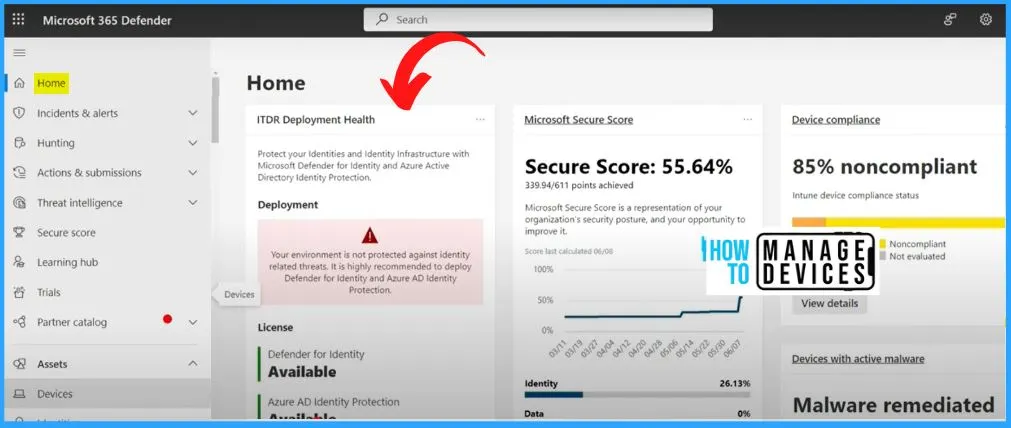
Welcome to the new, integrated experience where managing your security policies has never been easier! You can view all your Intune security policies directly within the Microsoft 365 Defender portal. To access them, do the following.
- As you access Security.microsoft.com, which serves as the home page for Microsoft 365 Defender
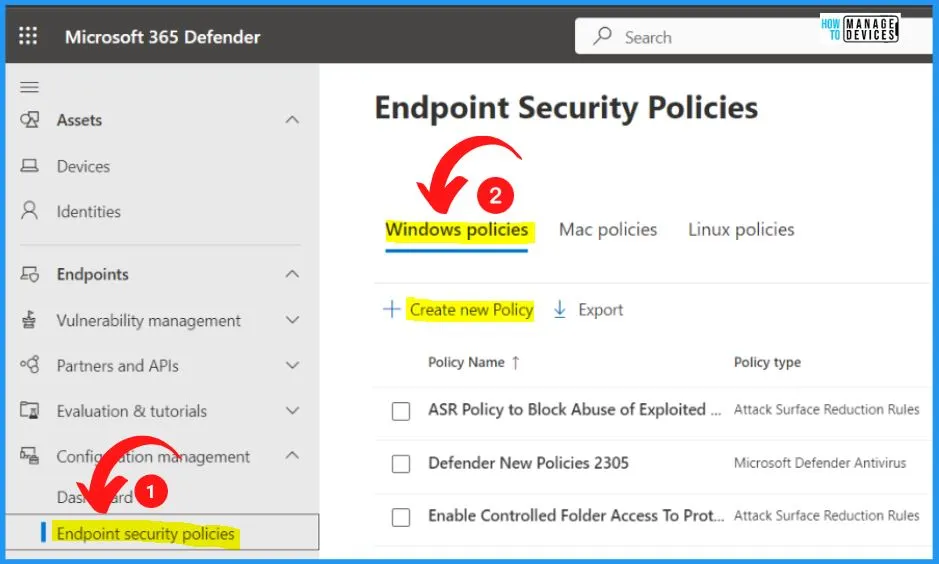
- Select the Endpoint Security Policies under Configuration Management on the Left side of MS 365 Defender.
- Under the Endpoint security policies, you can see 3 policies: Windows, Mac, and Linux.
- You can easily create a new policy by clicking the Create new policy option below.
- You can easily filter the list and search for specific policies using the built-in ‘filter’ and ‘search’ capabilities.
AV Policies for Windows, Linux, and macOS
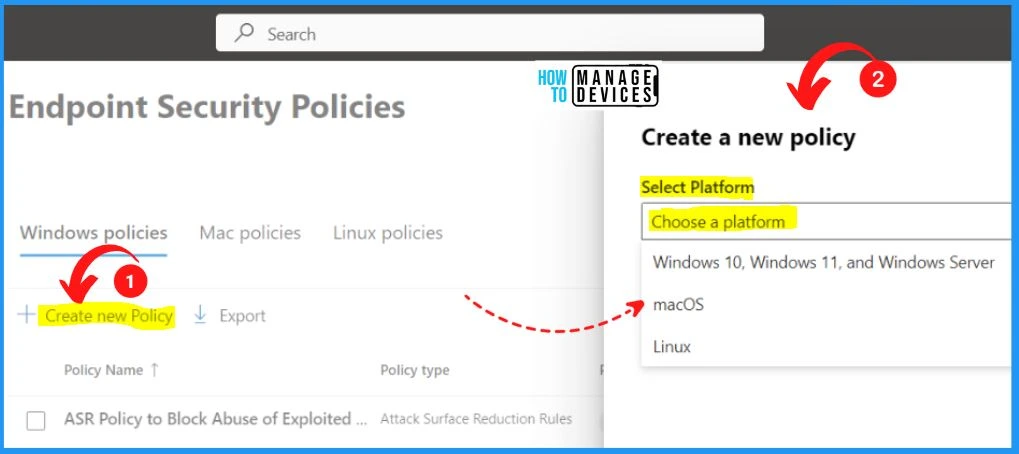
You can now create antivirus (AV) policies for Windows, Linux, and MacOS directly from the MS 365 Defender portal. This enhanced capability empowers you to tailor protection strategies across all platforms, ensuring a comprehensive defense against potential threats. Create a new policy showing the following platforms.
- Windows 10, Windows 11, and Windows Server
- macOS
- Linux
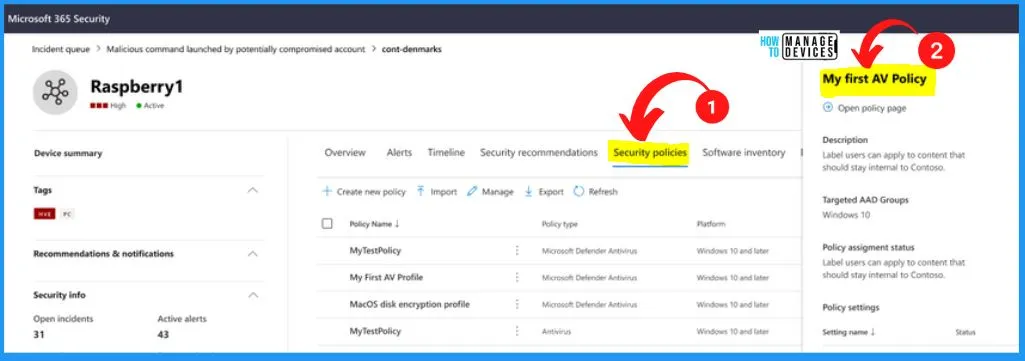
You can easily access a comprehensive list of received policies, their respective settings, and their current status. This powerful feature offers a centralized view of your security policies’ impact on devices, enabling you to monitor and manage their implementation effortlessly.
- All the details of the created policy are shown on the Right side of the below window.
Seamless Transition for All Existing Customers
With this update, Microsoft is dedicated to ensuring a seamless transition for all esteemed customers and making this transition as smooth and user-friendly as possible, empowering you to focus on your organization’s security without disruptions.
- Smooth Transition for Windows Devices to the New, Lightweight Mechanism
- Devices previously managed by Defender for Endpoint but with enrollment errors will now seamlessly be enrolled.
- Continued Registration and Policy Reception for Devices Registered with Azure AD
Steps to Prepare for the Upgrade
Although no immediate administrative action is necessary for this change, proactive steps can be taken to prepare for the upgrade. The following are the steps required for the upgrade.
| Steps to Prepare for the Upgrade |
|---|
| Turn on Preview Features |
| Review how Settings Management for Microsoft Defender for Endpoint is configured. |
| Create a dynamic AAD group to target devices with policies automatically |
Step 1 – Turn on Preview Features
To enable Preview Features for utilizing native Security Settings Management in Microsoft Defender for Endpoint, follow the below steps.
- Go to Microsoft 365 Defender portal navigation pane, select Settings > Endpoints > Advanced features > Preview features.
- Toggle the setting On and select Save preferences.
Step 2 – Enable New MDE Security Settings Management Experience
Microsoft recommends heading to the Microsoft 365 Defender portal and thoroughly reviewing the devices you plan to manage through Defender for Endpoint. You can follow the steps to Enable New MDE Security Settings Management Experience.
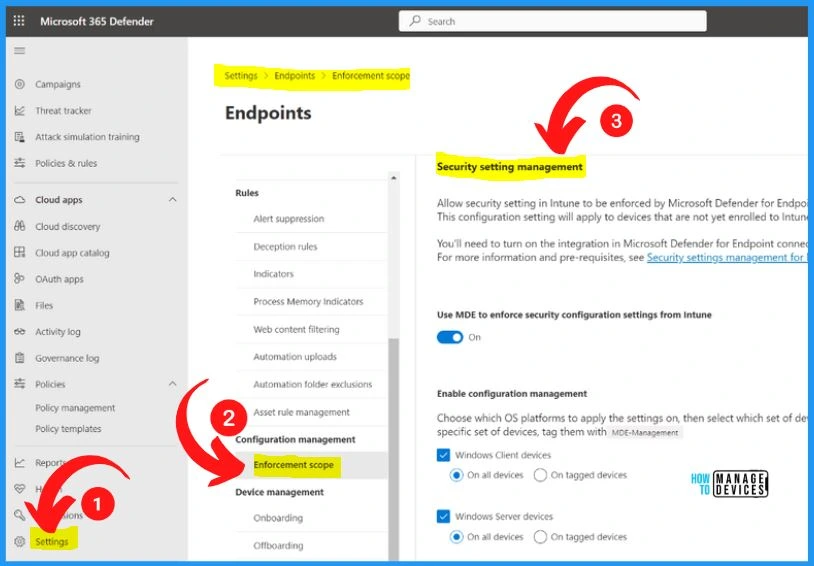
- Navigate to the Microsoft 365 Defender portal and click on “Settings.”
- Select “Endpoints” from there and proceed to “Configuration Management.”
- In the Configuration Management section, locate and click “Enforcement scope.”
- This step lets you review and define which devices you intend to manage through Defender for Endpoint.
- Confirm that the enforcement scope feature is turned on and that your management preferences have been configured accurately for each Operating System.
Step 3: Create a Dynamic AAD Group to Target Devices with Policies Automatically
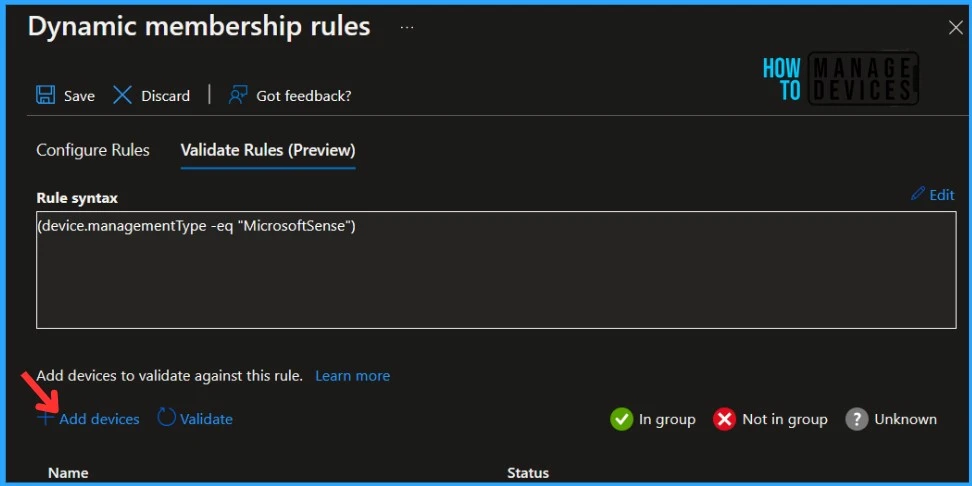
Microsoft recommends creating a dynamic Azure AD group based on the management type = MicrosoftSense. It’s worth noting that this dynamic grouping functionality has been extended to include servers, allowing you to organize and manage them within Azure AD conveniently.
More details are available in Azure AD Dynamic Device Group Managed By Defender for Endpoint HTMD Blog (anoopcnair.com)
Author
About Author – Vidya is a computer enthusiast. She is here to share quick tips and tricks with Windows 11 or Windows 10 users. She loves writing on Windows 11 and related technologies. She is also keen to find solutions and write about day-to-day tech problems.




Discussion