






New Settings Homepage Scrollable Quick Settings and System Components in Build 25967
The latest Windows 11 Insider Preview release has several significant updates, including the New Settings Homepage, Scrollable Quick Settings, and System Components Listed in Settings, etc. Microsoft released the latest Windows 11 Insider Preview Build 25967 in the Canary Channel.
This update brings several new features, fixes, and enhancements to Windows 11. The settings homepage gives Windows 11 users a fresh look for changing and organizing the important settings on your computer. This update is designed to make your experience on Windows 11 more user-friendly and organized. It makes finding and adjusting things how you want them easier.
We have an article highlighting the newest features in Windows 11 and how the DC (Domain Controller) locator algorithm works, specifically in Build 25931. One of the significant changes is that the DC location will no longer rely on NetBIOS.
The most recent Windows 11 Insider Preview Build 25967 brings users a range of additions, enhancements, and bug fixes. The Build aims to enhance the overall user experience on Windows 11.

- Windows 11 New Features | Latest Improvements
- 5 Latest Features of Windows 11 Announced – July 2023 Dev and Canary Channel Updates
What is Windows 11 Insider Preview Build 25967 in the Canary Channel?
Windows 11 Insider Preview Build 25967 is the latest pre-release version of Windows 11. It is accessible exclusively to members of the Canary Channel within the Windows Insider Program. It includes new features, improvements, fixes, etc.
New Settings Homepage Scrollable Quick Settings and System Componenets in Build 25967
Let’s discuss the Windows 11 Insider Preview Build 25967. This build is currently available in the Canary Channel, bringing many exciting updates and enhancements. The below list helps you to show the features in Build 25967.
- New Settings Homepage
- Scrollable Quick Settings
- System Components Listed in Settings
New Settings Homepage
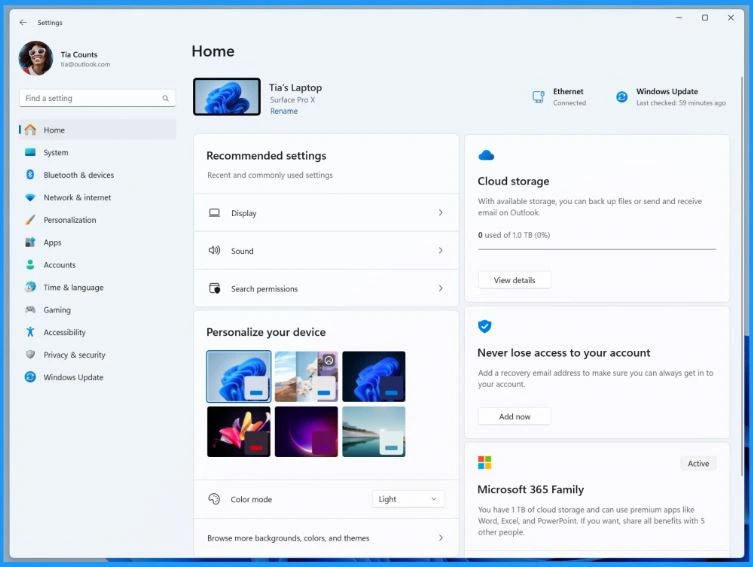
The new build introduces a new homepage in Settings; It offers you a dynamic and personalized experience. This feature provides you with a comprehensive device overview, quick access to key settings, and simplified management of your Microsoft account.
Microsoft introduced interactive cards that help to enhance user experience. Each card helps you to offer the most important information and controls at your fingertips. Microsoft introduced 7 cards in this release build, and more will be available.
- The homepage lets you perform actions quickly with a single click, making managing your device and account easy.
- As you use your device, it will adjust to provide the most relevant and useful information based on your usage and preferences.
- The table below helps you show all the cards on the settings homepage.
Note! – This feature will exclusively be accessible on Windows 11 Home and Pro editions and will not apply to devices under organizational management.
| Interactive Card | Details |
| Recommended Settings | This card customizes itself based on your use, offering timely and relevant options for settings. Its purpose is to simplify the management of your settings and save time. |
| Cloud Storage | It provides a quick overview of your subscription status and benefits and the ability to take key actions right in Settings. It avoids the need to go to the web. |
| Account Recovery | Improves Microsoft account security by assisting in adding additional recovery info. It ensures you never get locked out, even if you forget your password. |
| Personalization | Offers one-click access to update your background theme or change your colour mode, putting customization at your fingertips. |
| Microsoft 365 | It provides a quick overview of your subscription status and benefits and the ability to take key actions right in Settings. It avoids the need to go to the web. |
| Xbox | Like Microsoft 365, view your subscription status and manage the subscription directly from the Settings app. |
| Bluetooth Devices | It simplifies Bluetooth device management, allowing quick access and connection to your favorite Bluetooth-enabled devices. |
Scrollable Quick Settings
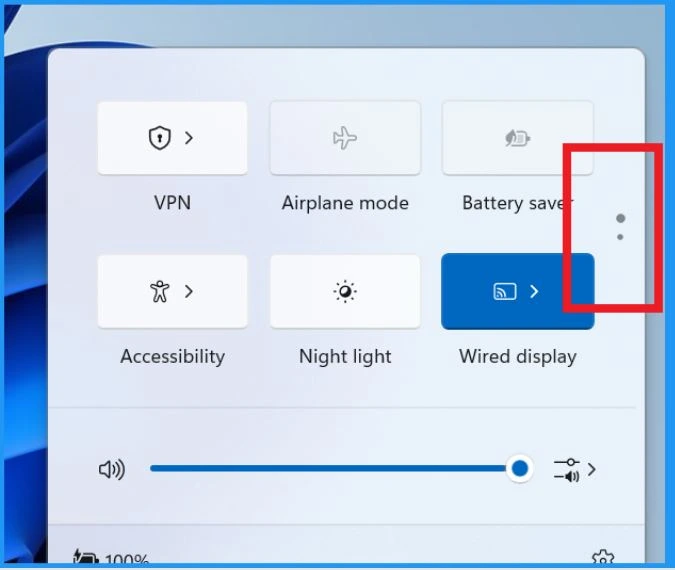
Microsoft is experimenting with a scrollable view of quick settings for some Windows Insiders in the Canary Channel. This is done to assess how different layouts perform and their effectiveness in improving user experience.
- In this update, users will no longer need to edit the list to add new quick actions.
- Instead, users can access a scrollable list of quick actions that can be customized and rearranged to suit their preferences.
System Components Listed in Settings
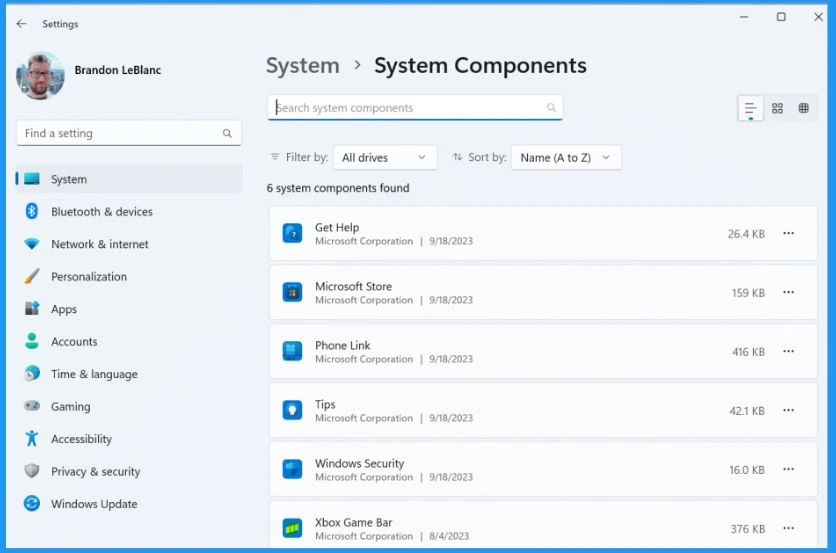
The system components are previously listed within the Settings > Apps > Installed Apps page. It relocated to the page, which can now be found under Settings > System > System Components. This feature makes it easier for users to access and manage system-related components separately within the system settings section.
Announcing Windows 11 Insider Preview Build 25967 (Canary Channel) | Windows Insider Blog
Author
About the Author – Vidya is a computer enthusiast. She is here to share quick tips and tricks with Windows 11 or Windows 10 users. She loves writing on Windows 11 and related technologies. She is also keen to find solutions and write about day-to-day tech problems.




Discussion