






Optimize Entra License with New Entra License Utilization Feature
Let’s discuss Optimize Entra License with New Entra License Utilization Feature. Microsoft Introduces New Entra License Utilization Feature that helps to optimize the Entra ID premium License. This feature is currently in Public Preview and will be available to users soon.
Microsoft Entra ID helps to empower organizations to manage and secure identities. It allows employees, partners and customers to access the application and services they need. Lakhs of people use Microsoft Entra to navigate and ensure the security and productivity of end users in the changing environment.
The importance of Microsoft Entra is increasing day by day. Customers desire to bring transparency to their Entra Usage. It is one of the popular long-term requests of customers towards Microsoft, and now they have introduced the Entra License Utilization Feature.
This new feature not only optimizes the customer’s Entra ID Premium licenses but also provides insights into the current usage of premium features. This blog post helps you learn more about optimising an Entra license with a new Entra license utilization feature.

- Comparison Microsoft Entra Vs Okta using Gartner Research
- Auto Rollout of Conditional Access Policy from Microsoft Entra ID Coming Soon
Optimize Entra License with New Entra License Utilization Feature
The Entra ID License Utilization Portal helps users see how many Entra ID P1 and P2 licenses they have and the usage of the key features corresponding to the license type. Conditional Access and risk-based Conditional Access usage are available as part of Entra ID License Utilization.
It is an initial step for empowering users to comprehend your license count and the value you extract from your Entra license. The Microsoft Entra license utilisation portal addresses over-usage issues that might emerge in your tenants.
Usage & Insights
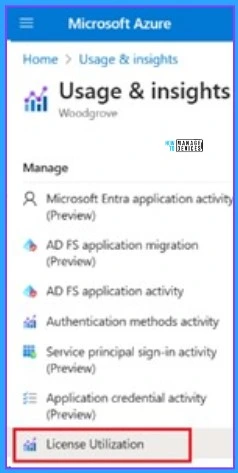
The license utilization & insights portal is available under the “Usage & Insights” blade. The license utilization option will be obtained from this blad. For this, select Home > Usage & Insights. Select License Utilization from Usage & Insights.
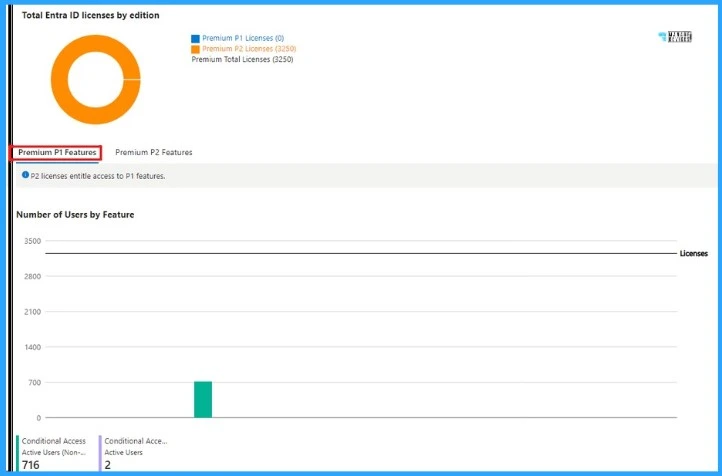
Premium P1 Features
This screenshot shows the feature usage view of Entra ID Premium P1 licenses. You can leverage these insights to secure and govern your users and ensure you comply with the licensing terms and conditions.
The total Entra ID license by edition is shown here. The Number of Premium P1 licenses is 0. Premium P2 license is 3250.
| Number of Conditional Access Active users (non) | Number of Conditional Access Active Users |
|---|---|
| 716 | 2 |
- Microsoft Entra ID Sync Delays to Microsoft 365 Services
- Download Microsoft Entra Architecture Icons
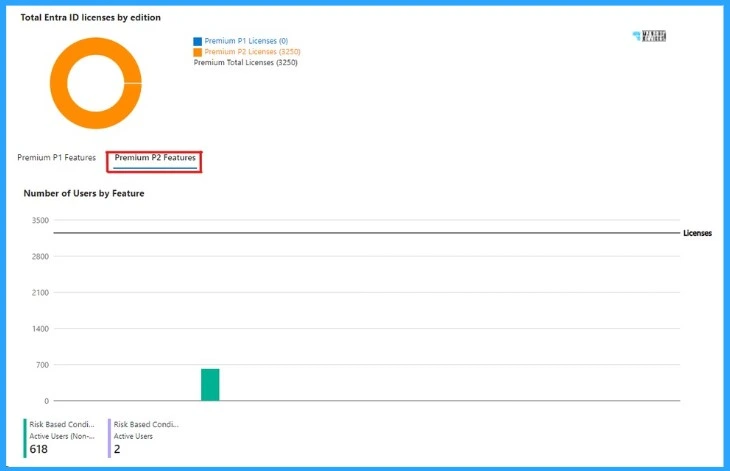
Premium P2 Features
This screenshot shows the feature usage view of Entra ID Premium P2 licenses. You can leverage these insights to secure and govern your users and ensure you comply with the licensing terms and conditions. The Number of Premium P1 licenses is 0. Premium P2 license is 3250.
| Number of Conditional Access Active users (non) | Number of Conditional Access Active Users |
|---|---|
| 618 | 2 |
Reference
Introducing Microsoft Entra License Utilization Insights – Microsoft Community Hub
We are on WhatsApp. To get the latest step-by-step guides and news updates, Join our Channel. Click here –HTMD WhatsApp.
Author
Gopika S Nair is a computer enthusiast. She loves writing on Windows 11 and related technologies. She is here to share quick tips and tricks with Windows 11 or Windows 10 users. She is Post Graduate Diploma Holder in Computer Science.




Discussion