






Out-of-band Patches to FIX Login Issues with Azure Active Directory Microsoft 365 services | ARM Devices
Microsoft released out-of-band patches to FIX Login issues with Azure Active Directory (AAD) and Microsoft 365 services on Windows Arm-based devices. This was one of the known issues that HTMD reported yesterday.
There were 2 known Issues with June patches that Microsoft confirmed for Windows devices. Microsoft released an Out of band patch to mitigate the AAD and Microsoft 365 services login issue on Windows ARM devices. The Out of Band patches released is Windows 11 KB5016138 and Windows 10 KB5016139.
This issue impacts only the Windows ARM devices installed with Microsoft released June 2022 CU patches, KB5014697 and KB5014699, on 14th June 2022. More details on June Latest Cumulative Update > Windows 10 KB5014699 Windows 11 KB5014697.
The second issue with connecting to the internet when using the Wi-Fi Mobile hotspot feature with June patches is not resolved, and there is no out-of-band update released for this patch.

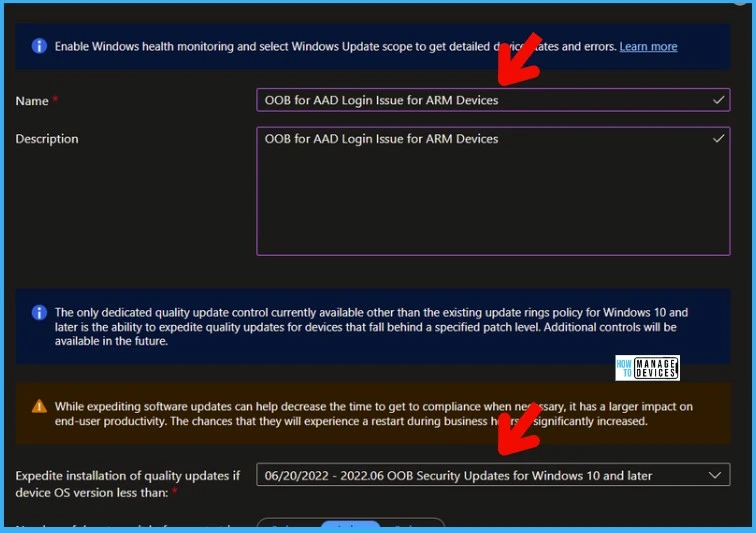
You can use the SCCM method (explained below) and Intune Windows Update for Business process to deploy these out-of-band patches to ARM-based Windows 10 or 11 devices. More Details on Zero Day Out Of Band Patch Deployment using Intune and Intune Reporting Issue: Expedite Windows Security Patch Deployment.
- 2022-06 Cumulative Update for Windows 10 Version 20H2 for ARM64-based Systems (KB5016139)
- 2022-06 Cumulative Update for Windows Server, version 20H2 for ARM64-based Systems (KB5016139)
- 2022-06 Cumulative Update for Windows 10 Version 21H2 for ARM64-based Systems (KB5016139)
- 2022-06 Cumulative Update for Windows 10 Version 21H1 for ARM64-based Systems (KB5016139)
- 2022-06 Cumulative Update for Windows 11 for ARM64-based Systems (KB5016138)
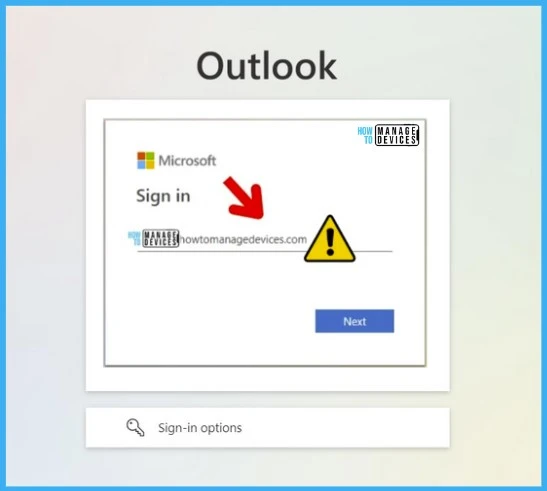
AAD and Microsoft 365 Login Issue with June Patches
From the Windows based ARM devices, users can’t log in to Azure AD and Microsoft 365 services such as MS Teams, etc. This issue was impacting all Apps and services that use AAD to sign in, such as:
- VPN connections
- Microsoft Teams
- Microsoft Outlook
- Microsoft OneDrive
FIX Login Issues with Azure Active Directory Microsoft 365 services using Out-of-band Patches
You can install this Out of Band Update to fix login Issues with Azure Active Directory and Microsoft 365 services for Windows ARM devices.
Microsoft resolved this issue in the out-of-band security update Windows 11 KB5016138 and Windows 10 KB5016139, released June 20, 2022. This update is available only for Arm-based Windows devices.
NOTE! – This login issue only impacts ARM-based Windows devices, so this update is not needed for x86-based or x64-based devices using AMD or Intel CPUs. You won’t get this patch for NON-ARM architectures.
This Out of band hotfix is available via Windows Update, Windows Update for Business, Windows Server Update Services (WSUS), and Microsoft Update Catalog. It is a cumulative update, so you do not need to apply any previous update before installing it.
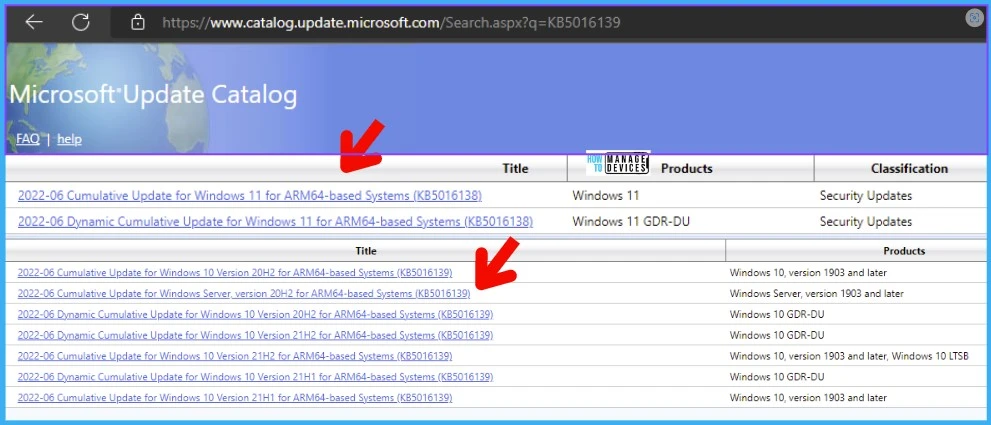
To get the standalone package for KB5016138 and KB5016139, search for it on the Microsoft Update Catalog website, as shown in the below section.
- Windows 11, version 21H2: KB5016138
- Windows 10, version 21H2: KB5016139
- Windows 10, version 21H1: KB5016139
- Windows 10, version 20H2: KB5016139
Download Out-of-Band Patches AAD and Microsoft 365 Login Issues
You can download the Out-of-Band Patches directly from the Microsoft Update Catalog website.
- Download KB5016138 – https://www.catalog.update.microsoft.com/Search.aspx?q=KB5016138
- Download KB5016139 – https://www.catalog.update.microsoft.com/Search.aspx?q=KB5016139
Out of Band Patch is available in WSUS and SCCM
You can deploy Windows 10 and 11 out-of-band patches KB5016138 and KB5016139 using Intune or SCCM. You can create an out-of-band patches package using the following methods. These are applicable only for Windows ARM-based devices.
The easiest way is to check from the SCCM admin console. You can verify the Windows 10 and 11 versions after patch installation. Windows 11 version after KB5016138 installation 22000.740. Windows 10 version number after KB5016139 patch installation 19042.1767, 19043.1767, and 19044.1767.
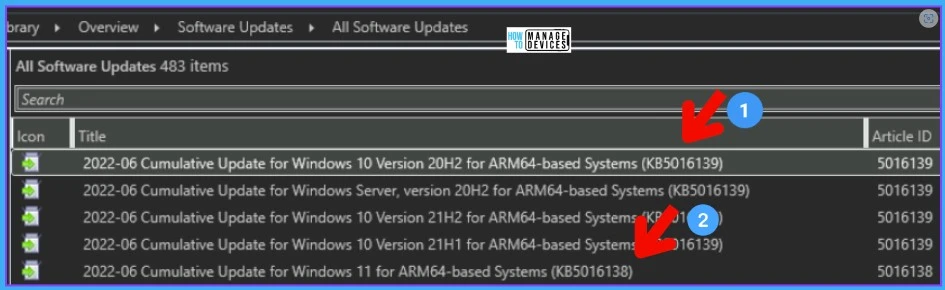
- Navigate to \Software Library\Overview\Software Updates\All Software Updates.
- You will need to initiate a WSUS Sync from the All Software Updates node (Right-click on the node and initiate the sync).
- Search with KB5016138 and KB5016139.
- You can follow the normal SCCM patching process as explained below to complete the deployment.
How to Create Deploy New Software Update Patch Package Using SCCM | ConfigMgr
SCCM ADR Automatic Deployment Rule Creation Process
ConfigMgr Software Updates Troubleshooting Tips | Fix Installation Issues
Author
Anoop C Nair is Microsoft MVP! He is a Device Management Admin with more than 20 years of experience (calculation done in 2021) in IT. He is Blogger, Speaker, and Local User Group HTMD Community leader. His main focus is on Device Management technologies like SCCM 2012, Current Branch, and Intune. He writes about ConfigMgr, Windows 11, Windows 10, Azure AD, Microsoft Intune, Windows 365, AVD, etc.




Discussion