






How to Fix Outlook Desktop Sign-In Issue Email Already Added Error on Current Channel
Hi all, today we are discussing How to Fix Outlook Desktop Sign-In Issue Email Already Added Error on Current Channel. As you know that Outlook is one of the significant email networking features. This will be used by many organizations and personal uses. Recently Outlook has reported many issues, and those issues were solved by Microsoft.
Previously, Microsoft Outlook declared that it may have Shared Calendar Issues in Classic Outlook for GAL Contacts. In hybrid environments where organizations use both on-premises Active Directory and Microsoft 365, some users have reported recently that an issue with Outlook Desktop for on-premises users.
This issue now facing the users who are on the Current Channel Version 2309 or later. The issue is now going on to the Outlook, when the user opens the Outlook, a Sign in button shown instead of the expected profile picture or a name.
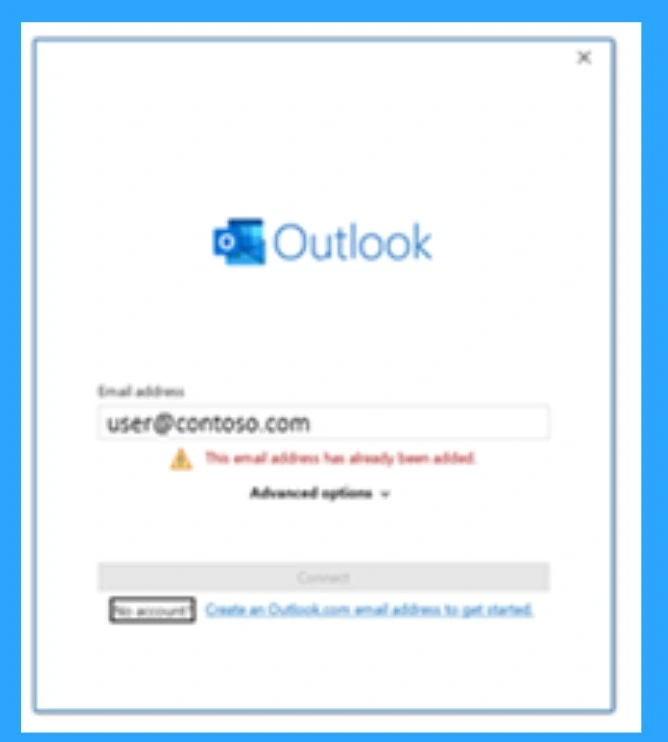
When the user clicks Sign in, Outlook asks for a password but then shows an error: “This email address has already been added. But they can open the outlook, and they can also Send messages, but this issue is very confusing for the users. This will affect the organization very badly. So, in this post Let’s look what was the issue and how to solve them.

Table of Contents
- How to Fix Shared Calendar Issues in Classic Outlook for GAL Contacts
- How to Fix Calendar Time Selection Issue in Outlook When Selecting Multiple Calendars and Timeslots
- Outlook for Mac Email Recall Tips for Resending and Fixing Email Errors
How to Fix Outlook Desktop Sign-In Issue Email Already Added Error on Current Channel
Above we discussed a lot of things about the issue Outlook Desktop Sign-In Issue for On-Premises Users in Hybrid Environment. As per the resources this issue is now going on and it is not solved by the Microsoft till now. The main issue is we are discussed above that when On-Premises Users open the outlook they get a sign option other than the profile picture.
- The user is actually already signed in and everything is working fine and the emails send and receive normally.
- This issue is related by hybrid setup.
| Error Message |
|---|
| when the user tries to log on with their credentials, they get message such as, “This email address has already been added” error message will appear with a Warning sign. |
Know the Workaround
Microsoft is aware of this issue and may provide an update or fix in future versions. This issue can be solved by enable Hybrid Modern Authentication. Hybrid Modern Authentication lets on-premises Exchange servers use modern, secure sign-in methods.
So, they can work smoothly with cloud services like Microsoft 365 or Azure AD. To setup the Hybrid Modern Authentication, Make sure you meet the prerequisites before you begin. Add on-premises web service URLs to Microsoft Entra ID. These URLs must be added as Service Principal Names(SPNS).
- If your Exchange setup is hybrid with multiple tenants, add these SPNs in each tenant’s Entra ID that connects with the on-prem Exchange.
- If you want to use Hybrid Modern Authentication for OWA (Outlook Web App) and ECP (Exchange Control Panel), make sure these directories are properly set.
- Check for the EvoSTS Auth Server object and it must exist in your environment.
- Ensure that the Exchange Server OAuth certificate is valid.
- Use the Monitor Exchange Auth Certificate script to check this. If it’s expired, the script helps you renew it.
- Ensure that all user identities are synchronized with Microsoft Entra ID. This includes all admin accounts.
- If accounts like the built-in Administrator are not synced (and can’t be due to their system attributes), they won’t work with OAuth logins after enabling HMA.
- Enable HMA in Exchange on-premises.
Need Further Assistance or Have Technical Questions?
Join the LinkedIn Page and Telegram group to get the latest step-by-step guides and news updates. Join our Meetup Page to participate in User group meetings. Also, Join the WhatsApp Community to get the latest news on Microsoft Technologies. We are there on Reddit as well.
Reference
Author
Anoop C Nair has been Microsoft MVP for 10 consecutive years from 2015 onwards. He is a Workplace Solution Architect with more than 22+ years of experience in Workplace technologies. He is a Blogger, Speaker, and Local User Group Community leader. His primary focus is on Device Management technologies like SCCM and Intune. He writes about technologies like Intune, SCCM, Windows, Cloud PC, Windows, Entra, Microsoft Security, Career, etc.




Discussion