






How to Update Intune SCEP Profiles with Given Name and Surname to Meet New S/MIME Requirements
Today we are discussing a new topic New Full Names Approval Requirements for S/MIME Intune. As per the new Update Intune SCEP Certificate Profiles need New S/MIME Rules. S/MIME certificates are digital tools used to make emails more secure.
These certificates in Intune will hep the user to send secure and signed emails without needing a setup. certificate providers are changing the rules for S/MIME email certificates. From now on, any certificate that verifies a person’s identity must include their first name and last name.
Before this updation S/MIME certificates didn’t need much personal info to be approved. But with the new rules, certificate providers must now check and include each user’s first and last name in the certificate. In the latest update announcing that July 16 2025 all public certification authorities will set a rule for S/MIME.
This is part of updated CA/Browser Forum rules that all public CAs must follow. Any certificate request missing these fields will be rejected. In this post let’s look ho this new update New Full Names Approval Requirements for S/MIME Intune.

Table of Contents
What Happens SCEP Certificate Profile Doesn’t Include First and Last Name?
New Full Names Approval Requirements for S/MIME Intune
Above we discussed an overview of New Full Names Approval Requirements for S/MIME Intune. In this new upopdate making a huge change in Certificate sysytems. Before there is no need for persornal info of a user. Microsoft is part of the CA/Browser Forum and is working with other certificate providers to get ready for this change.
- Many providers have already confirmed they’ll start blocking certificates that don’t meet the new rules from that date now this very concerned issue on this change.
- These updates should be available by mid-June 2025
- Windows and Android Support for 4096-bit Key Size for Intune SCEP and PFX Certificate Profiles
- Learn The Basic Concepts Of PKI – Intune PKI Made Easy With Joy
- Knowing SCEP – The General Workflow – Intune PKI
What will Happen to the Simple Certificate Enrollment Protocol
This new updation will affect the SCEP users. This change mostly affects organizations that use Intune together with third-party public certificate providers to issue secure email certificates. If you’re using Intune SCEP profiles to give users certificates for signing and encrypting emails and those certificates are trusted by public email systems and you will need to update your setup to meet this new rules.
| If affected | Impact |
|---|---|
| If you dont Use S/MIME certificates | There is no action required |
| Certificate requests (new or renewal) missing Given Name and Surname. | Will be rejected by public CAs. Users may not be able to read or sign emails. |
| Editing an existing certificate profile to add the required fields. | Will reissue all certificates. This might lead to extra costs depending on your CA provider agreement. |
What We Have to Do
If you don’t update your SCEP certificate profiles to include both the first and last name, certificate requests from users devices will start failing. if you update your existing certificate profile later to fix the issue, all the certificates will be reissued at once, which might lead to additional costs depending on your agreement with your certificate provider.
- To avoid this issue you may need to take few steps;
- Contact your third-party CA to ensure they’re prepared for the new requirements.
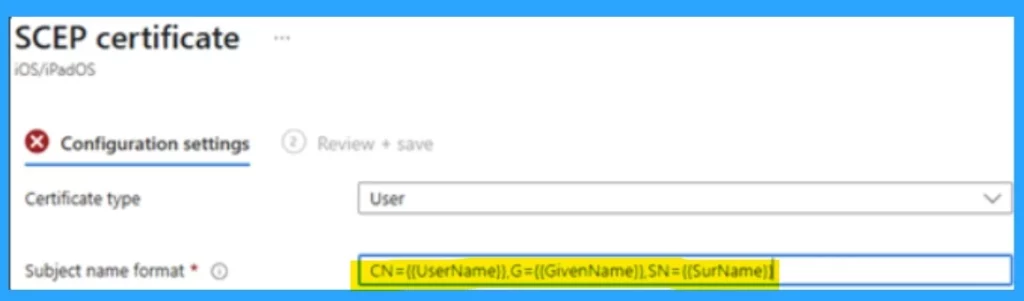
- Review your Intune SCEP profiles used for S/MIME and update the Subject Name field to include G={{GivenName}} and SN={{SurName}}.
Video- SCEP Certificate Deployement
The below video is conducted by Mr. Anoop C nair the MVP. Inthis vdeo he is explaining about the SCEP Certificate Deployement. If you are a beginner or intrested to know more about SCEP Certificate Deployement you can go watch this video,.
Need Further Assistance or Have Technical Questions?
Join the LinkedIn Page and Telegram group to get the latest step-by-step guides and news updates. Join our Meetup Page to participate in User group meetings. Also, Join the WhatsApp Community to get the latest news on Microsoft Technologies. We are there on Reddit as well.
Reference
Update Intune SCEP certificate profiles to comply with new S/MIME Baseline Requirements
Author
Anoop C Nair has been Microsoft MVP for 10 consecutive years from 2015 onwards. He is a Workplace Solution Architect with more than 22+ years of experience in Workplace technologies. He is a Blogger, Speaker, and Local User Group Community leader. His primary focus is on Device Management technologies like SCCM and Intune. He writes about technologies like Intune, SCCM, Windows, Cloud PC, Windows, Entra, Microsoft Security, Career, etc


Discussion