






Passwordless Authentication now Users can Sign in with a TAP
Exciting News! Passwordless Authentication now Users can sign in with a TAP. Nowadays, keeping information safe is very important. You all know why. Security risks are very high these days, so we must consider using advanced security measures. This new Passwordless Authentication enhancement keeps information safe.
Is the traditional approach to securing information in today’s digital world still reliable? I think it’s risky, as cyber-attacks and hacking are continuously growing. That’s why we are using new ways to log in without passwords.
I don’t say it has no challenges, but it does. One big problem we face when they stop using passwords is giving you Temporary Access Passes (TAP). TAPs are like special codes that help log in without a password. We must ensure they provide these codes safely and smartly.
Microsoft says that using TAPs with Windows Hello for Business is a good way for users to log in on their own devices without passwords. This post can look into the Important factors of being passwordless Authentication now Users can Sign in with a TAP.

- Quick Guide to Enforce Multifactor Authentication MFA for Users
- Retirement of Legacy Authentication Methods Management in Microsoft Entra ID
- MFA Authentication now Added to WhatsApp
- 4 New Security Features of Windows 11 to Reduce Credential and Identity
What are the Challenges to Creating TAP?
Passwordless Authentication now Users can Sign in with a TAP
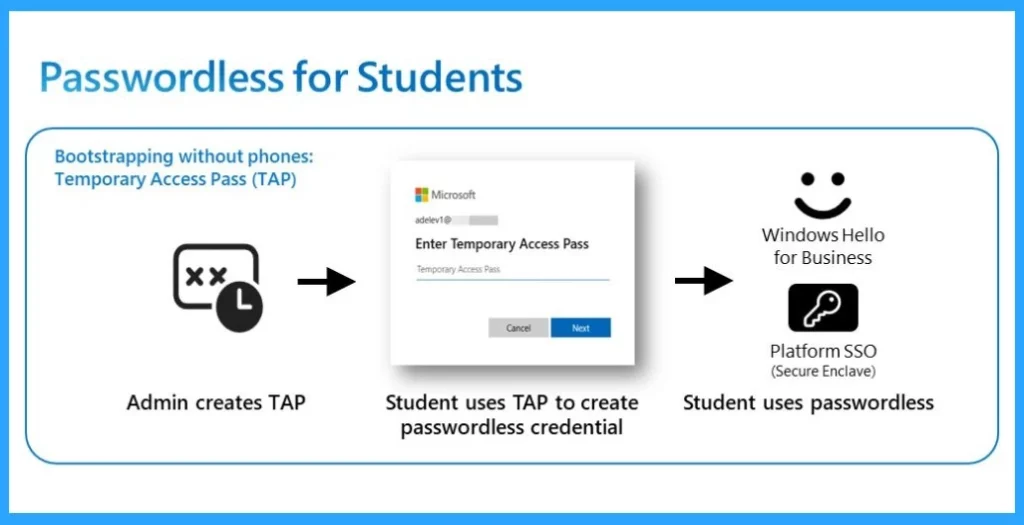
This post discusses the importance of passwordless sign-in and the critical Role of Temporary Access Passes (TAP) and Password Credentials.
- Administers do the role of creating TAP
- TAP helps you to set up your school accounts securely
- Students use this TAP to create a special login method like Fingerprints
- The login method is unique in the student’s device, making it very secure.
- It can’t be used to access anything if the device is lost or stolen.
| Passwordless Authentication Different Operating Systems | Info |
|---|---|
| Windows | Windows Hello for Business for 1:1 devices with TPM and supports Windows Hello biometrics. |
| macOS | Employs Platform SSO with Secure Enclave (preview) for 1:1 devices requiring Secure Enclave and TouchID. |
| iOS/Android: | Passkeys with Microsoft Authenticator (preview) for 1:1 devices on iOS 16+ and Android 14+, respectively, with biometric support for FaceID or OEM-specific features. |
See More: New Platform SSO for macOS Devices in Microsoft Intune
- How to Setup Passwordless Login for Microsoft Accounts
- How to Enable Passkeys in Microsoft Authenticator
- Easiest Method to Enable MFA for Admins using Azure AD Conditional Access
Know About Without TAP or the TAP is Expired
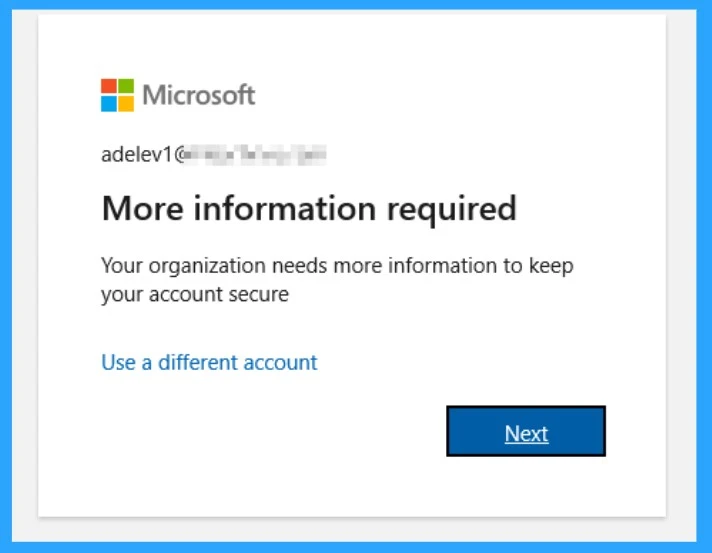
If you don’t have any TAP or if your TAP just expired, you have to fix that because, without TAP, it’s not possible to set passwordless credentials. Without a TAP, users must use Multifactor authentication through the autopilot process.
- You know it isn’t easy to share TAP with the students or the user
- If a user receives a TAP after the initial setup, they can use it to create their passwordless login method
See More: New External Authentication Methods in Microsoft Entra ID
What We Have to Know About if the Password is Changed or Reset
First of all, you don’t need to worry about the reset or password change or the device being stolen. You obey the security teams. Also, erase all information on the missing or stolen device and Disable the feature that allows password-free sign-in or the entire user account to stop someone from using it without permission.
Note: If a device is compromised, administrators can delete the passwordless credential from Microsoft Entra ID to prevent unauthorized use.
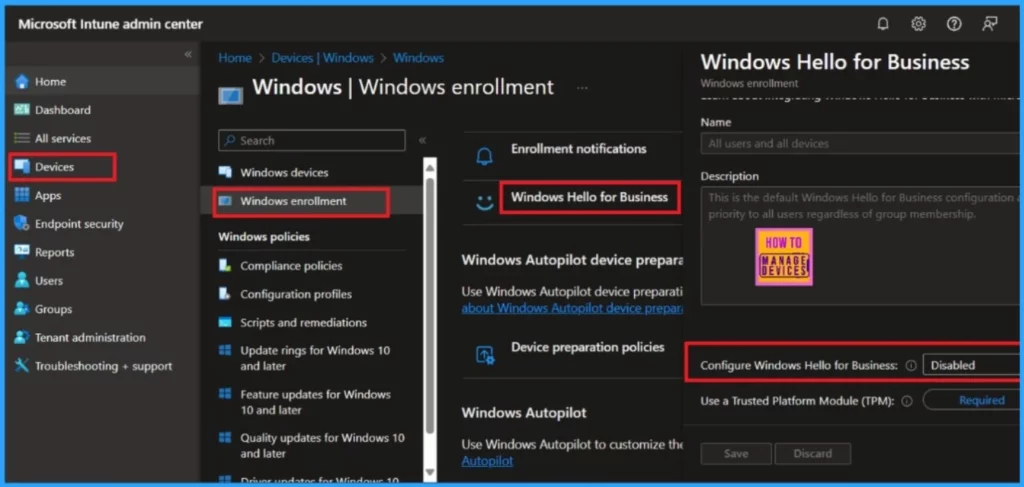
Customization of Windows Hello
Customizing the Windows Hello for Business experience involves setting up passwordless credentials, configuring security settings, and managing access control and monitoring through Microsoft Entra.
Reference
We are on WhatsApp. To get the latest step-by-step guides and news updates, Join our Channel. Click here –HTMD WhatsApp.
Author
Anoop C Nair is Microsoft MVP! He is a Device Management Admin with more than 20 years of experience (calculation done in 2021) in IT. He is a Blogger, Speaker, and Local User Group HTMD Community leader. His main focus is on Device Management technologies like SCCM 2012, Current Branch, and Intune. He writes about ConfigMgr, Windows 11, Windows 10, Azure AD, Microsoft Intune, Windows 365, AVD, etc.




Discussion