






Fix ConfigMgr Power BI Report Unexpected Error | SCCM | Configuration Manager
Let’s understand how to Fix ConfigMgr Power BI Report Unexpected Error. I could not connect to the Power BI Report server from the Power BI desktop app or the Power BI Reporting server.
I have already completed the integration with Power BI Reporting Server and SCCM. However, I could not access the reporting server URL(s). I got confused by two URLs available in SQL Reporting Server Configuration Manager. The URL from the web service URL tab worked fine, but from what I can see, that was not a Power BI report.
Have you not read Mohan’s post about How to Build Power BI Live Dashboard Integration with SCCM | ConfigMgr? You should read that post to know more about the Power BI SCCM Dashboard implementation. A video tutorial will also help with the Power BI Dashboard demo.
In this post, you will find detailed instructions on resolving the unexpected error in the ConfigMgr Power BI Report for SCCM. These steps will guide you through troubleshooting and fixing the issue, ensuring the smooth operation of your Configuration Manager environment.

Table of Contents
Issue? – Fix ConfigMgr Power BI Report Unexpected Error | SCCM | Configuration Manager
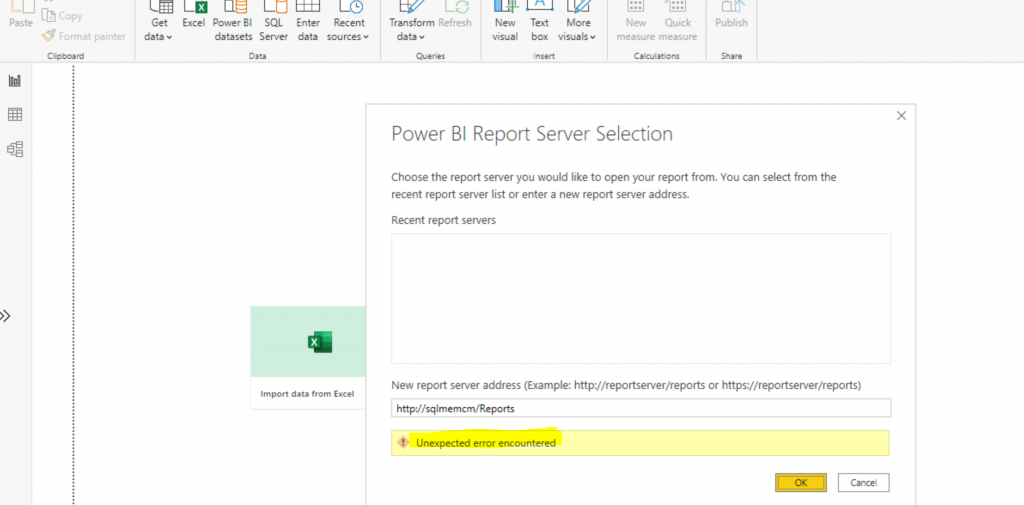
The following screenshots were from the Power BI Desktop app when I tried to connect to the Power BI reporting server. I also tried to launch the Reports URL (http://sqlmemcm/Reports/) from the browser, but it didn’t work.
I tried two different URLs (more details in the troubleshooting section below) mentioned in Reporting Server Configuration Manager to connect to the Power BI reporting server, but both failed.
Let’s find out a fix for these issues and understand what is missing here. I got the following error when connecting to the Power BI Report Server.
- http://sqlmemcm/Reports/
NOTE! You must be wondering where I got the URL details. Read on, and you will find out!
- Unexpected Error Encountered
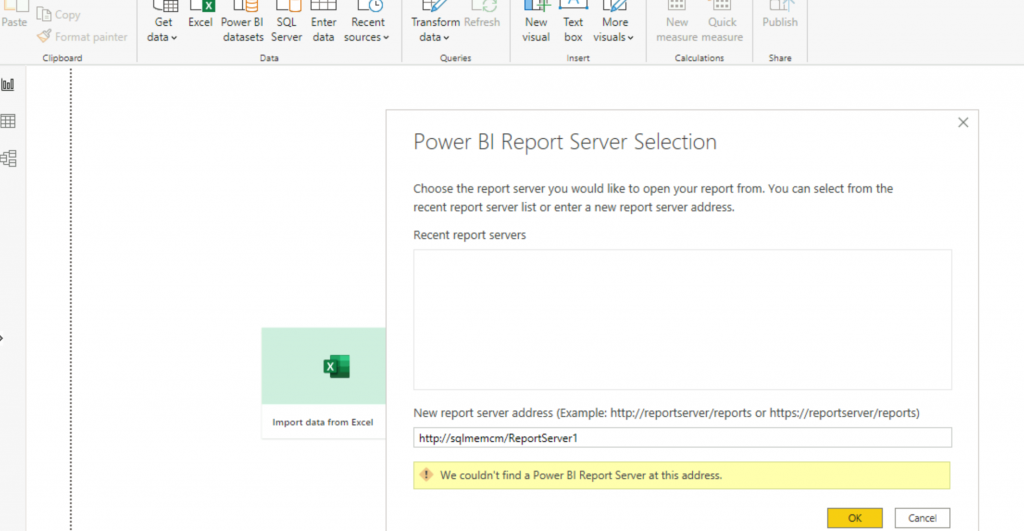
I tried to open the following URL “http://sqlmemcm/ReportServer1/“. Another error I got was “We couldn’t find a PowerBI Report Server at this address.”
- ConfigMgr Integrate Power BI Reporting Server with SCCM | Configuration Manager
- FIX SCCM Client WMI Issues | ConfigMgr | WMImgmt Errors
- SCCM ConfigMgr Hardware Related Reports | Default Reports | Configuration Manager
Troubleshooting
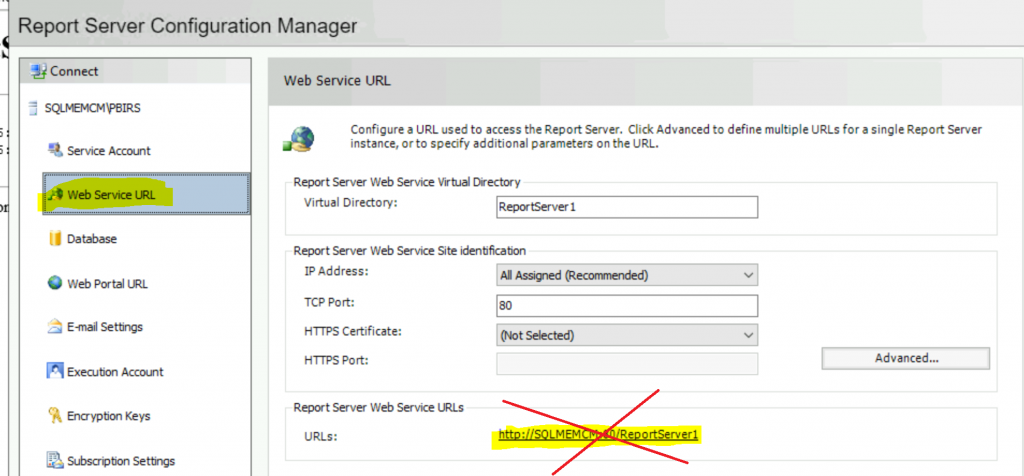
From the troubleshooting, I learned that you should not use the URL given in the Web Service URL (This is the reporting server URL) tab from Reporting Server Configuration Manager. There is a separate URL for accessing the reports.
If you use the following URL to connect to the Power BI server from the Power BI Desktop app, it will fail with the error “We couldn’t find a PowerBI Report Server at this address”.
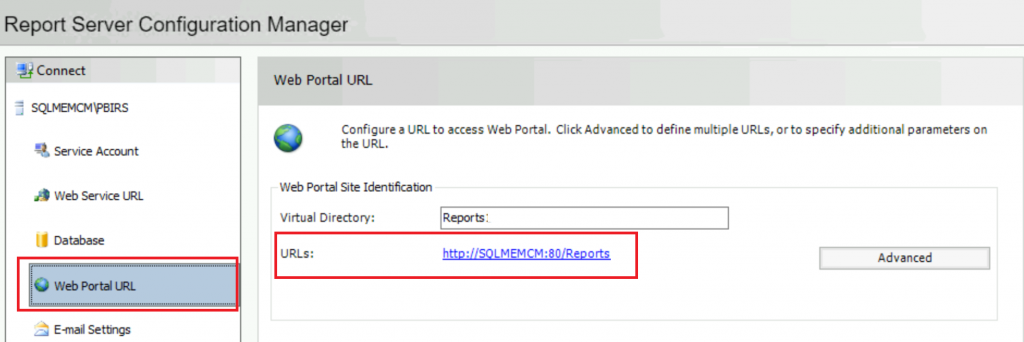
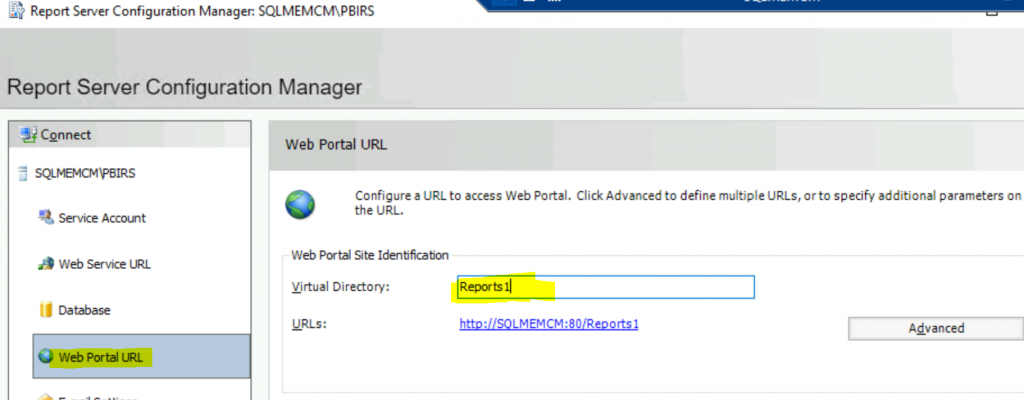
To connect to the Power BI Server, go to the Web Portal URL from the Reporting Server Configuration Manager and copy the URL.
- I tried to copy and use the same URL in the Power BI Desktop portal, but it failed with the error “Unexpected Error Encountered.”
- This means we cannot connect to Power BI Server, and Power BI Reports are unavailable.
Solution
Previously, the Reports virtual directory and URL were used for the SSRS reports. As explained in the ConfigMgr Integrate Power BI Reporting Server with SCCM post, we have to uninstall the SSRS, etc…
So, I thought of changing the virtual directory’s name and giving a new name to the virtual directory.
- Open “Reporting Server Configuration Manager”
- Click on the Web Portal URL tab
- Change the Virtual Directory Name to Reports1
- Click the APPLY button to confirm the changes
- Please wait until everything is confirmed as OK.
Results
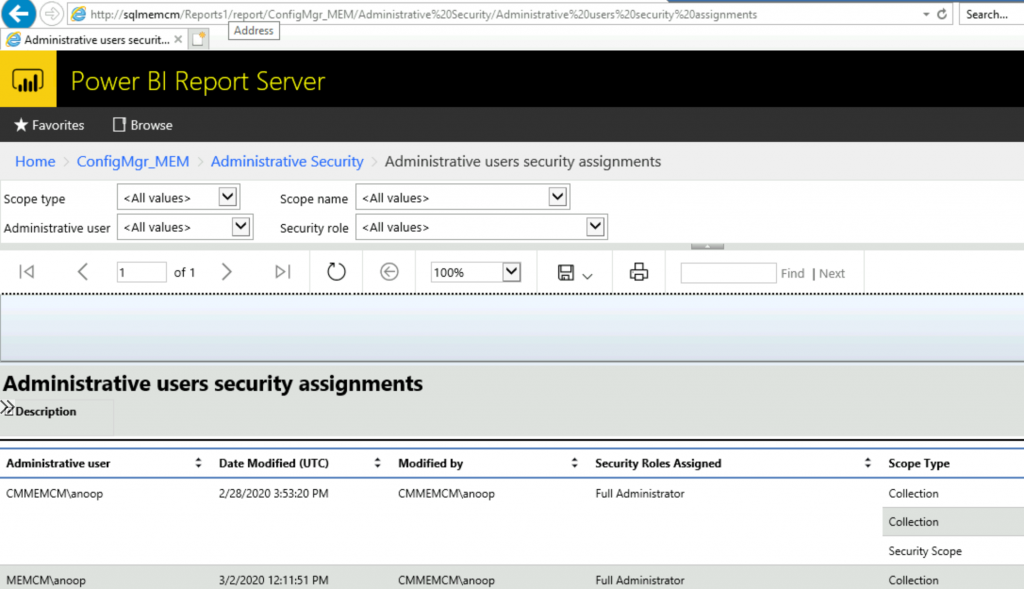
Click on the URL to confirm that Power BI reports are getting opened—http://sqlmemcm/Reports1/, where sqlmemcm is the Power BI Reporting server name.
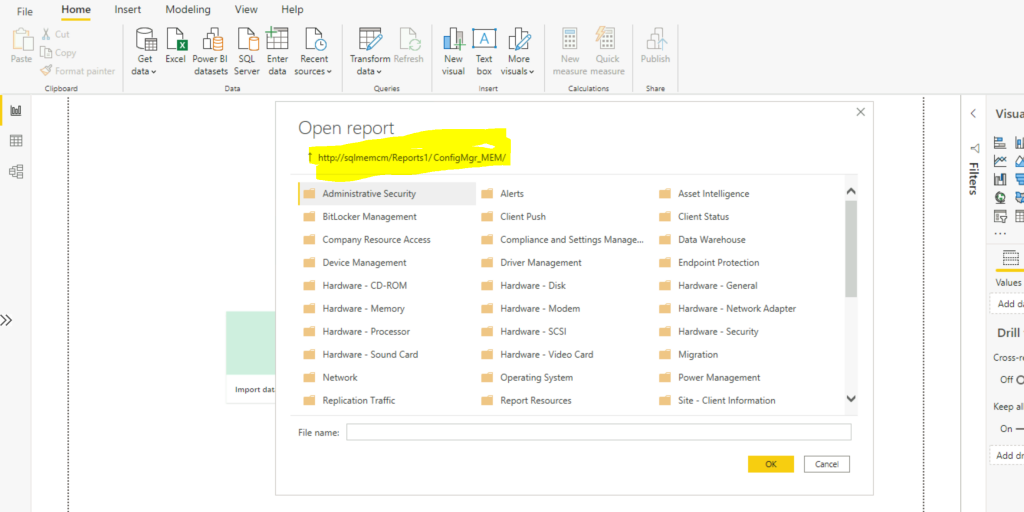
Try to connect to the Power BI Report Server with the new Reports URL. Successfully Connected to SCCM Default Reports from the Power BI Desktop application.
We are on WhatsApp now. To get the latest step-by-step guides, news, and updates, Join our Channel. Click here – HTMD WhatsApp.
Author
Anoop C Nair is Microsoft MVP! He is a Device Management Admin with more than 20 years of experience (calculation done in 2021) in IT. He is a Blogger, Speaker, and Local User Group HTMD Community leader. His primary focus is Device Management technologies like SCCM 2012, Current Branch, and Intune. He writes about ConfigMgr, Windows 11, Windows 10, Azure AD, Microsoft Intune, Windows 365, AVD, etc.




Discussion