






Learn How to Remove Distribution Point Role DP | SCCM | ConfigMgr
I have published the install configuration manager distribution point guide in the previous post.
In this post, you shall learn how to remove/reinstall the distribution point (Remove Configuration Manager Distribution Point). ConfigMgr|SCCM Remove Distribution Point Role Guide.
| Index |
|---|
| Remove Distribution Point Role |
| Log Files to Confirm SCCM DP Distribution Point Removal |
| Reinstall Distribution Point Role |
IMPORTANT! When you remove a configuration manager distribution point, all the packages distributed to that DP are removed. Even if you reinstate the DP, you might need to deploy containers to it again.
Remove Distribution Point Role
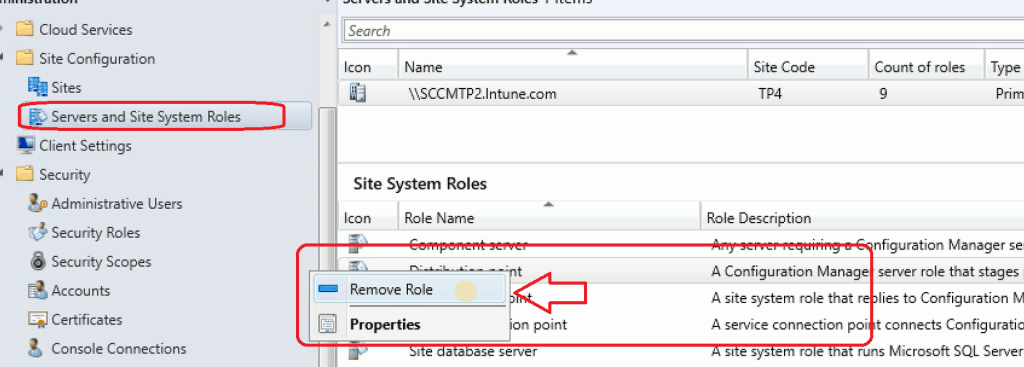
Let’s see how to remove/uninstall a configuration manager distribution point. The following are the steps you need to follow:

- Navigate – \Administration\Overview\Site Configuration\Servers and Site System Roles
- Right Click on the Distribution Point and Select Remove
- Click on Yes to confirm the removal of the DP role from the site system server
Prerequisite: Before removing the distribution point role on a site system server, Make sure the SCCM remote site server computer account is part of the Local Administrators group.
Log Files to Confirm SCCM DP Distribution Point Removal – HMAN.log
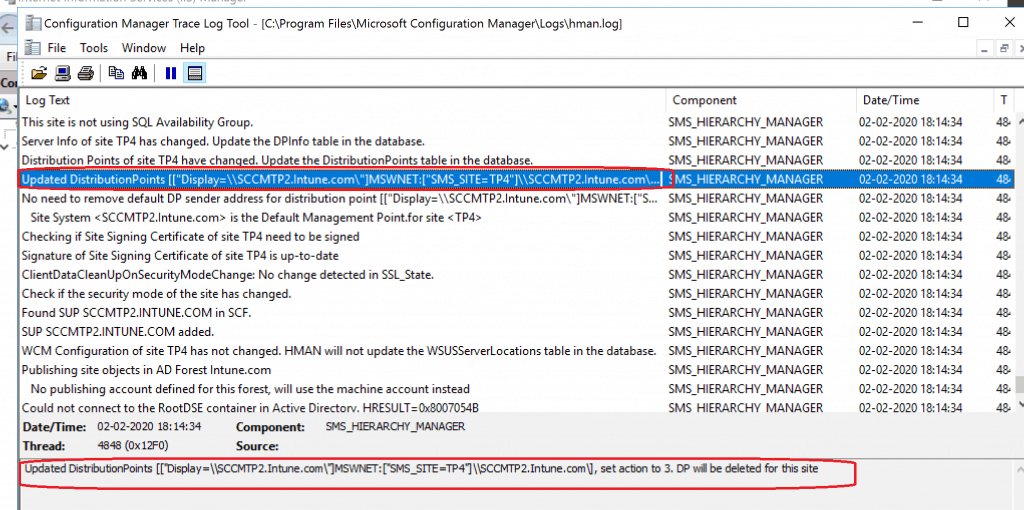
You can review the Hman.log log file to know the status of the successful completion of the Configuration Manager distribution point removal process.
Let’s check the Log Files to Confirm SCCM DP Distribution Point Removal – HMAN.log.
Server Info of site TP4 has not changed.HMAN will not update the DPInfo table in the database.
Distribution Points of site TP4 have changed. Update the DistributionPoints table in the database.
Updated DP ["Display=\\SCCMTP2.Intune.com\"]MSWNET:["SMS_SITE=TP4"]\\SCCMTP2.Intune.com\. DBCRC:3C53E82D,NewCRC:7635C56,Action:0,PDP:0,PullDP:0
Server Info of site
TP4 has changed. Update the DPInfo table in the database.
Distribution Points of site TP4 have changed. Update the DistributionPoints table in the database.
Updated DistributionPoints [["Display=\\SCCMTP2.Intune.com\"]MSWNET:["SMS_SITE=TP4"]\\SCCMTP2.Intune.com\], set action to 3. DP will be deleted for this site
No need to remove default DP sender address for distribution point
[["Display=\\SCCMTP2.Intune.com\"]MSWNET:["SMS_SITE=TP4"]\\SCCMTP2.Intune.com\], since it does not exists for this distribution point
Reinstall Distribution Point Role
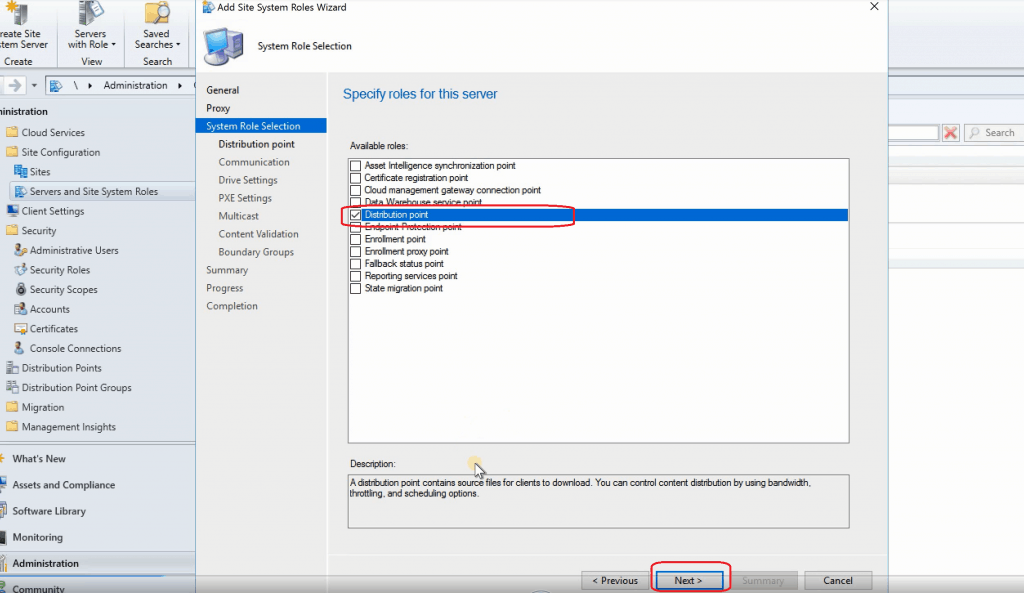
You need to follow the installation process I explained in the previous blog post to reinstall the Configuration Manager (SCCM) Distribution Point.
Resources – Remove a Distribution Point
- Reinstall the Configuration Manager (SCCM) Distribution Point
- Install and configure distribution points in Configuration Manager – https://docs.microsoft.com/en-us/configmgr/core/servers/deploy/configure/install-and-configure-distribution-points
- Setting up HTTPS MP SUP SCCM Site Systems for Co-Management – https://www.anoopcnair.com/setting-up-https-mp-sup-sccm-site-systems/
We are on WhatsApp. To get the latest step-by-step guides and news updates, Join our Channel. Click here –HTMD WhatsApp.
Author
Anoop C Nair is Microsoft MVP! He is a Device Management Admin with more than 20 years of experience (calculation done in 2021) in IT. He is a Blogger, Speaker, and Local User Group HTMD Community leader. His main focus is on Device Management technologies like SCCM 2012, Current Branch, and Intune. He writes about ConfigMgr, Windows 11, Windows 10, Azure AD, Microsoft Intune, Windows 365, AVD, etc.




Hello,
i have a branch office will the bandwith is 6,2 4 Mo.
I want to know if are sufficient to install a Distribution Point.
Best regards,
Jack Holman
StaffIt depends on the content/packages/applications source files that you distribute to remote DP. I normally try to avoid creating remote DPs when it’s at the end of saturated WAN network.
I have some sites with 10 Mbits and 40 Users or more, and the majority of sites they have 2 Mbits link to datacenter where my SCCM server is installed so, for you it is recommanded to link these sites with 2 Mbits to datacneter ?