






Microsoft Removes Location History Feature from Cortana in Windows
Hey there, Let’s discuss about the topic “Microsoft Removes Location History Feature from Cortana in Windows”. Yes, Microsoft has announced that it will remove the Location History feature from the operating system (Windows 10 and Windows 11).
Location services is a setting that the device administrator can control. When enabled, it allows certain Windows features to operate correctly, such as automatically setting the time zone and using the Find My Device function.
When this location setting is enabled, the Microsoft location service uses GPS, nearby Wi-Fi access points, cell towers, and our IP address to determine our device’s location. We can set a default location for our device that Windows, apps, and services can use when a more exact location can’t be detected using GPS or other methods.
Deprecating and removing the feature means that the data will no longer be saved locally, and the settings will disappear from the Windows 10 and 11 operating systems. The API behind the feature provides apps with locally stored data collected by location services in the previous 24 hours.

Table of Contents
What is an API?
Microsoft Removes Location History Feature from Cortana in Windows
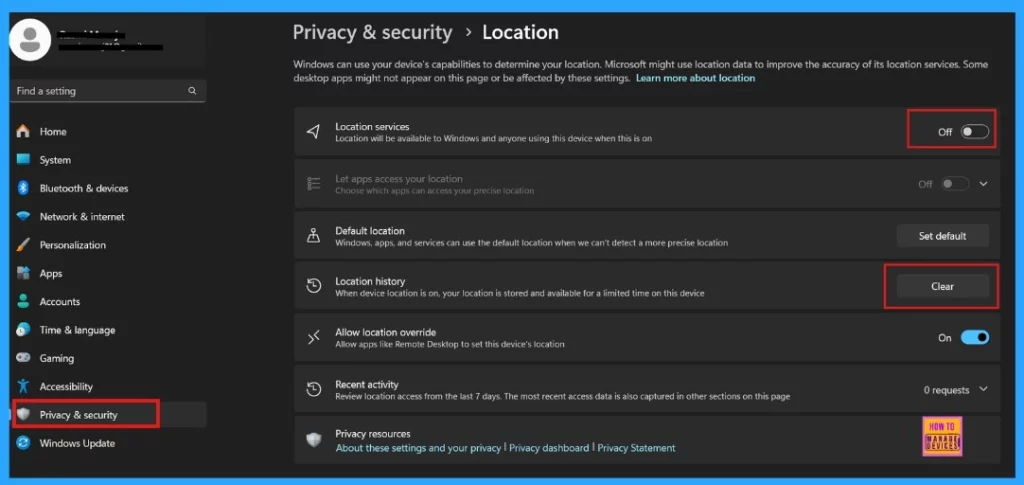
With the removal of the Location History feature, location data will no longer be saved locally. As a result, users will no longer find the option to manage or access this information. Additionally, the settings related to location tracking will be eliminated from the Privacy & Security > Location section within the Settings menu.

- Deploy Turn Off Location Policy using Intune
- How to Change Location and Language in the Copilot
- Conditional Access Security Settings for Countries Location in Entra ID
Deprecation of Location History
Microsoft has announced that it will discontinue the Windows feature that allows applications, such as the AI assistant Cortana, to access the device’s location history.
| Feature | Details and Mitigation | Deprecation Announcement |
|---|---|---|
| Location History | Microsoft is discontinuing the Location History feature in Cortana, which previously allowed the assistant to access 24 hours of device location data when enabled. With this removal, location data will no longer be stored locally, and the related settings will be removed from the Privacy & Security > Location section in Windows Settings. | February 2025 |
Developers should review applications that use the Windows.Devices.Geolocation API and migrate away from GetGeopositionHistoryAsync. Otherwise, the core features of their tools may malfunction in the future, the location services option will be removed from Windows Settings.
- Start Menu > Settings > Privacy & Security > Location.
Need Further Assistance or Have Technical Questions?
Join the LinkedIn Page and Telegram group to get the latest step-by-step guides and news updates. Join our Meetup Page to participate in User group meetings. Also, Join the WhatsApp Community to get the latest news on Microsoft Technologies. We are there on Reddit as well.
Resource
Deprecated features for Windows client
Author
Anoop C Nair has been Microsoft MVP for 10 consecutive years from 2015 onwards. He is a Workplace Solution Architect with more than 22+ years of experience in Workplace technologies. He is a Blogger, Speaker, and Local User Group Community leader. His primary focus is on Device Management technologies like SCCM and Intune. He writes about technologies like Intune, SCCM, Windows, Cloud PC, Windows, Entra, Microsoft Security, Career, etc.




Discussion