






Network Requirements for PowerShell Scripts and Win32 Apps Coming to the Microsoft Intune
Hi, today we are discussing a new topic: Network Requirements for PowerShell Scripts and Win32 Apps Coming to the Microsoft Intune. As you all know, Microsoft Intune is a cloud service that is the best for deploying applications. The latest update for Microsoft Intune is ongoing this year.
With the retirement of Edgeio, updated CDN endpoints are required for deploying Win32 apps and PowerShell scripts. According to sources from Microsoft Intune, a significant update is the retirement of Edgeio on December 27, 2024.
The Content Delivery Network (CDN) provider will no longer be available for delivering content after that date. With this new update CDN endpoints are essential for delivering apps and scripts to devices. They serve as access points for data distribution, ensuring smooth and secure communication.
The retirement of Edgeio and the update to CDN endpoints for Win32 apps and PowerShell scripts are significant changes, and quick action is needed. In this post, we can look at a quick overview of this update and how it affects the organization.

Table of Contents
Network Requirements for PowerShell Scripts and Win32 Apps Coming to the Microsoft Intune
The above discussed the overall details of the Network Requirements for PowerShell Scripts and Win32 Apps Coming to Microsoft Intune. Recently, Mr. Arnab Mithra’s report (Microsoft Corp. Sr. Program Manager M365) provided this update on his social media platform.
- The retirement of Azure CDN from Edgio, Microsoft is updating the required CDN endpoints used for deploying Win32 apps and PowerShell scripts via Microsoft Intune.
- Devices continue to receive these resources after December 27, 2024.
- Ensure access to new CDN endpoints to maintain functionality for Intune deployments.

- Intune Policy Assignment Classification Easy Secrets of using Graph API with PowerShell
- AZ-500 Exam Prep Guide Microsoft Azure Security Engineer Associate Professional Certificate
- Maximum Size Cap for Intune Win32 App is Increased Now
How the Change Will Affect Your Organization
When using Intune to deploy PowerShell scripts or Win32 applications, it is essential to grant access to the updated endpoints specific to your location. If access to these endpoints is not provided, users will be unable to install Win32 applications, and PowerShell scripts will fail to execute.
| What you need to do to prepare |
|---|
| Update your firewall rules to include the new CDN endpoints for Win32 apps and PowerShell scripts. |
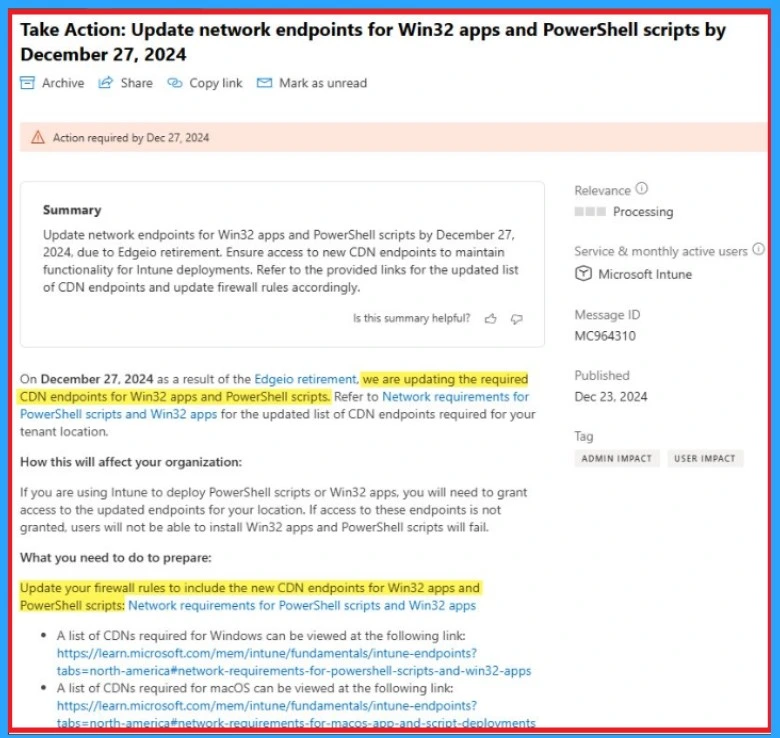
Source: Action required by Dec 27
Need Further Assistance or Have Technical Questions?
Join the LinkedIn Page and Telegram group to get the latest step-by-step guides and news updates. Join our Meetup Page to participate in User group meetings. Also, Join the WhatsApp Community to get the latest news on Microsoft Technologies. We are there on Reddit as well.
Author
Anoop C Nair has been Microsoft MVP from 2015 onwards for 10 consecutive years! He is a Workplace Solution Architect with more than 22+ years of experience in Workplace technologies. He is also a Blogger, Speaker, and Local User Group Community leader. His primary focus is on Device Management technologies like SCCM and Intune. He writes about technologies like Intune, SCCM, Windows, Cloud PC, Windows, Entra, Microsoft Security, Career, etc.


The new CDNs are not even resolving to any DNS, how are we supposed to update our firewall.
Is it the local firewall on the windows machine that needs updating?