






Restrict Azure AD Tenant Creation for Users
In this post, you will learn how you can restrict Azure AD Tenant Creation for Users. Administrators can now restrict tenant creation to only administrators or users with Azure AD Tenant Creator role.
By default, non-admins users are allowed to create new tenants, and the setting has been set to the default No. Non-admin users can create an Azure AD tenant using the Azure AD portal or Azure portal. However you can toggle the switch to Yes from restricting to create tenants.
With tenant restrictions, organizations can specify the list of tenants that users on their network are permitted to access. Azure AD then only grants access to these permitted tenants – all other tenants are blocked, even ones that your users may be guests in.
Users can create tenants in the Azure AD and Entra administration portal under Manage tenant. The creation of a tenant is recorded in the Audit log as category DirectoryManagement and activity Create Company. Anyone who creates a tenant will become the Global Administrator of that tenant. The newly created tenant does not inherit any settings or configurations.

- Configure Azure AD Company Branding For Sign-in Experiences
- Organize Intune Managed Google Play Store Apps In Collections
Restrict Azure AD Tenant Creation for Users
Here’s how you can restrict users’ default permissions from creating tenant. You can restrict default permissions for non-admin users or restrict Azure AD tenant creation for users in the following ways:
- Sign in to Azure Active Directory admin center (https://aad.portal.azure.com)
- Navigate to Azure Active Directory -> User settings.
Under User settings, In Tenant creation set Restrict non-admin users from creating tenants (preview) to Yes and click Save.
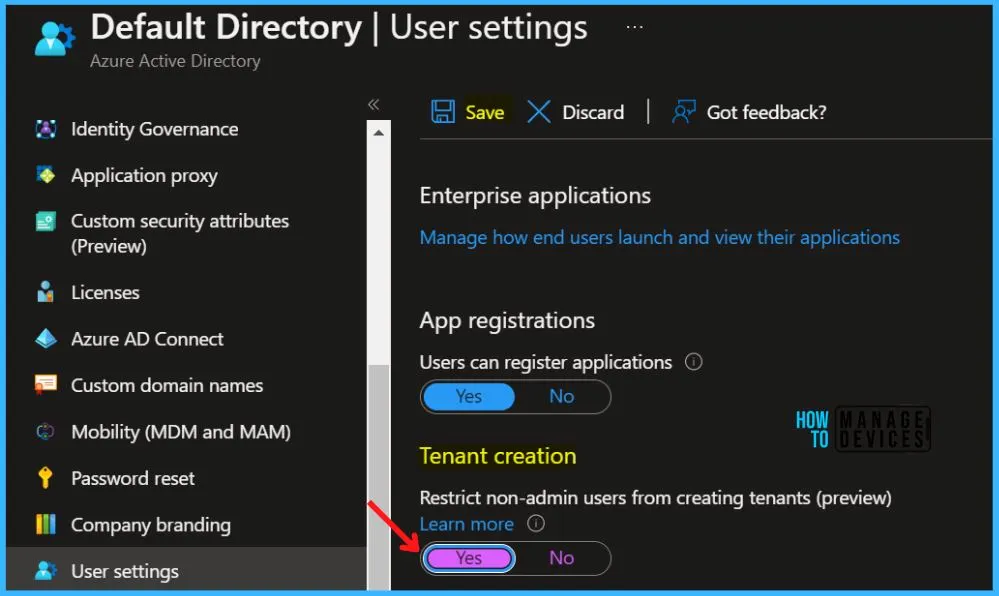
Setting this option to Yes restricts creation of Azure AD tenants to the Global Administrator or tenant creator roles. Setting this option to No allows non-admin users to create Azure AD tenants. Tenant creation will continue to be recorded in the Audit log.
The ability to manage tenants is granted by assigning roles that require permissions. Roles can be assigned to individual users.
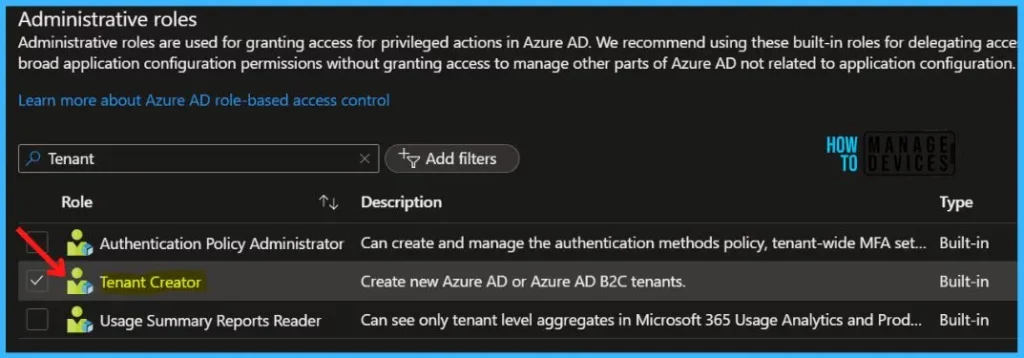
To grant only a specific non-administrator user the ability to create new tenants? Set this option Restrict non-admin users from creating tenants (preview) to No, then assign them the tenant creator role.
Author
About Author – Jitesh, Microsoft MVP, has over six years of working experience in the IT Industry. He writes and shares his experiences related to Microsoft device management technologies and IT Infrastructure management. His primary focus is Windows 10/11 Deployment solution with Configuration Manager, Microsoft Deployment Toolkit (MDT), and Microsoft Intune.


Discussion