





Restrict Entra Multi-Tenant App Registrations to Specific Tenants for Security
Key Takeaways:
- Limit a Multi-Tenant app registration to chosen Tenants with Entra
- Preview capability to Limit Multi-Tenant app registration to chosen Tenants is available
- Useful for Test App need access to multiple tenant
- Available through Entra Portal
Let’s discuss Restrict Entra Multi-Tenant App Registrations to Specific Tenants for security. Microsoft released the preview capability of limiting multi-tenant app registrations to specific tenants for developers. Chosen Tenant can be easily limit with this feature.
Table of Contents
Table of Contents
Restrict Entra Multi-Tenant App Registrations to Specific Tenants for Security
Microsoft introduced Entra Multi-Tenant App Registrations to Specific Tenants feature as a preview initially and later we can expect the general availability of this feature. Using Microsoft Entra Portal you can access and explore this new capability.
| Use Cases |
|---|
| This new feature is particularly useful for test that need access to multiple tenants but should not be universally available. |
- How to Track User Registration Details in Entra ID using Microsoft Graph API
- Microsoft Entra Global Secure Access Adds BYOD Support Using Entra Registered Devices
- Automate Microsoft Entra User Offboarding with Microsoft Graph API and PowerShell
How to Access Entra Multi-Tenant App Registrations to Specific Tenants Feature
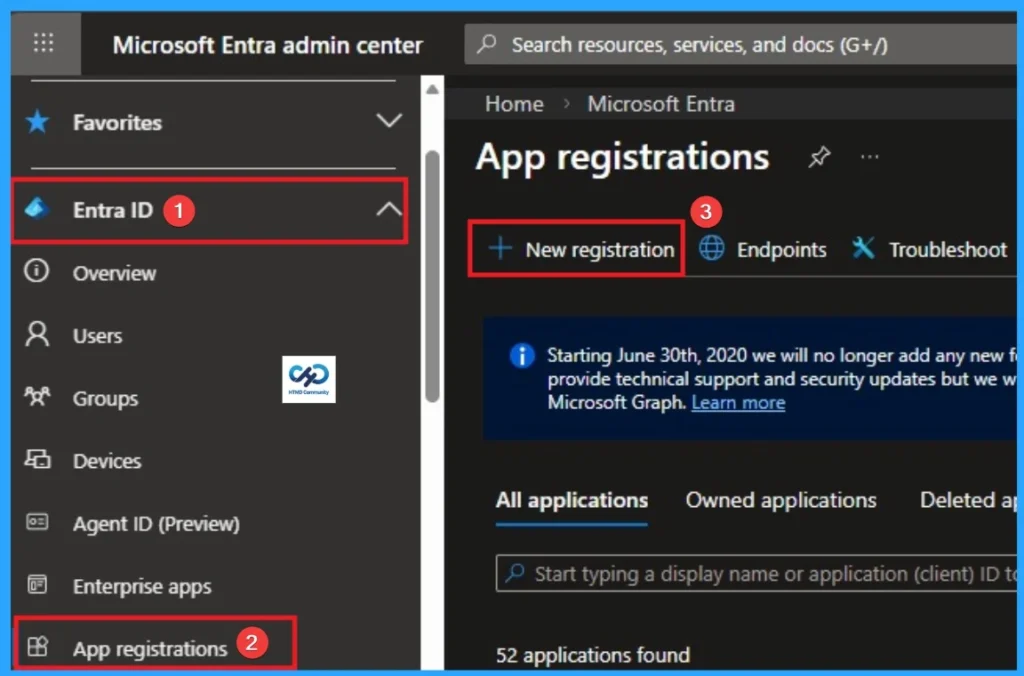
To access the Multi-Tenant App Registrations to Specific Tenants, Sign in to the Microsoft Entra admin center with your credentials. Then go to Entra ID > App Registration > +New Application.
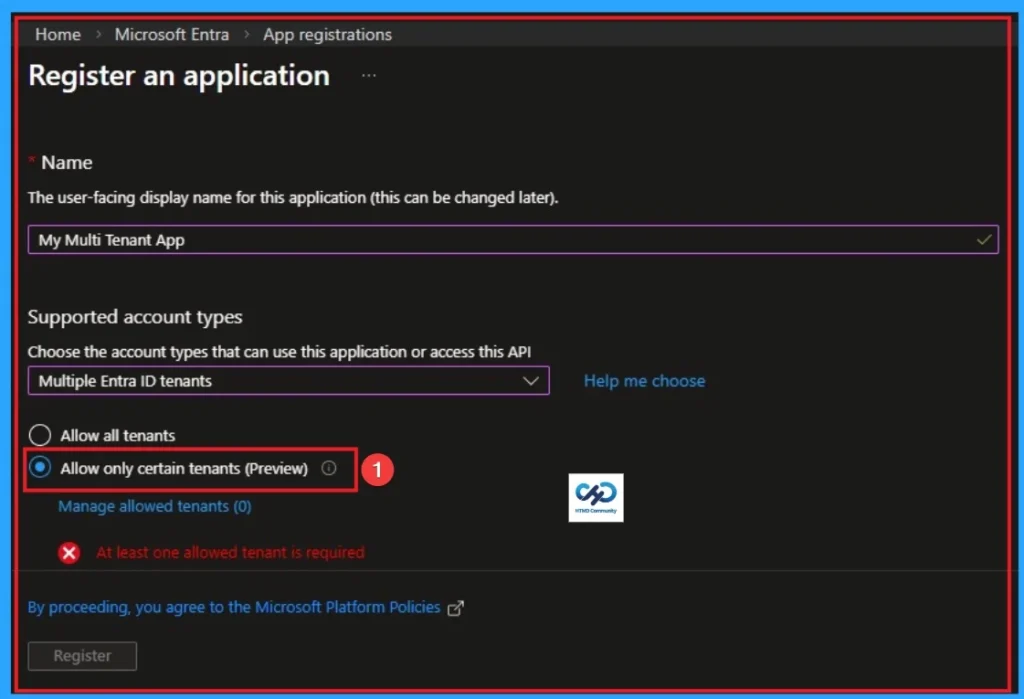
Under Register an Application, Enter the Name. The user-facing display name for this application (this can be changed later). Here I add the Name as My Multi Tenant App. And select the supported account types as Multiple Entra ID Tenants. Here you can see Allow only certain tenants (Preview) feature.

Need Further Assistance or Have Technical Questions?
Join the LinkedIn Page and Telegram group to get the step-by-step guides and news updates. Join our Meetup Page to participate in User group meetings. Also, Join the WhatsApp Community and WhatsApp Channel to get the latest news on Microsoft Technologies. We are there on Reddit as well.
Author
Anoop C Nair has been Microsoft MVP for 10 consecutive years from 2015 onwards. He is a Workplace Solution Architect with more than 22+ years of experience in Workplace technologies. He is a Blogger, Speaker, and Local User Group Community leader. His primary focus is on Device Management technologies like SCCM and Intune. He writes about technologies like Intune, SCCM, Windows, Cloud PC, Windows, Entra, Microsoft Security, Career, etc.




Discussion