






Enable SCCM Active Directory User Discovery | Exclude OU | ConfigMgr | Best Guide
First, learn to Enable SCCM Active Directory User Discovery. Then, let’s check the ConfigMgr options to Exclude OUs from SCCM Active Directory User Discovery.
Configuration Manager has different discovery methods to find resources to manage from the network, Active Directory, and Azure Active Directory (Azure AD).
ConfigMgr’s most common discovery methods (a.k.a SCCM) are the Active Directory system and Active Directory user discoveries. AD discovery is one of the first steps you will take after building a new ConfigMgr Primary Server.
Microsoft introduced a new option to exclude an OU from SCCM Active Directory User Discovery with the 2103 version of ConfigMgr. This post explains the exclude options.

SCCM Active Directory User Discovery FAQs?
Let’s learn more about frequently asked questions about SCCM Active Directory Discovery methods.
What is SCCM Active Directory System Discovery?
What is SCCM Active Directory User Discovery?
How many types of Active Directory Schedules are available?
Is it Possible to exclude OUs from AD System Discovery?
Is it Possible to exclude OUs from AD User Discovery?
SCCM Active Directory User Discovery
Let’s understand how to configure SCCM Active Directory User Discovery.
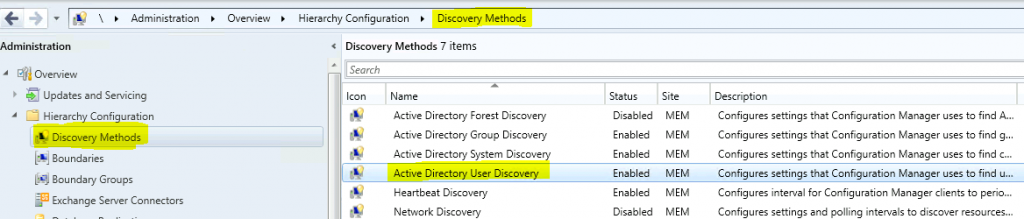
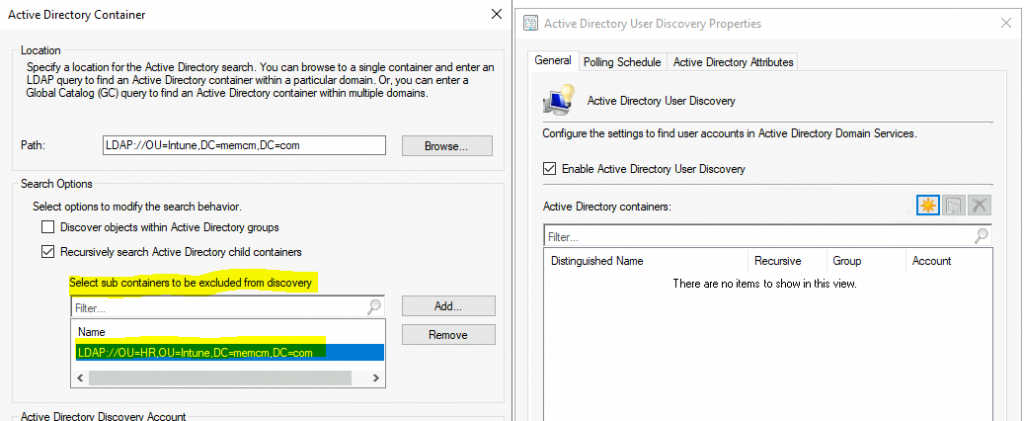
Go to Administration > Hierarchy Configuration > Discovery Methods from the ConfigMgr console. Double-click on the Active Directory User Discovery method to go to properties.
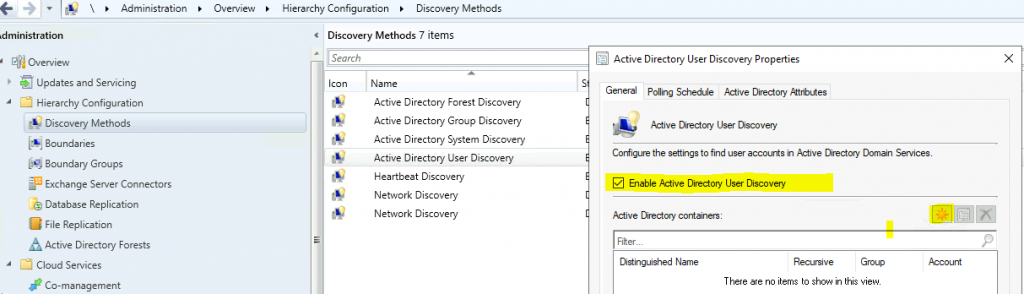
Click on the option – Enable Active Directory User Discovery. Click on the Star button to add Active Directory Containers/OUs.
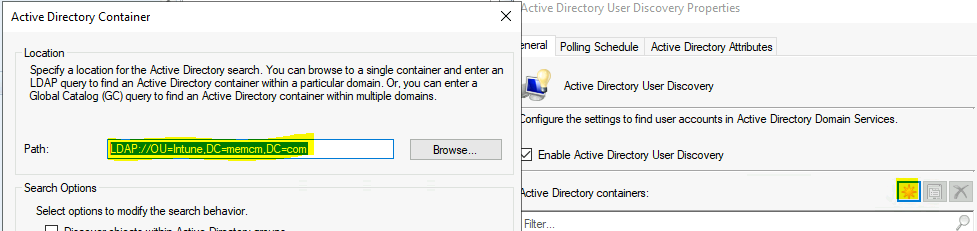
Click on BROWSE from Active Directory Container. Select the OU from where you want to discover the computer.
Select Intune OU and Click OK to discover all users in the Active directory for my test lab.
LDAP://OU=Intune,DC=memcm,DC=com
You can now exclude OUs from ConfigMgr Active Directory User Discovery. To exclude an OU:
In the Active Directory Container dialog box, locate the search option Select sub-containers/sub-OU to be excluded from discovery.
Select Add to add an exclusion OU. Select OK to save the Active Directory container configuration.
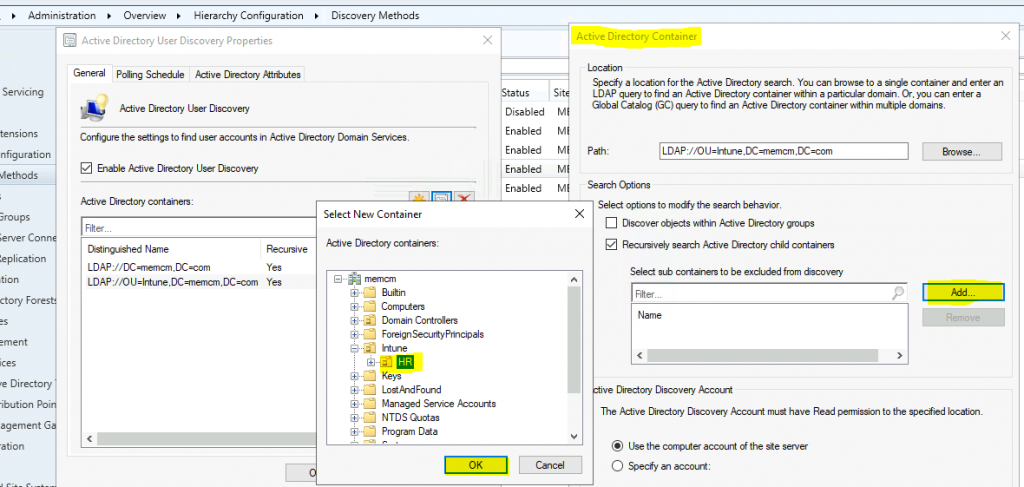
Click OK on the Active Directory container. Click OK again to complete.
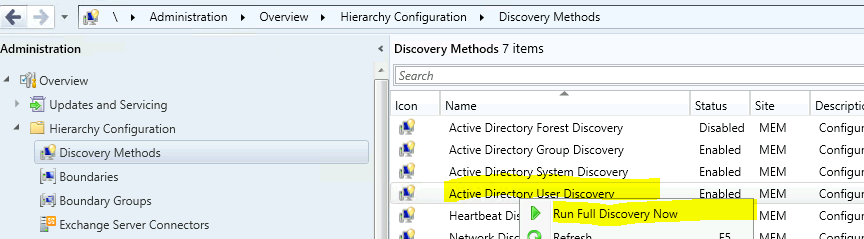
Right-Click on Active Discovery User Discovery. Select Run Full Discovery Now.
- How to Configure SCCM Active Directory System Discovery
- SCCM Collection based on Active Directory OU | The Easy Way
- SCCM Query All Active Directory Security Groups Dynamic Collection
Confirmation | Verification – How to Configure SCCM Active Directory User Discovery
Let’s check the SCCM log file adusrdis.log to confirm whether configuring Active directory user discovery works fine.
Some of the important steps are noted in the log file snippet below:
- SMS_EXECUTIVE started SMS_AD_USER_DISCOVERY_AGENT as thread ID 82860 (0x143AC).
- Connecting to site server’s (\CMMEMCM.memcm.com) registry
- !!!!Valid Search Scope Name: LDAP://OU=Intune,DC=memcm,DC=com Search Path: LDAP://OU=INTUNE,DC=MEMCM,DC=COM IsValidPath: TRUE
- Starting the data discovery.
- INFO: Processing search path: ‘LDAP://OU=INTUNE,DC=MEMCM,DC=COM’.
- INFO: Succeed to cached binding for LDAP://ADMEMCM.memcm.com/RootDSE
- INFO: search filter = ‘(&(objectClass=user)(objectCategory=person))’
- INFO: ads path = ‘LDAP://ADMEMCM.memcm.com/OU=INTUNE,DC=MEMCM,DC=COM’
- INFO: discovered object with ADsPath = ‘LDAP://ADMEMCM.MEMCM.COM/CN=HR User 1,OU=HR,OU=Intune,DC=memcm,DC=com’
- WARN: Discovered object is in excluded AD container. Skip.
- INFO: discovered object with ADsPath = ‘LDAP://ADMEMCM.MEMCM.COM/CN=Intune User 1,OU=Intune,DC=memcm,DC=com’
- Message processing engine client for SMS_AD_USER_DISCOVERY_AGENT created.
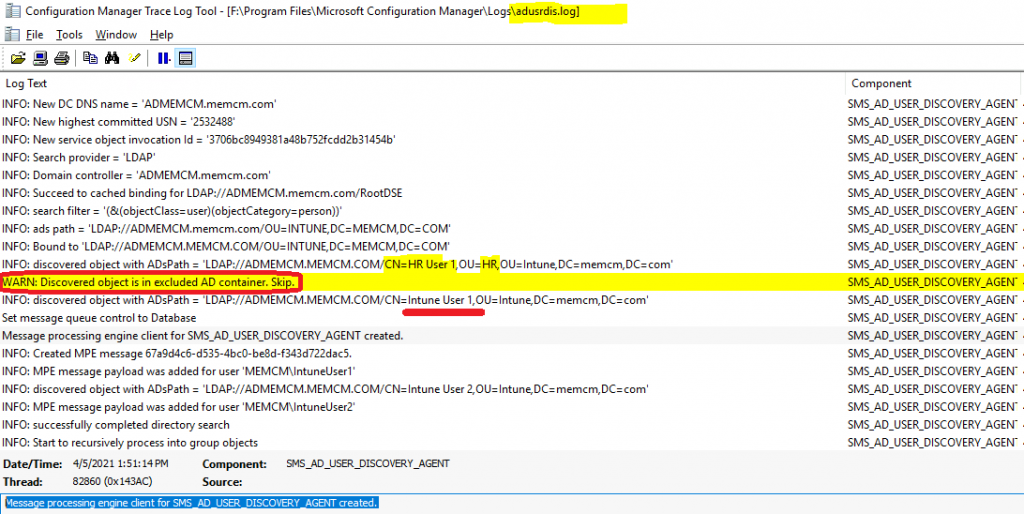
Bug? How to Configure SCCM Active Directory User Discovery OU Exclusion
I have seen that users from HR OU are getting discovered even after exclusion is set up in the configuration. Have you also seen this issue before? Share your experience in the comments section below.
Resources
- Install a New SCCM New ConfigMgr Primary Server
- How To Configure Active Directory System Discovery | SCCM|ConfigMgr HTMD Blog (anoopcnair.com)
We are on WhatsApp. To get the latest step-by-step guides and news updates, Join our Channel. Click here –HTMD WhatsApp.
Author
Anoop C Nair has been Microsoft MVP for 10 consecutive years from 2015 onwards. He is a Workplace Solution Architect with more than 22+ years of experience in Workplace technologies. He is a Blogger, Speaker, and Local User Group Community leader. His primary focus is on Device Management technologies like SCCM and Intune. He writes about technologies like Intune, SCCM, Windows, Cloud PC, Windows, Entra, Microsoft Security, Career, etc.




Is there a way to use LDAPS for the AD discovery methods? I tried updating the LDAP string to LDAPS ending in 636 but I just get an error that Config Manager doesn’t like the syntax. I am using an account to connect and again it works fine using LDAP but it would be better to use LDAPS.