






Fix SCCM HP Client Updates Catalog Trust Failed Issue | ConfigMgr
Let’s have a quick look at the fix for the trust failed Issue with the SCCM HP Client Updates Catalog. This post is applicable if you have already enabled the third-party software update patching from Configuration Manager (a.k.a SCCM).
You can also go through the back-end process details of 3rd party Software update via log file to better understand the troubleshooting process.
The Microsoft out-of-the-box solution includes only three partner catalogs by default: Dell, Lenovo, and HP.
I have also produced a list of free vendor catalogs available for the SCCM community in the following post, Free SCCM Catalogs. You can also purchase third-party patching vendors to automate the patching process end-to-end.

Issue?
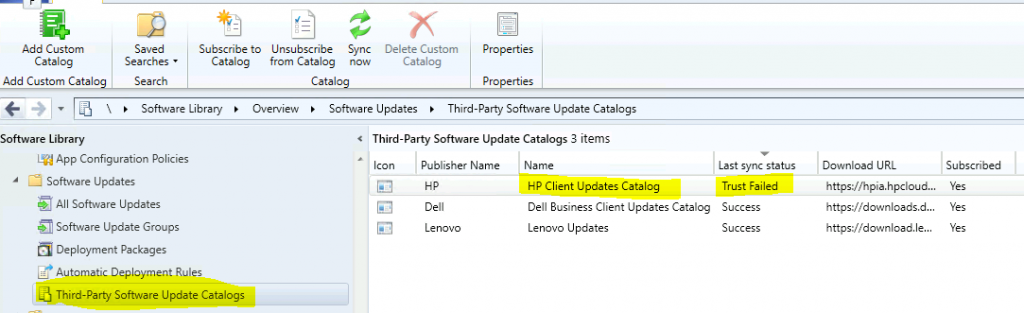
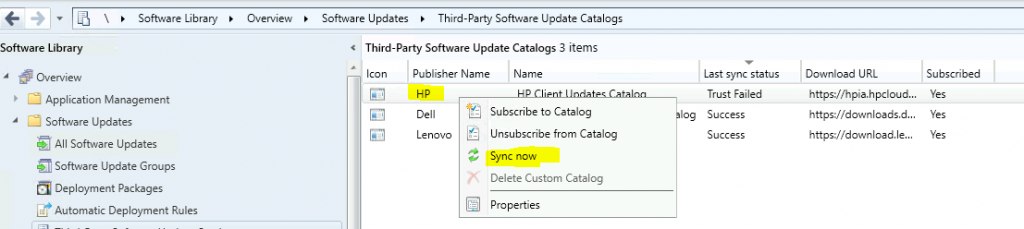
I have noticed a Last Sync status as Trust failed for the HP client update catalog. Where can you find this error?
- Launch Admin Console for SCCM
- Navigate \Software Library\Overview\Software Updates\Third-Party Software Update Catalogs.
- Select the Last Sync Status column to get details about the third-party catalog failure caused by the Trust Failed error.
Troubleshoot via Logs
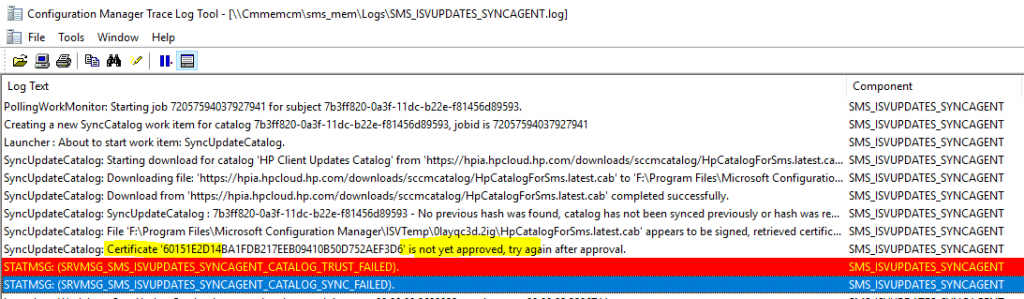
Check the SMS_ISVUPDATES_SYNCAGENT.log for more details about the trust failed error with the HP catalog. After reviewing the logs, it seems that HP updated the certificate, which is not approved in the Configuration Manager.
The following is the SMS_ISVUPDATES_SYNCAGENT.log snippet to get the details about the SCCM third-party catalogue sync flow.
- Launcher: About to start work item: SyncUpdateCatalog.
- SyncUpdateCatalog: Starting download for catalog ‘HP Client Updates Catalog’ from ‘https://hpia.hpcloud.hp.com/downloads/sccmcatalog/HpCatalogForSms.latest.cab’ …
- SyncUpdateCatalog: Downloading file: ‘https://hpia.hpcloud.hp.com/downloads/sccmcatalog/HpCatalogForSms.latest.cab’ to ‘F:\Program Files\Microsoft Configuration Manager\ISVTemp\0layqc3d.2ig\HpCatalogForSms.latest.cab’.
- SyncUpdateCatalog: Download from ‘https://hpia.hpcloud.hp.com/downloads/sccmcatalog/HpCatalogForSms.latest.cab‘ and complete it successfully.
- SyncUpdateCatalog: SyncUpdateCatalog : 7b3ff820-0a3f11dc-b22e-f81456d89593 – No previous hash was found, catalog has not been synced previously or hash was reset.
NOTE! The following lines in the log file give you an error about certificates. These log entries also give us details about fixing the issue.
- SyncUpdateCatalog: File ‘F:\Program Files\Microsoft Configuration Manager\ISVTemp\0layqc3d.2ig\HpCatalogForSms.latest.cab’ appears to be signed, retrieved certificate, checking signature…
- SyncUpdateCatalog: Certificate ‘60151E2D147EEB09410B50D752AD6’ is not yet approved. Try again after approval.
- STATMSG: (SRVMSG_SMS_ISVUPDATES_SYNCAGENT_CATALOG_TRUST_FAILED).
- STATMSG: (SRVMSG_SMS_ISVUPDATES_SYNCAGENT_CATALOG_SYNC_FAILED).
You can check the log called SMS_ISVUPDATES_SYNCAGENT.log from SCCM primary server installation folder called F:\Program Files\Microsoft Configuration Manager\Logs.
Fix – SCCM HP Client Updates Catalog Trust Failed
Now, let’s get into the resolution for the SCCM HP Client Updates Catalog Trust Failed issue. I have seen this issue for other partner catalogs in the SCCM world and fixed those issues with a similar solution. You can get more details about those issues and fixes in the following blog post.
- Launch the SCCM admin console.
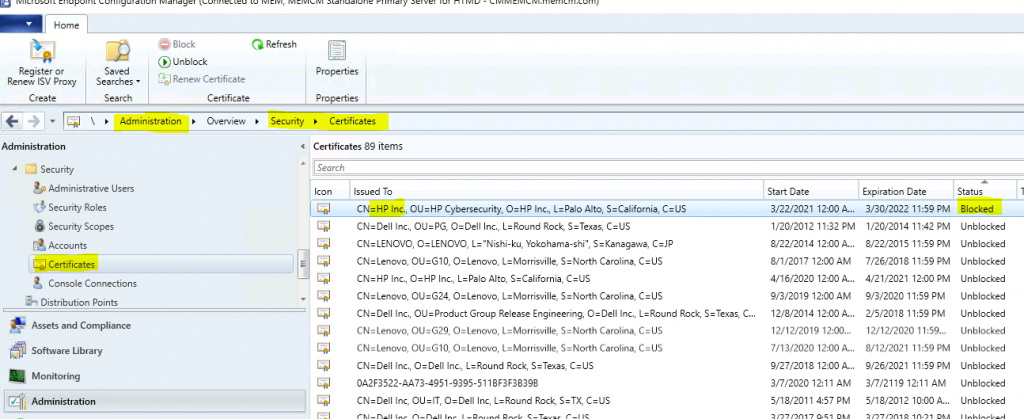
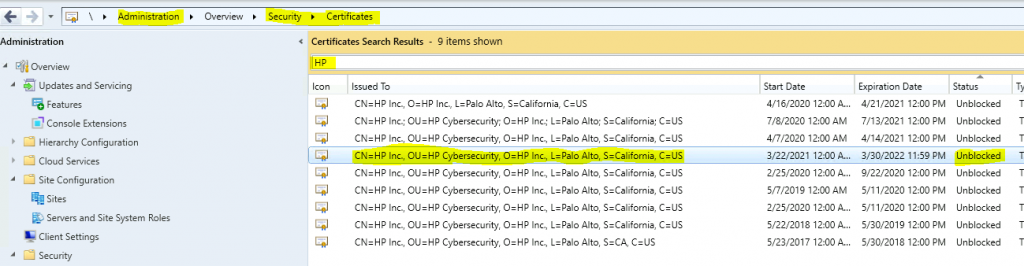
- Navigate to \Administration\Overview\Security\Certificates.
- Sort the with the Status column.
- Find out the Blocked certificates.
I can see the following HP certificate is blocked:
- CN = HP Inc.
- OU = HP Cybersecurity
- O = HP Inc.
- L = Palo Alto
- S = California
- C = US
Now, let’s unblock the HP client update catalog certificate to fix the HP third-party software update patching issue.
- Right-click on the HP update catalog certificate and click on the unblock option.
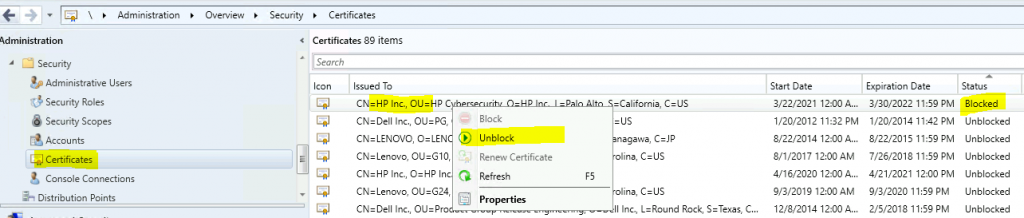
You can see the HP certificate is unblocked now.
Results
You can go back to the Third-Party Software Update node to confirm whether the sync is getting successful or not. You can check the results of the Fix SCCM HP Client Updates Catalog Trust Failed Issue.
- Navigate to \Software Library\Overview\Software Updates\Third-Party Software Update Catalogs
- Click on the HP partner Catalog and select the Sync Now option.
NOTE! – You can review the sync catalog process by checking the SMS_ISVUpdates_SyncAgent component in th component status node of the monitoring workspace. Are you sure that you want to sync this catalog? Click on Yes.
Now, let’s check the SMS_ISVUPDATES_SYNCAGENT.log file to get more details about update sync details.
- SyncUpdateCatalog: 7b3ff820-0a3f-11dc-b22e-f81456d89593 – No previous hash was found, catalog has not been synced previously or hash was reset.
- SyncUpdateCatalog: File ‘F:\Program Files\Microsoft Configuration Manager\ISVTemp\24ucmo2n.2f3\HpCatalogForSms.latest.cab’ appears to be signed, retrieved certificate, checking the signature
- SyncUpdateCatalog: Catalog files were decompressed in directory ‘F:\Program Files\Microsoft Configuration Manager\ISVTemp\0gsibmox.tjk’
- SyncUpdateCatalog: Synchronizing an indexed catalog, the index will be used during processing, and the catalog may include certificate information.
- SyncUpdateCatalog: Catalog includes categorized updates.
- SyncUpdateCatalog: Completed parsing of catalog ‘HP Client Updates Catalog’
- SyncUpdateCatalog: Checking for any new catalog certificates…
NOTE! The following log entries clearly indicate that everything is GREEN after unblocking the HP certificates.
- SyncUpdateCatalog: Updating category configuration data. There are 385 categories in the catalog.
- SyncUpdateCatalog: The new category ‘HP ProBook 445 G8 Notebook PC’ specifies a parent category with id ’27ad3850-70cd-4de6-8c77-eb89b75ea496′. However, the specified parent category has direct member updates.
- STATMSG: (SRVMSG_SMS_ISVUPDATES_SYNCAGENT_CATALOG_SYNCED).
- SyncUpdateCatalog: SyncUpdateCatalog : 7b3ff820-0a3f-11dc-b22e-f81456d89593 – Completed.
Now, you can return to the console and confirm whether the HP catalog sync was completed successfully.
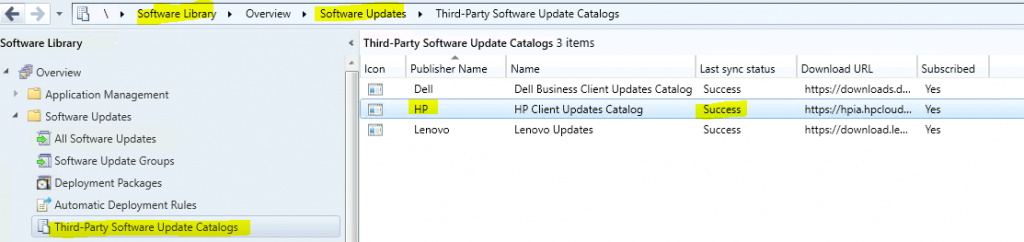
You can continue to deploy the third-party software updates related to HP laptops and desktops using the newly synced catalog. You can follow the SCCM Third-Party Software Updates Setup Step-By-Step Guide 1 (anoopcnair.com) deployment process.
Resources
- SCCM Third-Party Software Updates Setup Step-by-Step Guide Post Video Guide
- Free SCCM Catalog List – SCCM Third-Party Updates Post 2
- How to Install, Configure and Integrate with SCUP 2017 with SCCM
- How to Publish 3rd Party Abode Acrobat Patches via SCCM SCUP 2017
We are on WhatsApp. To get the latest step-by-step guides and news updates, Join our Channel. Click here –HTMD WhatsApp.
Author
Anoop C Nair has been Microsoft MVP for 10 consecutive years from 2015 onwards. He is a Workplace Solution Architect with more than 22+ years of experience in Workplace technologies. He is a Blogger, Speaker, and Local User Group Community leader. His primary focus is on Device Management technologies like SCCM and Intune. He writes about technologies like Intune, SCCM, Windows, Cloud PC, Windows, Entra, Microsoft Security, Career, etc.




Discussion