






SCCM Application Deployment Options | ConfigMgr | Endpoint Manager
In this post, you will learn about the available Application deployment options in SCCM. Application deployment has two options for selecting the deployment when a client uses a distribution point from the neighbour or the default site boundary group.
In SCCM Application deployment options, you can specify if clients should download the application when using a distribution point from a neighbor or the default site boundary groups.
You might also experience this if the client is stuck downloading an application or fails to download the application content.
In the section below, you will learn how to validate or change the deployment options when you experience application download failures.

Table of Contents
Applications Deployment Options
The content tab for an application offers two deployment options. Let’s check them out.
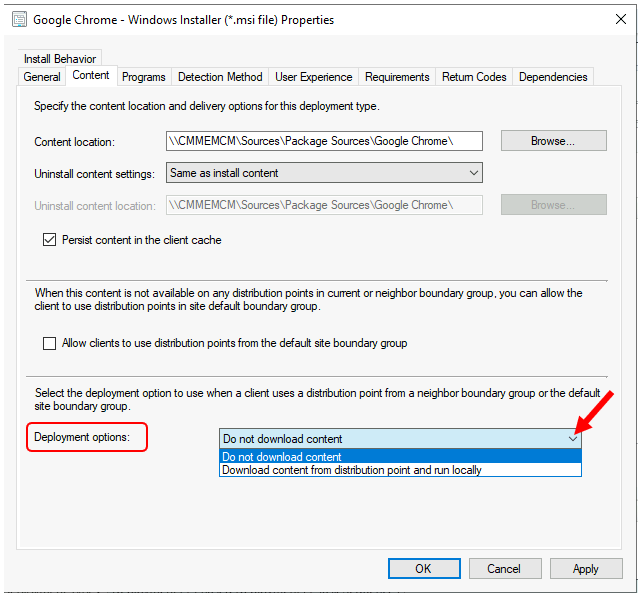
- Do not Download Content – Select this option to do not download content when an application runs (Default)
- Download Content from Distribution Point and Run Locally—Specify that clients download the application content from the distribution point and run it locally when they use a distribution point from a neighbor or the default site boundary groups.
- Create SCCM Application Deployment using PowerShell
- FIX SCCM Application Deployment Error 0x80110449 -2146368439
- Easy Steps Software Center Icon for SCCM Application Deployment | ConfigMgr | Endpoint Manager
Modify Existing Application Deployment Options
To change the deployment options for the existing application, Follow the below steps –
Go to the Software Library workspace in the Configuration Manager console, expand Application Management, and select Applications.
Select an existing application and select the Deployment Types tab. Right-click on the existing deployment type and select Properties.
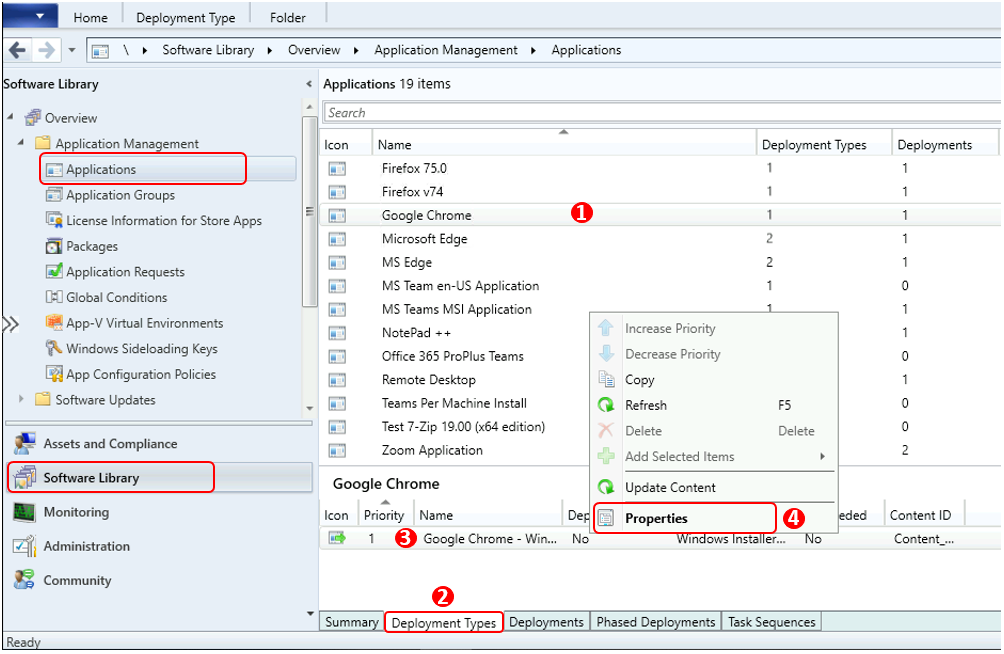
- Switch to the Content tab, Under Deployment options, you can specify if clients should download the application when using a distribution point from a neighbor or the default site boundary groups.
- By default, this setting is Do not download content.
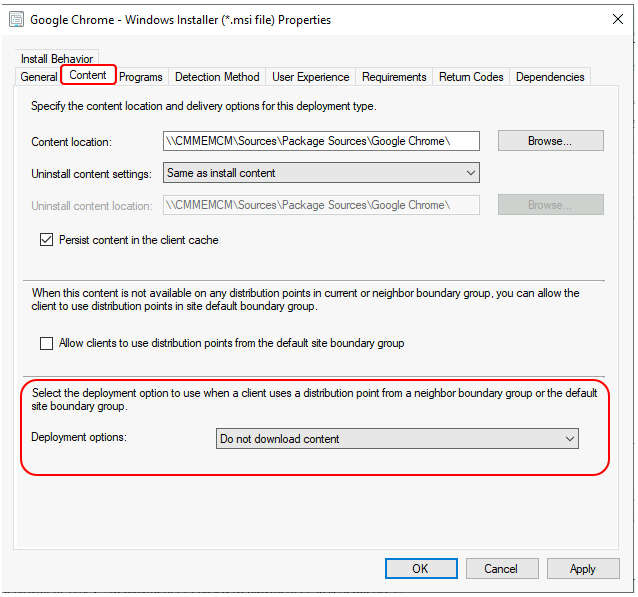
When you view the properties of a deployment type, the following options appear on the Content tab –
- Allow clients to use distribution points from the default site boundary group: Specify if clients should download and install the software from a distribution point in the site default boundary group when the content isn’t available from a distribution point in the current or neighbor boundary groups.
- Deployment options – You can change the Deployment options. Click Apply and Ok to apply the changes.
Additional Tips – If the client is stuck downloading an application or fails to download the application content, Ensure it’s distributed to a distribution point.
If you can’t configure a boundary for a client, or if a specific boundary group can’t be a member of another boundary group, change the Deployment options to Download content from the distribution point and run locally. Hopefully, this will help you resolve the Application download failure issues.
Resources
- Create applications in Configuration Manager
- SCCM Application Supported Deployment Types | ConfigMgr | Endpoint Manager
We are on WhatsApp. To get the latest step-by-step guides and news updates, Join our Channel. Click here –HTMD WhatsApp.
Author
Anoop C Nair has been Microsoft MVP for 10 consecutive years from 2015 onwards. He is a Workplace Solution Architect with more than 22+ years of experience in Workplace technologies. He is a Blogger, Speaker, and Local User Group Community leader. His primary focus is on Device Management technologies like SCCM and Intune. He writes about technologies like Intune, SCCM, Windows, Cloud PC, Windows, Entra, Microsoft Security, Career, etc.




Discussion