






New SCCM 2103 Hotfix Rollup Update KB10036164 | List of Fixes for Configuration Manager 2103 | ConfigMgr
Microsoft released SCCM 2103 Hotfix Rollup Update KB10036164. The Configuration Manager production version of 2103 is generally available.
Let’s understand the fixes already issued with the rollup hotfix for the 2103 version. You can check out our 2103 upgrade guide.
The Fixes for the Configuration Manager 2103 list are available in the table format below. I hope this helps. I have a post where I tried to list all the known issues (official and unofficial) of the 2103 version of MEM (Microsoft Endpoint Manager).
You can get more details about the new Top 5 New Features available in SCCM 2103 | ConfigMgr. The SCCM 2103 hotfix rollup KB10036164 is available for both opt-in and globally available versions of 2103.

There are 14 documented fixes available with this rollup hotfix.
Table of Contents
List of Fixes SCCM 2103 Hotfix Rollup Update KB10036164
The following table helps to give an easy understanding of the 2103 known issues fixed with the release of ConfigMgr 2103 hotfix update rollup. My recommendation is to install this update rollup hotfix as soon as possible.
| Issues | Components | Error Code/Details | Log File |
|---|---|---|---|
| Deployment of an operating system image may fail | Imaging | 80004005 | smsts.log |
| Applications don’t upgrade as expected | Application | App2 doesn’t automatically replace App1 | |
| The Install-Package task sequence step repeats indefinitely | Task Sequence | Pending reboot exit code of 3010 | |
| The Import-CMQuery PowerShell cmdlet fails with a MOF compilation error after updating SCCM version 2103. | MOF Error | PowerShell cmdlet fails | |
| Selecting the Task Sequences node after selecting the References tab in deployment details causes the console to terminate unexpectedly. | Task Sequence | Console to terminate unexpectedly | |
| Content for Microsoft updates fails to download if an Alternate Content Provider (ACP) | Content Transfer | 0x80004004 | ctm.log |
| Client installation from a cloud management gateway (CMG) fails | CMG | WinHttpQueryHeaders: 405 | ccmsetup.log |
| Deploying an operating system using boot media over a cloud management gateway may fail if the management point is configured for Internet-only communication. | Software Center | 0x87d00215 | cidownloader.log & cistore.log |
| Task sequences that run with the Run as high-performance power plan | Task Sequence | Not reverting back to the previously defined power plan. | |
| If a required scheduled task sequence attempts to run during an in-place upgrade and the client is in provisioning mode, the scheduled task sequence and the upgrade fail. | Task Sequence | 0x80070002 | smsts.log |
| The Apply Operating System task fails if you set the option Logical drive letter stored in a variable under the Destination field to the variable _OSDDetectedWinDrive. | Task Sequence | Error: 80070057 | smsts.log |
| The deployment of an operating system using boot media over a cloud management gateway may fail if the management point is configured for Internet-only communication. | Task Sequence | HRESULT=80004005 | TSMBootstrap.log |
| The SMS Executive Service (smsexec.exe) terminates unexpectedly | SMS Executive Issue | smsexec.exe – terminates unexpectedly – request timeout | |
| A task sequence may fail to complete if the content location lookup returns 0x8000000a (E_PENDING) | Task Sequence | 0x8000000a (E_PENDING) – exit code 0x00000000 | CcmMessaging.log and smsts.log |
Superseded Updates
Hotfixes are included in this update with the new SCCM 2103 hotfix KB10036164.
- KB 9603111 Update for Microsoft Endpoint Manager (MEM) ConfigMgr version 2103, early update ring.
- KB 9833643 Console update for Microsoft Endpoint Manager (MEM) ConfigMgr version 2103.
Install Hotfix Rollup Update KB10036164
Let’s understand how to update Configuration Manager (MEM ConfigMgr) 2103 update rollup KB10036164 on a standalone primary server or CAS server. The child primary servers shall get automatically updated.
- Launch the Configuration Manager Console.
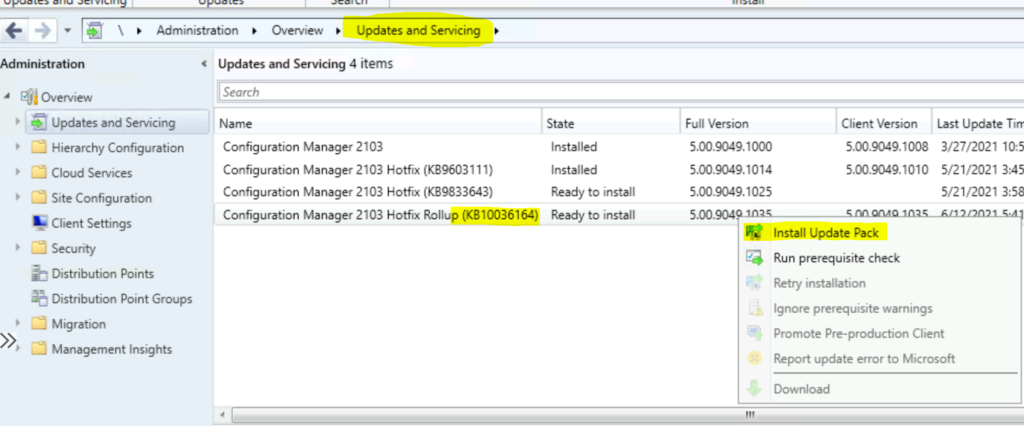
- Select the Administration tab.
- Expand Overview -> Select Updates and Services.
- The update Configuration Manager 2103 Hotfix Rollup KB10036164 is Ready to install stage.
- Click on Install Update Pack.
NOTE! – If there is any download issue with KB10036164, refer to the following article that might help to fix the issue with download CM Update Reset Tool Fixes SCCM CB Update Download Issue.
- Click Next.
- Select Client Update Settings. More details about the pre-prod client testing option are given in the following post – SCCM Client Upgrade – Promote Pre-Production Client To Production
- I selected this option for LAB Upgrade without validating
- Validate in pre-production collection
- Click on Next.
- Accept the license and click on Next to continue.
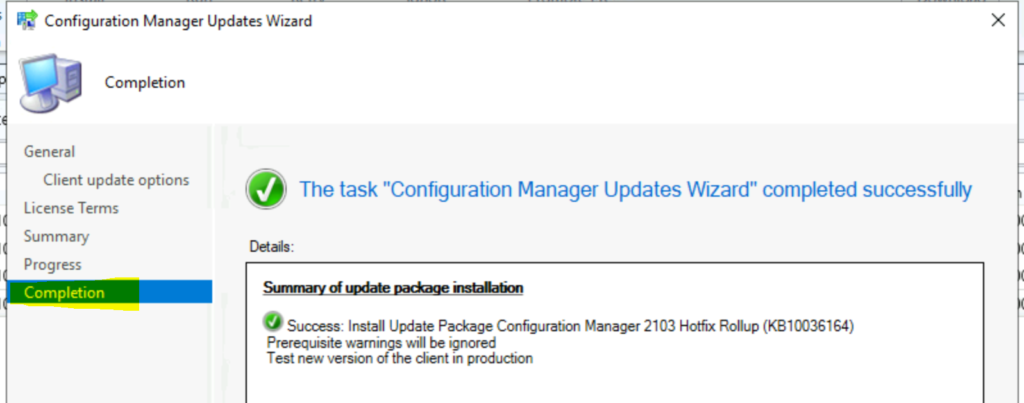
- Check the Summary of the updated package installation
- Click on Close to complete Configuration Manager Updates Wizard.
Secondary Server Rollup Update
The steps below are for installing the Hotfix rollup update on Configuration Manager (a.k.a SCCM) secondary servers.
The following blog posts provide more details about the secondary server installation, troubleshooting, and update installation. The installation of the secondary site is not automatic; rather, you should initiate a secondary server update from the console.
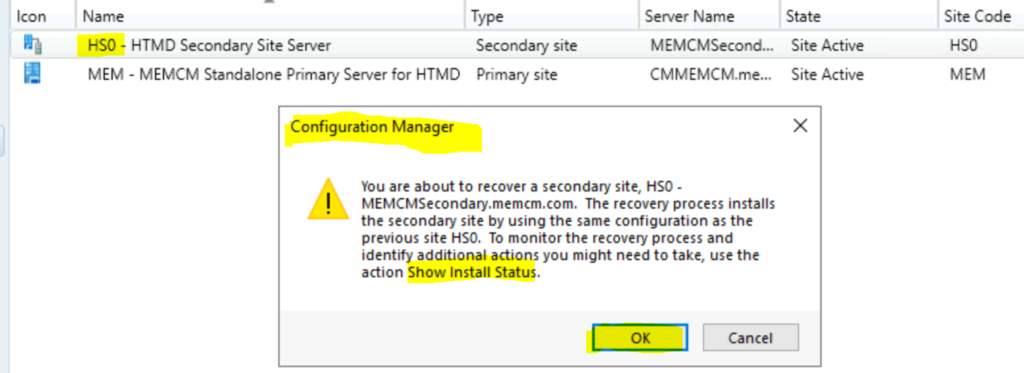
- To update a secondary site in the ConfigMgr console.
- Click Administration, Site Configuration, Sites, and Recover Secondary Site.
- Then, select the secondary site you want to upgrade.
- The primary site then reinstalls that secondary site by using the updated files.
- SCCM Secondary Server Hotfix Installation Guide | ConfigMgr
- Check SCCM Secondary Server Hotfix Installation Status
- SCCM Secondary Server Installation Guide | Step by Step | ConfigMgr
Verification of Successful Installation of KB10036164
Following are the verification steps for SCCM 2103 Hotfix Rollup KB10036164 Hotfix Rollup Update.
- Check the monitoring workspace
- \Monitoring\Overview\Updates and Servicing Status\Configuration Manager 2103 Hotfix Rollup (KB10036164)
KB10036164 – SCCM 2103 Version Details
Let’s find out the SCCM 2103 version details below. This is useful for troubleshooting KB10036164 hotfix rollup client-side updates.
- Full Version = 5.00.9049.1035
- Client Version = 5.00.9049.1035
- Console – 5.2103.1059.3100
- Site Version 5.00.9049.1000
- Build Number = 9049
We are on WhatsApp. To get the latest step-by-step guides and news updates, Join our Channel. Click here –HTMD WhatsApp.
Author
Anoop C Nair has been Microsoft MVP for 10 consecutive years from 2015 onwards. He is a Workplace Solution Architect with more than 22+ years of experience in Workplace technologies. He is a Blogger, Speaker, and Local User Group Community leader. His primary focus is on Device Management technologies like SCCM and Intune. He writes about technologies like Intune, SCCM, Windows, Cloud PC, Windows, Entra, Microsoft Security, Career, etc.




A lot of us are now Cloud attached which presents different options during the CM Updates Wizard so you might want to consider setting that up to make your guides relative to current scenarios.