






SCCM Audit Reports Who Initiated CMPivot Query | ConfigMgr
Let’s check Who Initiated CMPivot Query. CMPivot is a real-time reporting tool available for SCCM admins. Microsoft introduced CMPivot with ConfigMgr version 1806.
CM Pivot is a powerful feature embedded within SCCM that empowers administrators to execute real-time queries on devices, offering immediate insights into various aspects of the managed environment.
The CMPivot is a new in-console (stand-alone tool also available) utility that now provides access to the real-time state of Windows 10 devices using the fast channel mechanism. The CMPivot helps to run a query (Kusto Query) on all currently connected devices in the target collection and returns the results.
More details about six status message queries are listed under the Administrative Security category. I have uploaded a YouTube video here to explain the audit reporting process.

- SCCM CMPivot Architecture and Sample Queries
- Get the Installed Applications list using SCCM CMPivot Query
- CMPivot Query for SCCM BitLocker Management Event Logs
- Use SCCM CMPivot to Perform Security Audits Create a New Local User Account | Tried to Reset Password
- Dot Net Version Details using SCCM CMPivot Query
| Index |
|---|
| Who Initiated CMPivot Query? |
| Status Message Query |
| Results |
Who Initiated CMPivot Query?
CMPivot empowers you to swiftly evaluate the status of devices in your environment and take necessary actions. Upon entering a query, CMPivot will conduct a real-time query on all currently connected devices within the specified collection.
It’s important to track who initiated the CMPivot Query.
- Open the SQL Management Studio.
- Click on the New Query button.
- Select the CM_MEM database from the drop-down menu.
- MEM is the ConfigMgr site code.
- Copy the following SQL query to find the Legacy version of Edge.
- Click on the Execute button.
select * from vStatusMessagesWithStrings where MessageID = '40805'Let’s find the results of the query.
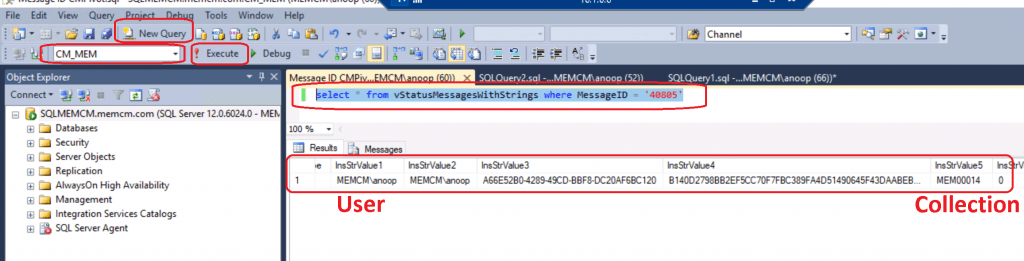
Status Message Query
Utilize this node to execute status message queries for specific events and their associated details. These status message queries are valuable for identifying when a particular component, operation, or Configuration Manager object and the corresponding user account were modified. For instance, you can use the built-in query for Collections Created, Modified, or Deleted to track when a specific collection was created and by whom.
Let’s check the status message query!
- Launch ConfigMgr Console
- Navigate to Monitoring > System Status > Status Message Queries.
- You can run All Audit status Messages for a Specific User, All Audit status Messages for a Specific Site, or create your own status message query.
MessageId 40805: User <UserName> ran script Script-Guid with hash Script-Hash on collection Collection-IDResults – Who Initiated CMPivot Query?
| MachineID | MachineName | ModuleName | Win32Error | Time | SiteCode | TopLevelSiteCode | Component | ProcessID | ThreadID | Severity | MessageID | ReportFunction | SuccessfulTransaction | PartOfTransaction | PerClient | MessageType | InsStrValue1 | InsStrValue2 | InsStrValue3 | InsStrValue4 | InsStrValue5 | InsStrValue6 | InsStrValue7 | InsStrValue8 | InsStrValue9 | InsStrValue10 |
| NULL | CMMEMCM.memcm.com | SMS Provider | 0 | 43:40.3 | MEM | Microsoft.ConfigurationManagement.exe | 4900 | 13036 | 1.07E+09 | 40805 | 0 | 0 | 0 | 0 | 768 | MEMCM\anoop | MEMCM\anoop | A66E52B0-4289-49CD-BBF8-DC20AF6BC120 | B140D2798BB2EF5CC70F7FBC389FA4D51490645F43DAABEBB6C19EEC9BF4A474 | MEM00014 | 0 | NULL | NULL | NULL | NULL |
Resources
- CMPivot for real-time data in Configuration Manager
- Creating custom report models for Configuration Manager in SQL Server Reporting Services.
We are on WhatsApp. To get the latest step-by-step guides and news updates, Join our Channel. Click here –HTMD WhatsApp.
Author
Anoop C Nair is Microsoft MVP! He is a Device Management Admin with more than 20 years of experience (calculation done in 2021) in IT. He is a Blogger, Speaker, and Local User Group HTMD Community leader. His primary focus is Device Management technologies like SCCM 2012, Current Branch, and Intune. He writes about ConfigMgr, Windows 11, Windows 10, Azure AD, Microsoft Intune, Windows 365, AVD, etc.




Discussion