






SCCM CB 1706 Hotfix KB 4039380 is not Applicable for All Configuration Manager
Let’s discuss the SCCM CB 1706 Hotfix KB 4039380, which is not Applicable for All Configuration Manager ConfigMgr MEMCM. The SCCM CB 1706 version was released on July 28th for early adopters. I have a video post that explains the SCCM CB 1706 in-place upgrade, “the secret behind the success of SCCM CB Updates and Servicing.”
The Microsoft SCCM team released a new hotfix for the SCCM/ConfigMgr 1706 version. However, SCCM CB 1706 hotfix KB 4039380 does NOT apply to all SCCM CB 1706 servers.
If you don’t see the new KB4039380 on your SCCM CB 1706 production console and your infrastructure doesn’t require this update, you are fine. The Microsoft SCCM team made this KB 4039380 available only for selected SCCM 1706 installations.
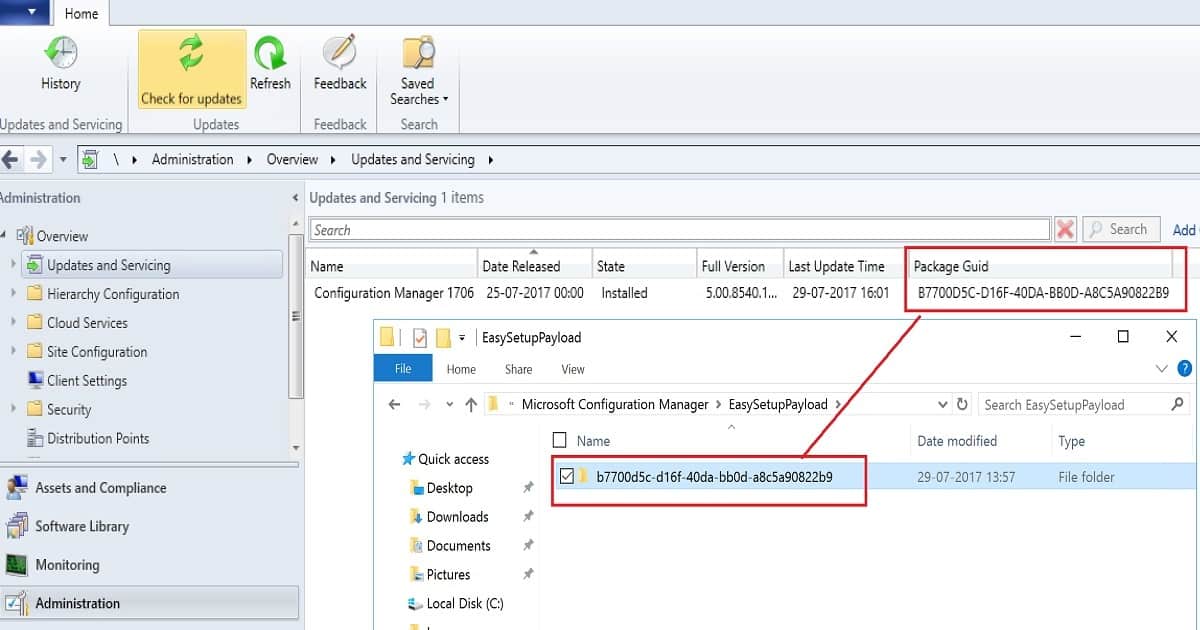
This Hotfix applies to SCCM 1706 sites that downloaded version 1706 between 8 August 2017 and 11 August 2017. We can check the Package GUID of the update available in the SCCM 1706 console under the updates and servicing node. You might need to add the Package GUID column to the details pane of the Updates and Servicing node in the SCCM CB console.

Table of Contents
- SCCM Versions Build Numbers Client Console Site
- What is Microsoft Intune Product Family
- End of Support Dates for SCCM CB Current Branch | ConfigMgr | SCCM End of Life
- SCCM Client Version Dashboard SQL Query Custom Report
- Free Intune Training 2024 for Device Management Admins
SCCM CB 1706 Hotfix KB 4039380 is not Applicable for All Configuration Manager
The hotfix applies only to SCCM CB 1706 downloads with the GUID # ABB97C8D-81E2-4D97-85CD-26FF3C561058 packages. The hotfix KB 4039380 won’t be visible on the SCCM CB 1706 console with packages with GUID # C88976EC-69E5-4B14-90CE-FF84B656CE86.
If we downloaded the original SCCM CB 1706 update before 8th August 2017 or after 11th August 2017, the Microsoft SCCM team would have a hotfix package for you in the coming weeks to bring you up to the latest build.
| Package Guid |
|---|
| B77005C-D16F-40DA-BB0D-ABC5A90822B9 |
SCCM 1706 Issues Fixed and Improvements with KB 4039380 Update
Discuss the SCCM 1706 Issues Fixed and Improvements with KB 4039380 Update. The list below helps you show the SCCM 1706 Issues Fixed and Improvements with KB 4039380 Update.
- Use the script to clean up Inboxes on CAS and Primary servers (Andre has the script)
- Applications may not install on clients because of a failure to download the required content.
- Client upgrades may be unsuccessful
- Client communication that’s directed through the client notification server channel fails.
- The SMS Site Component Manager service (sitecomp.exe) can stop unexpectedly after upgrading to Configuration Manager version 1706, first wave one.
- You cannot enable a PXE Service Point.
- IMPROVEMENTS – Multiple accessibility improvements are added to the Configuration Manager console
References
Refresh of Update 1706 for System Center Configuration Manager (Current Branch) –https://blogs.technet.microsoft.com/configurationmgr/2017/08/14/refresh-of-update-1706-for-system-center-configuration-manager-current-branch/
Update for System Center Configuration Manager version 1706, first wave – https://support.microsoft.com/en-us/help/4039380/update-for-system-center-configuration-manager-version-1706-first-wave
We are on WhatsApp now. To get the latest step-by-step guides, news, and updates, Join our Channel. Click here. HTMD WhatsApp.
Author
Anoop C Nair is Microsoft MVP! He is a Device Management Admin with more than 20 years of experience (calculation done in 2021) in IT. He is a Blogger, Speaker, and Local User Group HTMD Community leader. His main focus is on Device Management technologies like SCCM 2012, Current Branch, and Intune. He writes about ConfigMgr, Windows 11, Windows 10, Azure AD, Microsoft Intune, Windows 365, AVD, etc.




Discussion