






As part of this post, let’s check SCCM Co-Management Schema Workflow Scenarios – Architecture. Microsoft renamed the co-management node in the SCCM admin console to Cloud Attach.
Recently, Microsoft changed the definition of co-management to be more realistic. The latest definition is that it is one of the primary ways to attach your existing SCCM deployment to the Microsoft 365 cloud.
SCCM Cloud management gateway (CMG) is an Azure service (PAAS) for managing SCCM clients over the Internet. It is an SCCM Management point in the Cloud. SCCM CMG helps reduce SCCM infrastructure complexity and cost.
SCCM CMG also opens up different scenarios for modern device management. We will discuss these in this post and then cover configuration and troubleshooting in a later post.

Read More – Overview Windows 10 Windows 11 Co-Management With Intune And SCCM HTMD Blog (anoopcnair.com)
This is a series of posts as listed below:
- SCCM CMG Architecture and Different Scenarios – Part 1
- How to Configure CMG – Part 2
- CMG troubleshooting Tips – Part 3
SCCM CMG High-level Architecture and Workflow
In the video below, let’s check the high-level architecture schema of SCCM Cloud Management Gateway (SCCM CMG).
- Internet-connected SCCM client request for policy from Azure CMG cloud service.
- Azure CMG cloud service forwards the client communication to the on-premises CMG connection point. CMG cloud service gets the policy from On-premise MP and SUP through the SCCM CMG connection point role.
- CMG connection point role acts as a proxy and builds a 2-way communication channel between on-premise SCCM (MP & SUP) and Azure CMG cloud service.
- Finally, SCCM clients get policy and content from the Azure SCCM CMG cloud service.
Note: Starting SCCM 1806, CMG can act as DP as well.
Do you want to download the SCCM Architecture Visio Diagram? Check out SCCM Architecture Visio Template Download from GitHub Throwback. You can download the slides used in this post from Github.
SCCM CMG Co-Management Scenarios
- Co-management = Manage Windows 10 with Intune and SCCM.
- CMG = Manage SCCM client over internet.
SCCM CMG is required in some co-management scenarios but not in all. In some co-management scenarios, CMG will be optional.
Let us discuss some of the common co-management scenarios and the role of SCCM CMG. The best way to explain Co-Management is through “entry points.”
There are two types of co-management entry points.
- Entry point 1: On-premise domain-joined computers get into the cloud world.
- Entry point 2: Windows 10 from the OEM / or cloud world gets into on-premise
We can think about many scenarios with each entry point. However, this post will cover several scenarios from each Entry point.
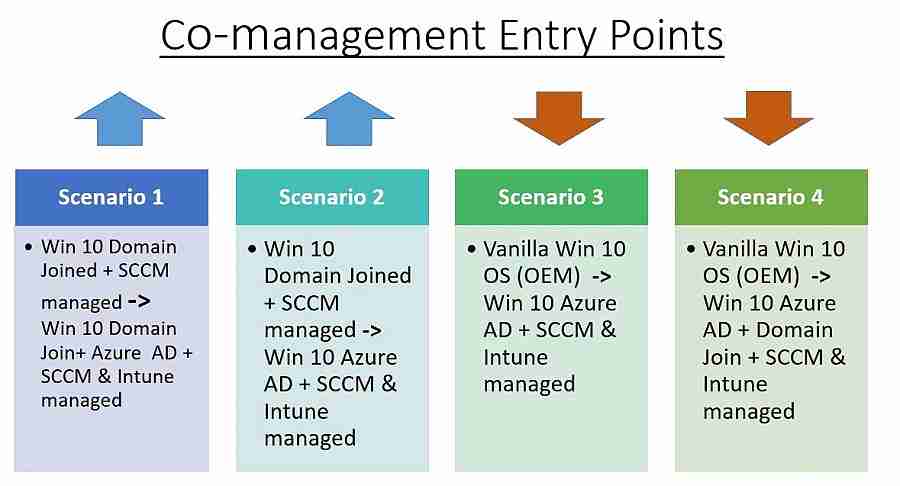
Entry point 1 – Scenario 1
- This is a common scenario for most customers. Initially, Windows 10 is Domain-Joined, and SCCM is managed only.
- Windows 10 is configured to Win 10 Hybrid Azure AD Join+ co-managed to avail of co-management benefits.
- Once the machine is co-managed, we can offload some of the on-premise workloads and use cloud solutions.
- In this scenario, CMG is optional. You require CMG only if you want to manage the SCCM agent over the Internet.
The below on-premise workloads can be offloaded to the cloud in this scenario.
- Software update (WSUS) – > WufB.
- GPO policies – > Intune Baseline policies.
- Security baseline – > Intune security baseline policies.
- SCCM software distribution – > Intune software distribution.
- SCCM Endpoint protection – > Intune Endpoint protection.
With SCCM 1906 production release, you have improved options to deploy specific workloads to different pilot collections.

Entry point 1 – Scenario 2
Initially, Windows 10 or Windows 11 was Domain-Joined and SCCM managed only. However, it is possible to use the SCCM task sequence to change the domain-joined computer managed by SCCM to an Autopilot computer.
The built-in task sequence is available starting SCCM Current Branch builds (1810).
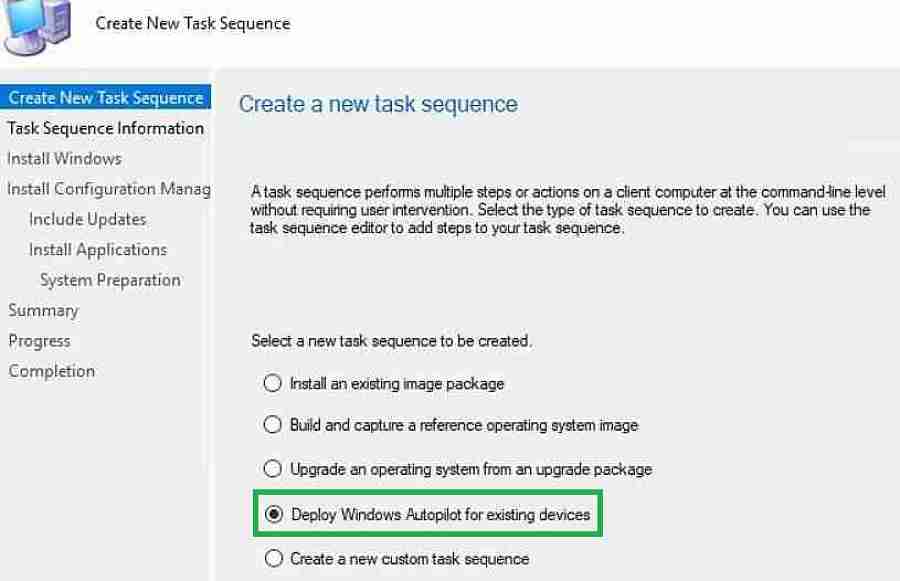
The SCCM task sequence will Wipe and deploy an offline autopilot profile as shown below. Offline autopilot profile can be exported in JSON file format. We will cover how to configure this Task sequence in detail later.
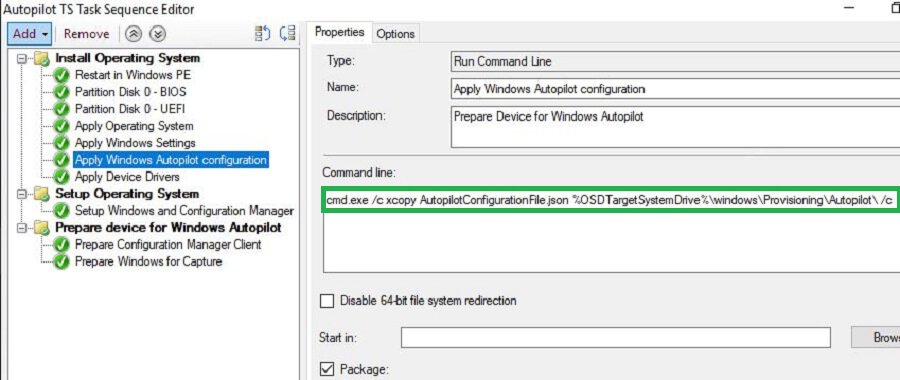
After offline autopilot profile deployment using the SCCM task sequence, the Win 10 computer becomes Azure AD Joined and Intune enrolled.
You can push the SCCM agent from Intune. To achieve this, SCCM CMG plays an essential role. Through CMG, the SCCM agent communicates with the on-premise SCCM server over the Internet.
Finally, the computer is no longer on-premise Domain AD joined. We cannot use on-premise AD for authentication and GPOs. Instead, Intune will manage the cloud GPO and security baseline settings.
In this scenario, the workloads below can be co-managed. Based on the requirements, we can decide who should do what.
- SCCM WSUS < —- > WufB
- SCCM software distribution < —- > Intune software distribution
- SCCM Endpoint protection < —- > Intune Endpoint protection
Entry point 2 – Scenario 3
- In this scenario, we initially provisioned the device as a Windows Autopilot computer.
- Next, the SCCM agent needs to deploy from Intune. SCCM agents will communicate with the SCCM server over CMG.
- Now Autopilot computer has become a co-managed state.
- SCCM CMG is not optional here but is required
Below are the typical workloads that can be co-managed. Based on the requirements, we can decide who should do what.
- SCCM WSUS < —- > WufB
- SCCM software distribution < —- > Intune software distribution
- SCCM configuration policy < —- > Intune configuration policy
- SCCM Endpoint protection – > Intune Endpoint protection
Entry point 2 – Scenario 4
This scenario can be referred to as “Hybrid Autopilot.” In this setup, the Windows 10 computer is Hybrid Azure AD joined. An Intune AD connector is required for this setup. I already covered how to configure “hybrid Autopilot” in my previous post.
To be Continued…
In my future posts, we will discuss deploying SCCM agents from Intune in a hybrid autopilot scenario. Intune will push the SCCM client and communicate with SCCM through CMG, which is required here.
In this post, we discussed four different co-management scenarios and the role of SCCM CMG in each of them.
You can download the slides used in this post from here, Github. In the next post, we will discuss configuring SCCM CMG and troubleshooting.
Resources
We are on WhatsApp. To get the latest step-by-step guides and news updates, Join our Channel. Click here –HTMD WhatsApp.
Author
Vimal has more than 10 years of experience in SCCM device management solution. His main focus is on Device Management technologies like Microsoft Intune, ConfigMgr (SCCM), OS Deployment,Patch Management. He writes about the technologies like SCCM, Windows 10, Microsoft Intune and MDT.




Discussion