






SCCM Hotfix is Not Visible in Console – Here is the Reason
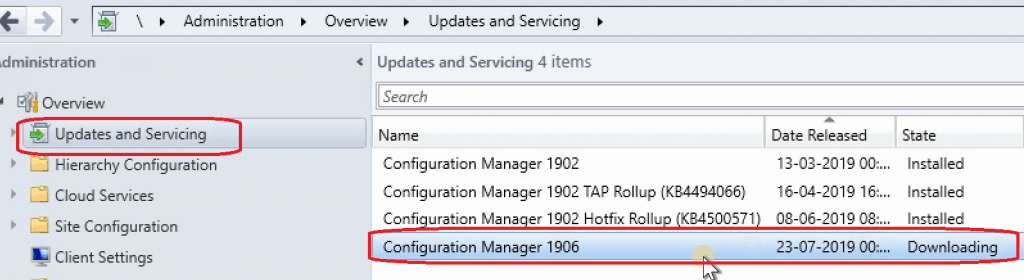
Are you wondering why that particular SCCM Hotfix is not Visible in the SCCM console? The availability of SCCM CB versions and Hotfixes in the SCCM console is based on the applicability of your environment, and Microsoft dynamically manages this.
I will cover the details about SCCM applicability checks and applicability SQL scripts available for each version and hotfixes of SCCM. Is an SCCM hotfix not available in the console? If so, this post will help you understand why.
Based on the results of the applicability scripts, SCCM will automatically decide whether to show SCCM versions (1902, 1906, etc.) in your console.
Are you curious why one of the hotfixes isn’t showing up in the SCCM console? This is due to the dynamic nature of SCCM applicability checks.

NOTE ! – If you want to know more about the SCCM 1906 new features & what’s new in SCCM 1906, you can refer to my other post, What is New in SCCM 1906 New Features a Walkthrough
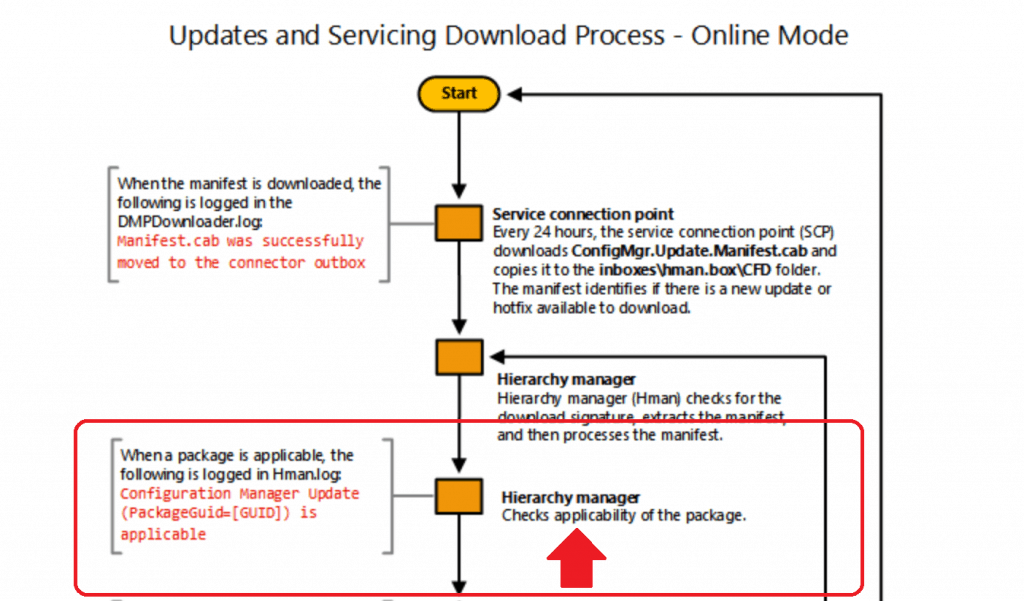
Hierarchy Manager & SCCM Applicability Checks
Which SCCM component is responsible for applicability checks? The hierarchy Manager checks the applicability of an update package.
What are SCCM Applicability Checks?
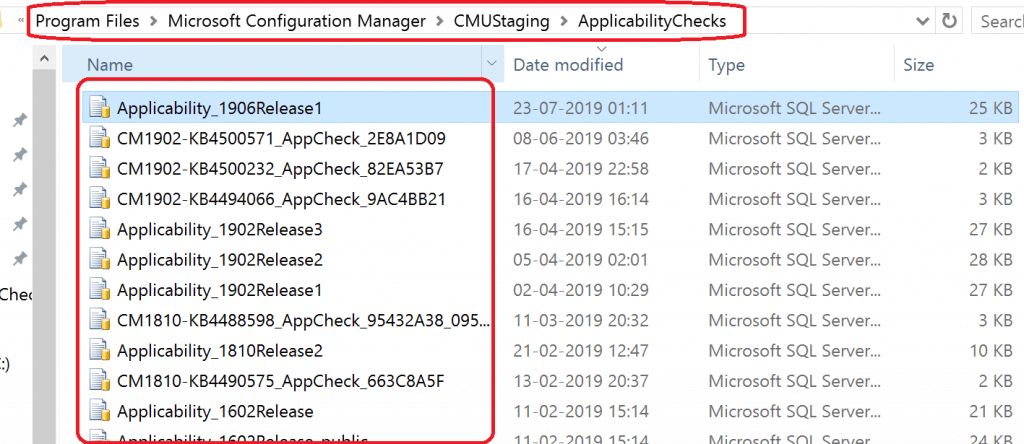
SCCM CB updates and hotfixes will be available only when all the applicable conditions are met. For each SCCM update and hotfix, there will be an applicability SQL script.
All those applicability SQL Scripts are stored in the folder “C:\Program Files\Microsoft Configuration Manager\CMUStaging\ApplicabilityChecks.”
Based on the criteria mentioned in the SQL Applicability rules, the SCCM CB updates will probably show up in the console.
I don’t have any confirmation (Microsoft documentation) on the above point, but this is just guesswork based on the analysis of the script. So, I could be 100% wrong.
APPLICABILITY_SUCCESS = 0x00050002, // 327682
APPLICABILITY_HIDE = 0x0005FFFD, // 393213
APPLICABILITY_NA = 0x0005FFFE, // 393214
APPLICABILITY_NOT_CB = 0x0005FFFC, // 393212
Major Versions – Why SCCM Hotfix is Not Visible in Console?
Let’s check the logic behind the Applicability SQL scripts for major version changes, such as SCCM 1902, 1906, etc.
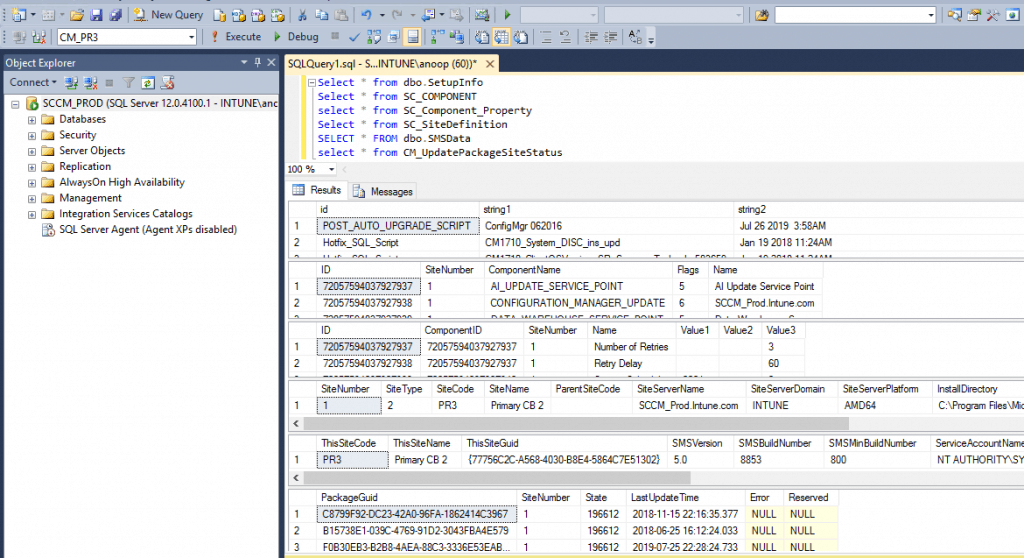
The applicability checks SQL scripts use the following tables to validate and confirm whether the update applies to an SCCM infra.
- Select * from dbo.SetupInfo
- Select * from SC_COMPONENT
- select * from SC_Component_Property
- Select * from SC_SiteDefinition
- SELECT * FROM dbo.SMSData
- select * from CM_UpdatePackageSiteStatus
Legacy Logic Behind SCCM Applicability Checks?
I think the SCCM applicability check logic for the SCCM CB upgrade (for example, upgrade from SCCM 1902 to SCCM 1906) is just simple, and it’s nothing but build numbers. For example:
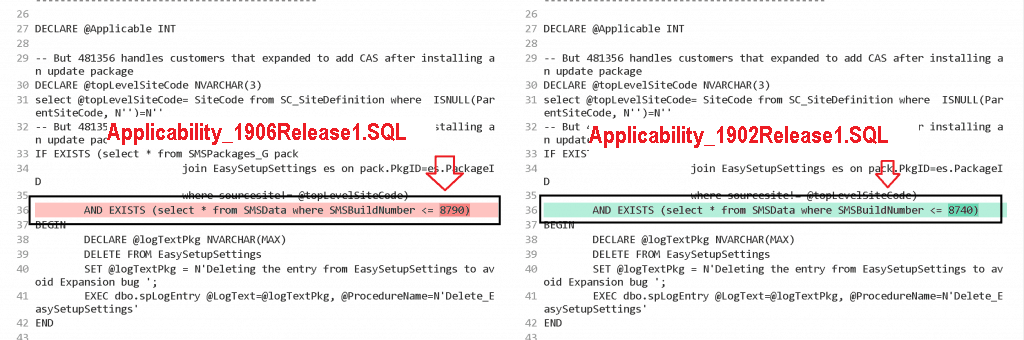
- 8790 = SCCM 1902
- 8740 = SCCM 1810
After comparing the two SCCM applicability SQL scripts for major version releases 1902 and 1906, I discovered that one of the logic is SMSBuildNumber.
NOTE: SMSBuildNumber validation is the old method of applicability check (it applies to 1610 and below). It’s been changed for good in the newer versions.
| 8790 (Build Number) | 8740 (Build Number) |
|---|---|
| Applicability_1906Release1.SQL -> AND EXISTS (select * from SMSData where SMSBuildNumber <= 8790) | Applicability_1902Release1.SQL-> AND EXISTS (select * from SMSData where SMSBuildNumber <= 8740) |
New Logic Applicability Checks
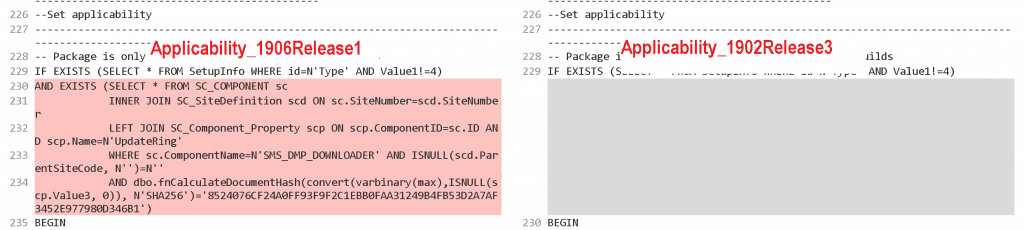
The new SCCM applicability logic seems more robust. One of the criteria I can see in the 1906 SQL Script is the SHA256 hash value. The following is the SQL condition used in the SCCM 1906 applicability script.
IF EXISTS (SELECT * FROM SetupInfo WHERE id=N'Type' AND Value1!=4)
 AND EXISTS (SELECT * FROM SC_COMPONENT sc
             INNER JOIN SC_SiteDefinition scd ON sc.SiteNumber=scd.SiteNumber
             LEFT JOIN SC_Component_Property scp ON scp.ComponentID=sc.ID AND scp.Name=N'UpdateRing'
             WHERE sc.ComponentName=N'SMS_DMP_DOWNLOADER' AND ISNULL(scd.ParentSiteCode, N'')=N''
             AND dbo.fnCalculateDocumentHash(convert(varbinary(max),ISNULL(scp.Value3, 0)), N'SHA256')='8524076CF24A0FF93F9F2C1EBB0FAA31249B4FB53D2A7AF3452E977980D346B1')
Applicability Checks for SCCM CB Hotfixes
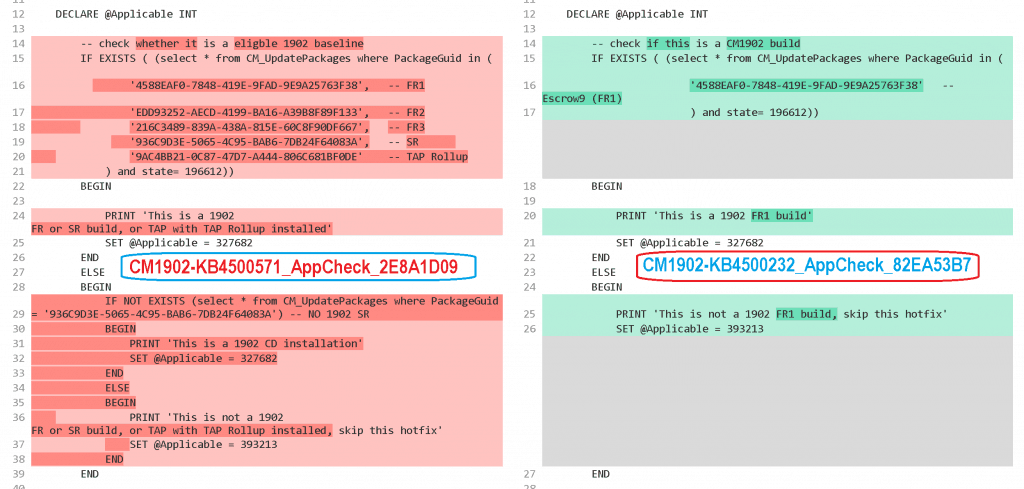
Another set of applicability SQL scripts handles the availability of SCCM CB hotfixes in the console. This Applicability SQL script logic is mainly based on the PackageGuid (from CM_UpdatePackages table) of the SCCM update version.
Sample Applicability SQL Script
The following is the sample SQL Applicability script used to confirm to make the SCCM 1902 hotfix KB4500571 visible in the SCCM console. As you can see, it’s based on the PackageGuid = ‘936C9D3E-5065-4C95-BAB6-7DB24F64083A’.
--
-- Applicability check
--
--
--  APPLICABILITY_SUCCESS       = 0x00050002,       // 327682
--  APPLICABILITY_HIDE          = 0x0005FFFD,       // 393213
--  APPLICABILITY_NA            = 0x0005FFFE,       // 393214

SET NOCOUNT ON

    DECLARE @Applicable INT

        -- check whether it is a eligble 1902 baseline
        IF EXISTS ( (select * from CM_UpdatePackages where PackageGuid in (
                '4588EAF0-7848-419E-9FAD-9E9A25763F38',   -- FR1
                'EDD93252-AECD-4199-BA16-A39B8F89F133',   -- FR2
                '216C3489-839A-438A-815E-60C8F90DF667',   -- FR3
                '936C9D3E-5065-4C95-BAB6-7DB24F64083A',   -- SR
                '9AC4BB21-0C87-47D7-A444-806C681BF0DE'    -- TAP Rollup
            ) and state= 196612))
        BEGIN

            PRINT 'This is a 1902 FR or SR build, or TAP with TAP Rollup installed'
            SET @Applicable = 327682
        END
        ELSE
        BEGIN
            IF NOT EXISTS (select * from CM_UpdatePackages where PackageGuid = '936C9D3E-5065-4C95-BAB6-7DB24F64083A') -- NO 1902 SR
            BEGIN
                PRINT 'This is a 1902 CD installation'
                SET @Applicable = 327682
            END
            ELSE
            BEGIN
                PRINT 'This is not a 1902 FR or SR build, or TAP with TAP Rollup installed, skip this hotfix'
                SET @Applicable = 393213
            END
        END

    SELECT @Applicable
Resources
- List of SCCM CB DMP Downloader Troubleshooting with State Messages
- Flowchart – Download updates for SCCM
We are on WhatsApp. To get the latest step-by-step guides and news updates, Join our Channel. Click here –HTMD WhatsApp.
Author
Anoop C Nair is Microsoft MVP! He is a Device Management Admin with more than 20 years of experience (calculation done in 2021) in IT. He is a Blogger, Speaker, and Local User Group HTMD Community leader. His main focus is on Device Management technologies like SCCM 2012, Current Branch, and Intune. He writes about ConfigMgr, Windows 11, Windows 10, Azure AD, Microsoft Intune, Windows 365, AVD, etc




Will the 1906 upgrade appear if the 1902 hotfix KB4500571 is not installed?
StaffYes it will appear
Thank you! Your a true “MVP’
StaffYou are welcome
What do we do to meet the Sha-256 requirements. I’ve enabled “Require Signing” and “Require-SHA-256” in Sites\PrimaryServer\Signing and Encryption.
The SHA-256 call is just doing a has on one of the site settings to verify you are in the early update ring before showing 1906 to you since it’s only been released to early update so far. To op-in to the early update ring see:
https://docs.microsoft.com/en-us/sccm/core/servers/manage/checklist-for-installing-update-1906#early-update-ring