






SCCM WQL Query Results Preview Tool | Best One to Analyze Performance of Collections
Microsoft improved the SCCM WQL Query Results Preview Tool with the latest version of ConfigMgr. Collection WQL query preview is useful for testing your WQL query before building a dynamic collection query. This tool can also help avoid accidental deployments.
I have highlighted the SCCM WQL Query Results Preview Tool in the Top 5 New Features Of ConfigMgr 2103 | SCCM HTMD Blog. Dynamic collections are helpful for automating many tasks. However, you must be very careful when creating dynamic collections.
The SCCM collection WQL query results preview tool can help identify the problematic or intensive WQL queries that can impact the entire infrastructure’s performance. Let’s also learn What is Collection, How to Create SCCM Direct Membership Collections, and How to create dynamic collections?
SCCM WQL Query Results Preview Tool is the best tool for analyzing the performance of collections. In this post, you can learn more about best practices and the total time to evaluate collections queries.

Table of Contents
What is the SCCM Collection WQL Query Results Preview Tool?
How to Launch SCCM Collection WQL Query Results Preview?
Verify SCCM Collection with WQL Query Results Preview Tool
Let’s check the performance of the SCCM dynamic collections with the SCCM WQL Query Results Preview Tool. You can Set Limit Rows Returned for the collection results preview. You can limit preview rows to be returned between 1 to 10,000 rows. The default is 5000 rows.
You have an Omit option to avoid duplicate row issues. I recommend using this omit option in the results preview and distinct in the WQL query.
- Click on the Run button to get the performance details of the WQL query.
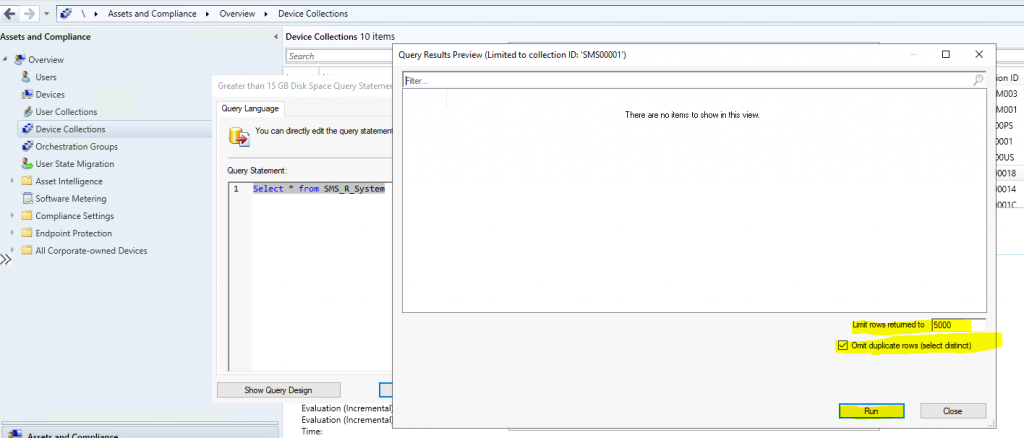
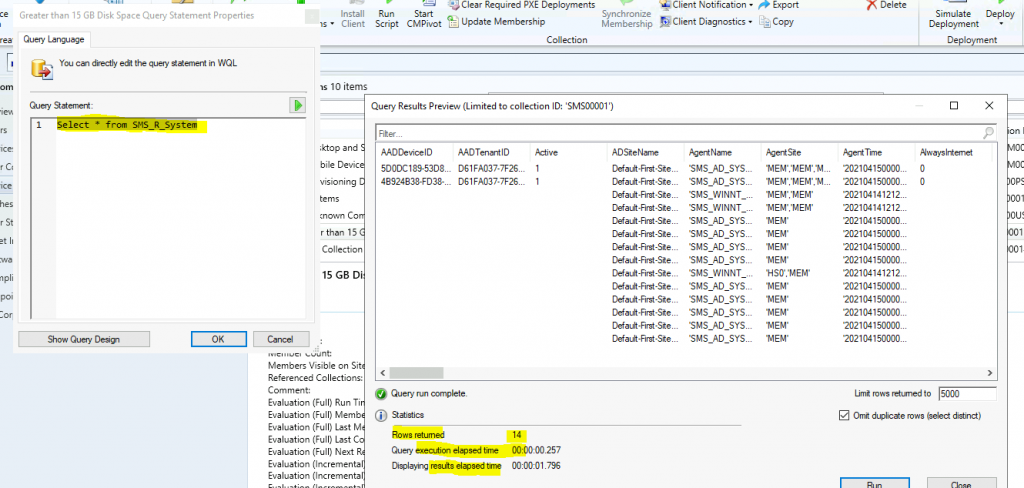
Now, SCCM shall give you the Preview results of the query’s WQL query and performance details.
- Let’s check the default query that fetches all the devices from the hierarchy.
- Select * from SMS_R_System
- Statistics or performance details of this query are also given in the preview results.
- Rows Returned = 14
- Query Execution Elapsed Time – 00:00:00:257
- Displaying results elapsed time – 00:00:01:796
NOTE: The number of managed clients in your environment might affect the results and performance.
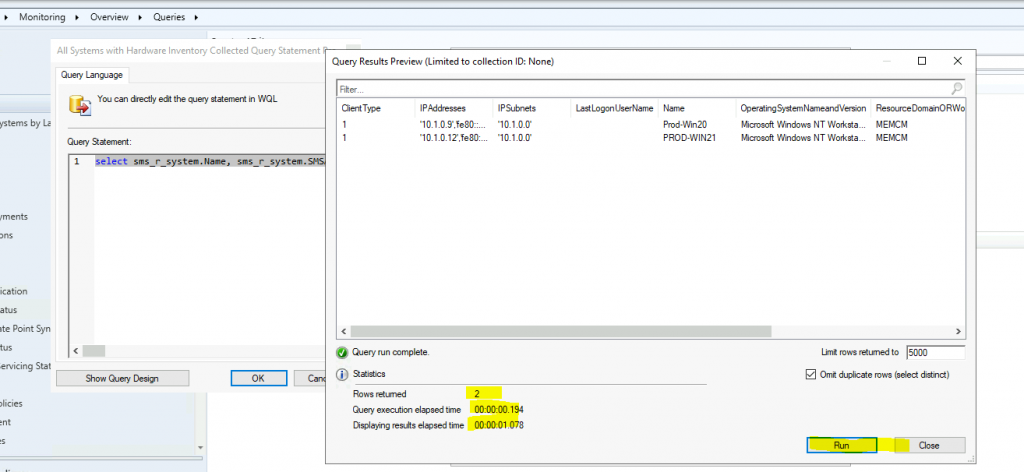
I used another WQL query to test its performance via the results preview option. As you can see, this is a more complex query than the above one. You can check performance-related details below.
- Rows Returned = 2
- Query Execution Elapsed Time – 00:00:00:194
- Displaying results elapsed time – 00:00:01:078
select sms_r_system.Name, sms_r_system.SMSAssignedSites, sms_r_system.OperatingSystemNameandVersion, sms_r_system.ResourceDomainORWorkgroup, sms_r_system.LastLogonUserName, sms_r_system.IPAddresses, sms_r_system.IPSubnets, sms_r_system.ResourceId, sms_r_system.ResourceType, sms_r_system.ClientType from sms_r_system AS sms_r_system inner join SMS_G_System_SYSTEM as c on c.resourceid=sms_r_system.resourceid where datepart(yy,c.timestamp) >= 1997 AND datepart(mm,c.timestamp) >= 01 AND datepart(dd,c.timestamp) >= 01- Find Device From MAC Address Using SCCM Query
- Create MS Edge SCCM Device Collection using WQL Query
- Create SCCM Query Find Device From BIOS GUID
Launch Results preview from Queries Node – SCCM WQL Query Results Preview Tool
Let’s see whether there is an option to launch the collection result preview tool from the queries node in the Monitoring workspace.
I have a blog post about SCCM Query All Active Directory Security Groups Dynamic Collection HTMD Blog (anoopcnair.com).
- Launch the console.
- Navigate to \Monitoring\Overview\Queries.
- Select a query and go to properties.
- Click on Edit Query Statement.
- Click on the green triangle to show the Query Results Preview window.
Query Results Preview Tool – Best Tool to Analyze the Performance of Collections
SCCM WQL Query Results Preview Tool can be used to check the performance of the dynamic collections in SCCM. I have noted some of the points in the following post on best practices of collection creation.
Query Results Preview Tool is the Best Tool to Analyze the Performance of Collections. It helps to analyze the end-to-end performance of the WQL query, similar to that of SQL server management studio.
Resources
We are on WhatsApp. To get the latest step-by-step guides and news updates, Join our Channel. Click here –HTMD WhatsApp.
Author
Anoop C Nair has been Microsoft MVP for 10 consecutive years from 2015 onwards. He is a Workplace Solution Architect with more than 22+ years of experience in Workplace technologies. He is a Blogger, Speaker, and Local User Group Community leader. His primary focus is on Device Management technologies like SCCM and Intune. He writes about technologies like Intune, SCCM, Windows, Cloud PC, Windows, Entra, Microsoft Security, Career, etc.




Discussion