






SCCM ConfigMgr CB 1606 How to Automatically Categorize Devices into Collections Configuration Manager
Let’s discuss SCCM ConfigMgr CB 1606 and how to automatically Categorize Devices into Collections in Configuration Manager. The device category is one of the new features introduced in the latest version of ConfigMgr SCCM CB.
This device category feature in SCCM CB 1606 helps to automatically add devices to device collections when you are in a hybrid scenario with SCCM and Intune.
As part of MDM enrollment, mobile device users must choose a category. Once the user selects a particular category, that device will be added to the corresponding collection we created in SCCM CB 1606. How does this work in the background?
There is a new membership rule in the collection called “Device Category Rule,” which helps SCCM/Intune add devices to their respective collections. I’ve created a quick video tutorial to show how this works.

Table of Contents
- SCCM ConfigMgr CB Free Training Led by Wally Mead Configuration Manager
- Free SCCM Training Part 1 | 17 Hours Of Latest Technical Content | ConfigMgr Lab HTMD Blog
- Free ConfigMgr Training Part 2 | 20 Hours Of Technical | SCCM HTMD Blog
- 63 Episodes Of Free Intune Training For Device Management Admins HTMD Blog
Automatically Categorize Devices into Collections – SCCM ConfigMgr CB 1606 How to Categorize Devices into Collections Configuration Manager Automatically
Once devices are added to a collection using the device category, you want to change their category (How to change the category of a device in SCCM?).
How does that work? You can change the device category from the SCCM CB console. In the device collections, you can see “Manage Device Categories“, and this is the place where you can create a new device category, edit a device category, and remove a device category.
What is the Device Category in SCCM ConfigMgr CB
How do you automatically add devices to a collection using the SCCM CB 1606 Device Category option? This video explains the options.
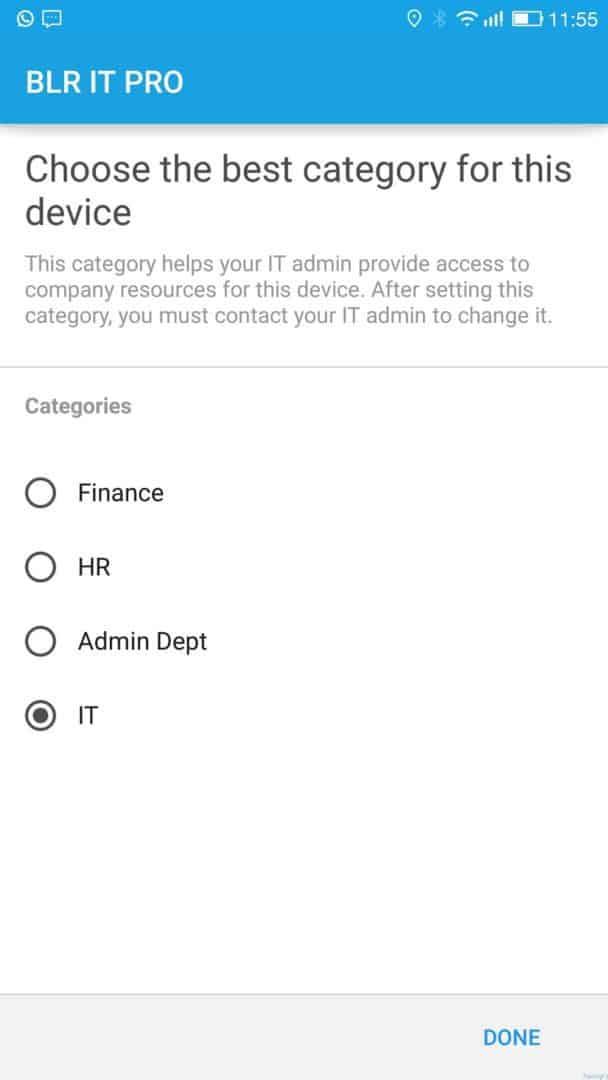
SCCM Device Category End User Experience
SCCM ConfigMgr CB How to Automatically Categorize Devices into Collections Configuration Manager. Choose the best category for this device:-
This category helps IT admin provide access to company resources for devices (e.g., Different security policies for different departments). After setting this category, you must contact your IT admin to change it.
| Choose the Best Category for this Device |
|---|
| IT |
Resources
SCCM Related Posts Real World Experiences Of SCCM Admins
We are on WhatsApp now. To get the latest step-by-step guides, news, and updates, Join our Channel. Click here. HTMD WhatsApp.
Author
Anoop C Nair is Microsoft MVP! He is a Device Management Admin with more than 20 years of experience (calculation done in 2021) in IT. He is a Blogger, Speaker, and Local User Group HTMD Community leader. His main focus is on Device Management technologies like SCCM 2012, Current Branch, and Intune. He writes about ConfigMgr, Windows 11, Windows 10, Azure AD, Microsoft Intune, Windows 365, AVD, etc.




unfortunately there are big practical issues with this feature that while it is in principle a great idea, the lack of certain key functionality makes it in practise unviable for us (and I suspect many others):
1. As it currently stands, it seems that there is no way to get devices to automatically choose a category without offering the choice to the user at enrolment time. Which is kind of what we would want for most people most of the time. You only really want the enrolment choice for people you define as special cases where they could have multiple types on offer.
2. As far as I can see (and it is hard to be sure without actually doing it in production), the moment you create any category at all, even for testing purposes and even if it is not used to populate a collection yet, any user from then on is going to be offered at the point of enrolment the screen where they have to choose between whatever categories you have created, regardless of whether they are only for testing, in development or ready for production use.So it would be hard to develop this without it being quite visible for anyone enrolling devices and potentially confusing them into picking categories that are not ready for production use yet.
Sure you can have a test CM2012 environment, however that often is of limited us unless you also have test AD and then have both kept in close production lockstep with your production environment. You would also need an additional Intune subscription just for testing and that simply is going to be a hard business case to make in a lot of organisations.