






SCCM ConfigMgr CB How to Plan Backup Recovery Configuration Manager Best Options
Let’s discuss SCCM ConfigMgr CB: How to Plan Backup Recovery Configuration Manager Best Options. What are the backup and recovery options changes in SCCM ConfigMgr CB 1606? Nothing much changed in terms of backup apart from taking a backup of the CD.Latest folder.
The CD.LATEST folder is also backed up as part of the SCCM CB full backup. Why do we need the CD.LATEST as part of the SCCM CB full backup? This is because it is a source file for when you want to recover an SCCM CB site server!
Why can’t we use the baseline version, which can be downloaded from MSDN/Volume Licensing sites? Those binaries can’t be used because they are not the same version of SCCM CB that is installed in your primary server/CAS.
The baseline version of SCCM CB production is 1511, and if you upgraded/updated the site to SCCM CB 1606 using Updates and Servicing, you can’t use the 1511 version source files to recover the primary site.

Table of Contents
- SCCM ConfigMgr CB Free Training Led by Wally Mead Configuration Manager
- Free SCCM Training Part 1 | 17 Hours Of Latest Technical Content | ConfigMgr Lab HTMD Blog (anoopcnair.com)
- Free ConfigMgr Training Part 2 | 20 Hours Of Technical | SCCM HTMD Blog (anoopcnair.com)
- 63 Episodes Of Free Intune Training For Device Management Admins HTMD Blog (anoopcnair.com)
When Do You Want to Run SCCM CB Setup from CD.LATEST Folder? – SCCM ConfigMgr CB How to Plan Backup Recovery Configuration Manager Best Options
Only when you are trying to recover a site !! In the following video, I try to explain the process of back and restore. Also, when to select which option during the recovery process.
There is always a question of whether to use SCCM full backup or just SQL backup to restore the functionality of SCCM sites. My answer is, “It depends.”
SCCM CB supports both the scenarios mentioned above; however, in some of the scenarios, you may need a full SCCM CB backup to complete the restore. The SCCM restore and recovery come with loads of permutations and combinations, as I explained in the table below and the video above.
SCCM ConfigMgr CB How to Plan Backup Recovery | Configuration Manager Best Options
After watching the video, I hope you will gain some clarity about those scenarios. What are the changes in SCCM CB 1606 Backup and Recovery options—YouTube? SCCM ConfigMgr CB How to Plan Backup Recovery | Configuration Manager Best Options?
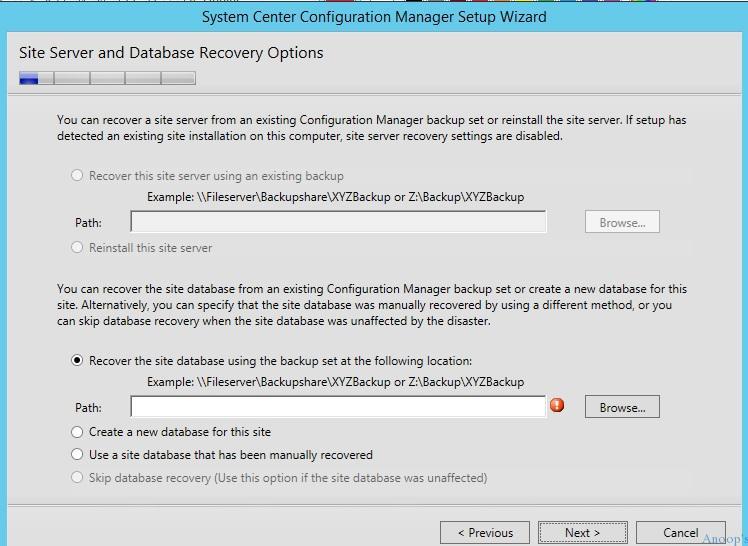
Table 1: SCCM CB Site Server and Site Database Recovery Options
The screenshot below shows the SCCM CB Site Server and Site Database Recovery Options. It shows the SCCM CB Site Server options such as the CAS, Stand-Alone Primary, Child Primary and Secondary Remote Site.
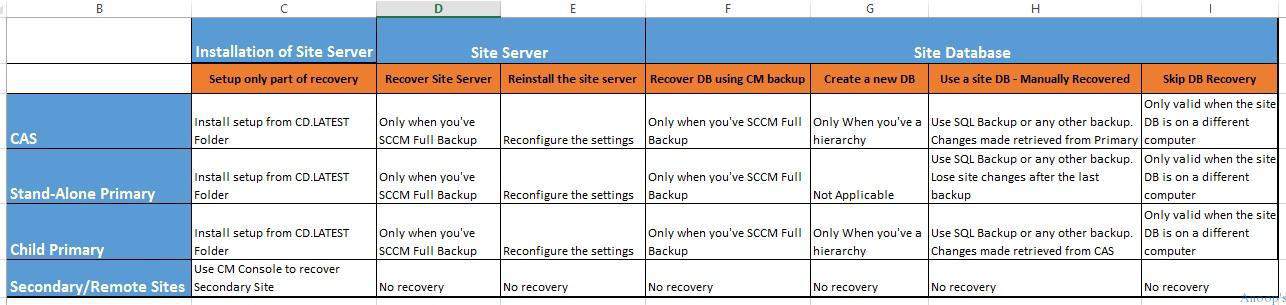
| Installation | Site Server | Site Database | |||||
|---|---|---|---|---|---|---|---|
| Setup only part of recovery | Recover Site Server | Reinstall the site server | Recover DB using CM backup | Create a new DB | Manually Recovered DB | Skip DB Recovery | |
| CAS | Install setup from CD.LATEST Folder | Only when you’ve SCCM Full Backup | Reconfigure the settings | Only when you’ve SCCM Full Backup | Only When you’ve a hierarchy | Use SQL Backup or any other backup. Changes made retrieved from Primary | Only valid when the site DB is on a different computer |
| Stand-Alone Primary | Install setup from CD.LATEST Folder | Only when you’ve SCCM Full Backup | Reconfigure the settings | Only when you’ve SCCM Full Backup | Not Applicable | Use SQL Backup or any other backup. Lose site changes after the last backup | Only valid when the site DB is on a different computer |
| Child Primary | Install setup from CD.LATEST Folder | Only when you’ve SCCM Full Backup | Reconfigure the settings | Only when you’ve SCCM Full Backup | Only When you’ve a hierarchy | Use SQL Backup or any other backup. Changes made retrieved from CAS | Only valid when the site DB is on a different computer |
| Secondary | Use CM Console to recover Secondary Site | No recovery | No recovery | No recovery | No recovery | No recovery | No recovery |
We are on WhatsApp now. To get the latest step-by-step guides, news, and updates, Join our Channel. Click here. HTMD WhatsApp.
Author
Anoop C Nair is Microsoft MVP! He is a Device Management Admin with more than 20 years of experience (calculation done in 2021) in IT. He is a Blogger, Speaker, and Local User Group HTMD Community leader. His main focus is on Device Management technologies like SCCM 2012, Current Branch, and Intune. He writes about ConfigMgr, Windows 11, Windows 10, Azure AD, Microsoft Intune, Windows 365, AVD, etc.




Hi Anoop,
I regularly follow all your SCCM Blogs , those are very helpful, I have a quick questions and need your help.
I have SCCM 2012 1606 on physical box and planning to migrate this application to a VM and install 1610 /1703.
If i do a backup/Restore , will I get all my configuration and clients/deployments back ?
Can you share any document for the same if you have one