






SCCM to Fix New Remote Code Execution Vulnerability in MSHTML component
Microsoft released the details of a new remote code execution vulnerability in MSHTML component. I think we can use SCCM to fix this vulnerability by disabling the installation of ActiveX controls. Microsoft explained the details about the workaround in the CVE-2021-40444. I have added the Intune method to deploy registry fix as well.
You can use SCCM to fix the new remote code execution vulnerability impacting Microsoft 365 apps. As per Microsoft, An attacker could craft a malicious ActiveX control to be used by a Microsoft Office document that hosts the browser rendering engine.
The attacker would then have to convince the user to open the malicious document. Users whose accounts are configured to have fewer user rights on the system could be less impacted than users who operate with administrative user rights.
Workaround to Fix New Remote Code Execution Vulnerability
Microsoft already provided registry entries to disable installing ActiveX controls in Internet Explorer in all zones. You can use SCCM to deploy this registry entry to mitigate this vulnerability. Microsoft also shared the impact of workaround as well in the MSRC article CVE-2021-40444.

This sets the URLACTION_DOWNLOAD_SIGNED_ACTIVEX (0x1001) and URLACTION_DOWNLOAD_UNSIGNED_ACTIVEX (0x1004) to DISABLED (3) for all internet zones for 64-bit and 32-bit processes. New ActiveX controls will not be installed. Previously installed ActiveX controls will continue to run.
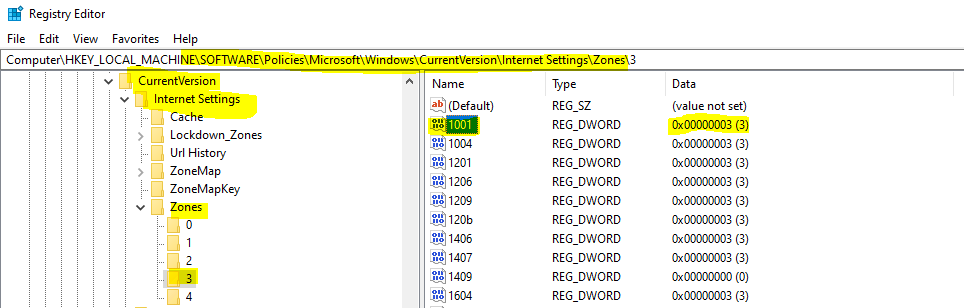
You can use the following registry entries as the workaround for this issue. You can paste the following into a notepad and save it with the .reg file extension. You can use this file in the following section of the post to deploy this from SCCM.
I saved this file as ActiveX.reg, and this file will be used in the below section.
Windows Registry Editor Version 5.00

[HKEY_LOCAL_MACHINE\SOFTWARE\Policies\Microsoft\Windows\CurrentVersion\Internet Settings\Zones\0]
"1001"=dword:00000003
"1004"=dword:00000003

[HKEY_LOCAL_MACHINE\SOFTWARE\Policies\Microsoft\Windows\CurrentVersion\Internet Settings\Zones\1]
"1001"=dword:00000003
"1004"=dword:00000003

[HKEY_LOCAL_MACHINE\SOFTWARE\Policies\Microsoft\Windows\CurrentVersion\Internet Settings\Zones\2]
"1001"=dword:00000003
"1004"=dword:00000003

[HKEY_LOCAL_MACHINE\SOFTWARE\Policies\Microsoft\Windows\CurrentVersion\Internet Settings\Zones\3]
"1001"=dword:00000003
"1004"=dword:00000003
Create CI and Baseline to Fix the Microsoft Office Vulnerability
You can also use Configuration Item and Baseline to deploy the registry keys. I heard from the community that baseline is the better method to fix the registry keys and recommended by Microsoft.
CI and Baseline deployment is explained in the following blog post How To Create SCCM Configuration Items Configuration Baselines. The following steps might help to create SCCM Configuration Item.
- Go to Asset and Compliance -> Compliance Settings -> Configuration Items -> click ‘Create Configuration Item‘
- Enter the name for CI.
- Select the operating system version for which you want to create the CI and click ‘Next‘.
- I have selected Windows 10 and Server operating systems in this scenario.
- Click on New to create new CI to fix this vulnerability.
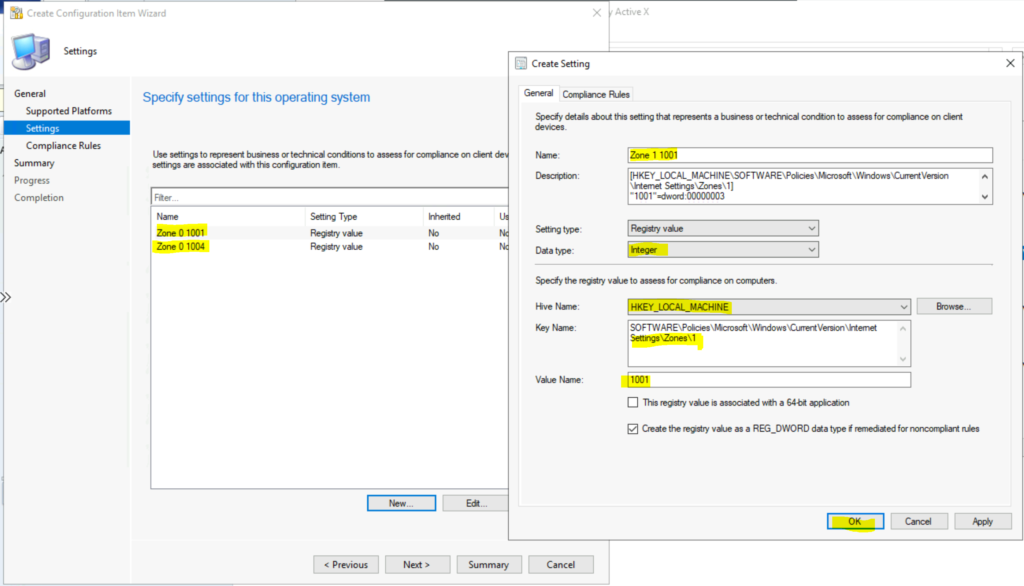
- Name -> Enter the name for CI -> Zone 0 1001.
- Description -> enter the details of this CI.
- Setting Type -> Registry Value
- Data Type -> Integer
- Specify the registry value to assess for compliance on computers.
- Hive Name -> HKEY_LOCAL_MACHINE
- Key Name -> SOFTWARE\Policies\Microsoft\Windows\CurrentVersion\Internet Settings\Zones\0
- Value Name -> 1001
- Enable the option – Create the registry value as a REG_DWORD data type if remeditied for non-compliant rule.
- Click OK to continue.
- Repeat the steps from 4 to 11 for all the Value Names. So for each key value, there are 2 value names. You can get all these details from the registry entries given in the above section.
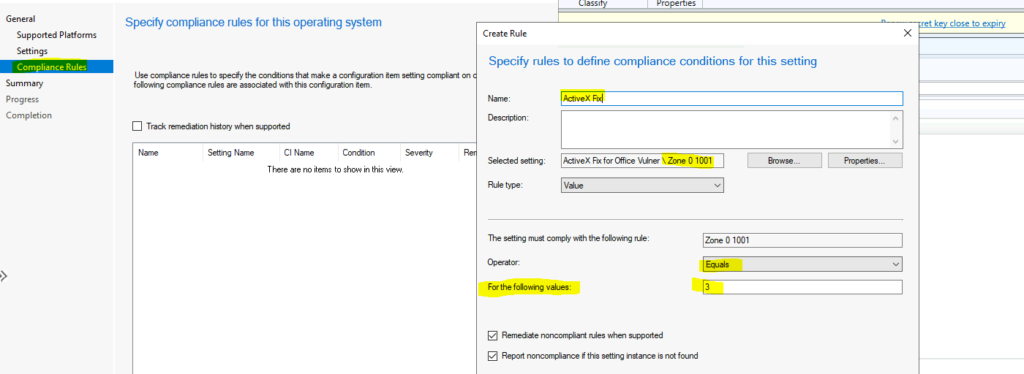
Click on the ‘Compliance Rules‘ tab and press New to create a new rule. You can also create compliance rules as the next step as well.
- Name -> Enter the name of the complaince policy.
- Select the CIs that you have created above.
- Rule Type -> Value.
- The Setting must comply with the following rule -> Select each rules for respctive compliance rule.
- Operator => Equal
- For the following value -> 3
- Repeate these steps for all the settings that you have created above.
Once you have created all the CIs for the registry fix (there should be 8 CIs), you can start creating a baseline and deploy it using the guide -> How To Create SCCM Configuration Items Configuration Baselines.
SCCM FIX: Deploy Registry File
You can use SCCM Applications or baseline to deploy the registry files to fix new remote code execution vulnerability in MSHTML component. Follow the steps mentioned below to create a simple application to deploy a registry fix using SCCM.
- Launch ConfigMgr Console
- Navigate to \Software Library\Overview\Application Management\Applications
- Right Click on the Applications node
- Select Create Application
- Select the option called “Manually specify the application information“
- Click on the Next button and enter name and other details of the application.
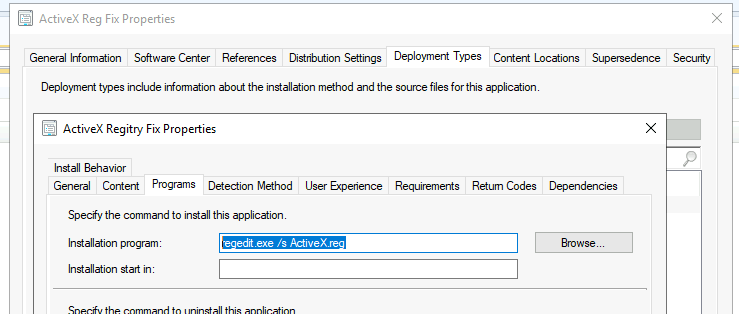
Using the following blog post, How To Create Deploy Adobe Acrobat Application Using SCCM ConfigMgr Easiest Method, you can continue creating the application. Make sure you have saved the registry file as mentioned in the above section. You can use the following command as an installation program.
regedit.exe /s ActiveX.reg
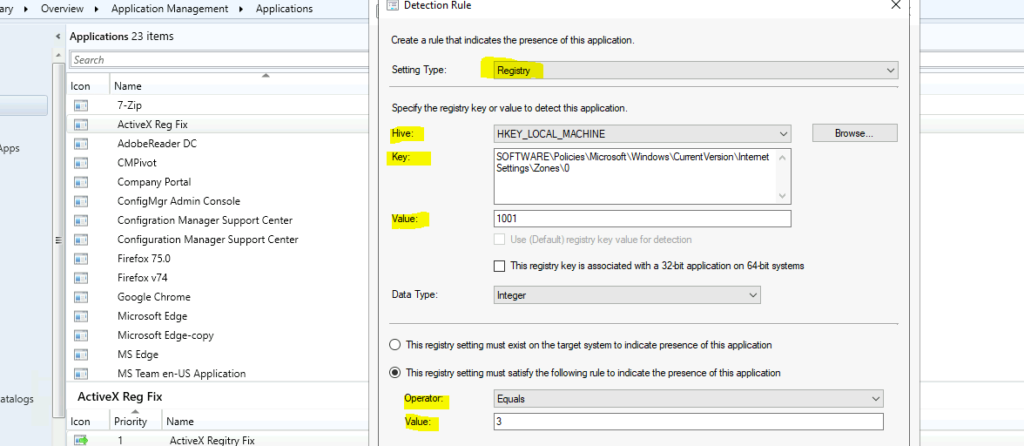
It’s important to have a detection method with all the following registry entries to track whether the changes are gone in or not.
- Hive -> HKEY_LOCAL_MACHINE
- Key -> SOFTWARE\Policies\Microsoft\Windows\CurrentVersion\Internet Settings\Zones\0
- Value -> 1001
- Data Value -> Integer
- The registry setting must satisfy the following rule to indicate the presence of this application:
- Operator -> Equal
- Value -> 3
- Click on Add Clause & Repeat the above steps for all the registry values mentioned in the above section.
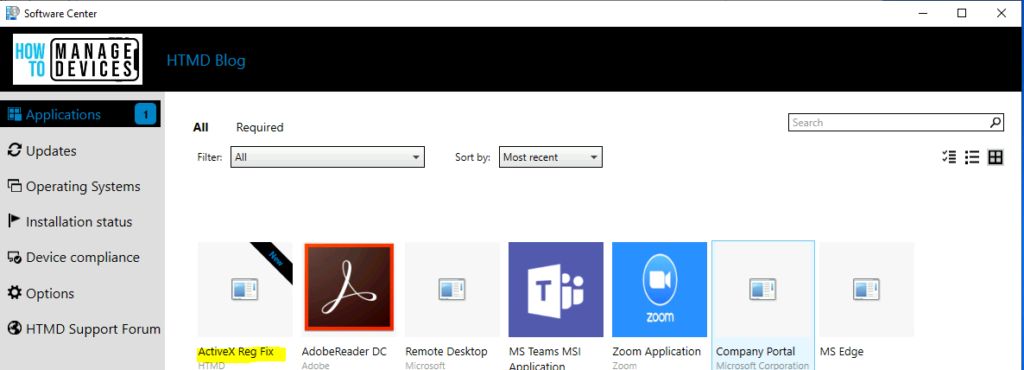
The application is deployed to all the impacted devices. The registry fixes for New Remote Code Execution Vulnerability in MSHTML component are deployed.




Have you noticed that this is not being applied for the user but only for admin. If I bring up the registry as a the logged in user the settings is not changed.
If i open regedit as admin the settings are in place.
how do i get this installed for users?
StaffI think we can avoid many of these issues with CI and Baseline deployment using the same registry keys as explained in the article.
thank you for this blog really helpful but when the app is going to install from software centre status is installation failed and the reason is Past due – Will be retired, please assist me on this
StaffTry to use Configuration Item and Baseline to fix this. I think that is the best option.
can you please provide the process steps for Configuration Item and Baseline to fix this
I think that it can be done with package deployment better than application. Application deployment isn’t good for changing registry. Best option is GPO.
While I always love using SCCM to fix everything, I feel this is much more of a group policy type thing rather than a SCCM push. I guess you could even do both.
Group Policy Preferences would deploy this Enterprise wide within 90 minutes and continuously reapply as needed.
No fighting with broken SCCM agents, corrupt WMI issues or anything else.
StaffYes. Good points. Configuration Item can also help instead of SCCM application.
Did you mean MECM?
StaffI mean Microsoft Endpoint Manager Configuration Manager can help to fix this issue.
Hi , We have deployed the CVE using MECM and some for GPO . But what about the devices which are mange using Intune only . Do you have any guidance please
StaffRegistry Fix using Intune Win32 App for CVE-2021-40444 Office App! Microsoft MSHTML Remote Code Execution Vulnerability #MSIntune #MEMPowered https://www.anoopcnair.com/deploy-registry-fix-using-intune-win32-app/
Thank you so much
Can you share your “add clause” settings for the deployment detection?
Thanks
StaffI think it’s already there isn’t it SOFTWARE\Policies\Microsoft\Windows\CurrentVersion\Internet Settings\Zones\0