






SCCM Logs Show IsDomainUser IsCloudUser
Let’s see why SCCM logs show IsDomainUser IsCloudUser? I got confused when I saw the isdomain user and iscloud user entries in SCCM logs. These are significant attributes in Cloud Management Gateway (CMG), and Tenant attach scenarios.
Let’s see the differences between IsDomainUser and IsCloudUser attributes in this post. You should have the cloud user attribute set to 1 for auto-enrollment of Windows 10 devices into Azure AD and Intune. These are cloud-only user accounts and directory synced user accounts. More details are available in the below section.
There are many ways to check whether the cloud sync is enabled for the users or not. You can check this from SQL and Active Directory. This is important to check whether the user is a domain user or a cloud user to enable tenant attach features.
Three Types of User Accounts Relevant for SCCM
You can confirm whether a user is a cloud user or not from SQL, on-prem Active Directory, or Azure AD. If the user is an on-prem domain user, the Azure AD connect helps sync the user account with the appropriate UPN to Azure AD. I think this is applicable when you have a different cloud UPN and domain name.

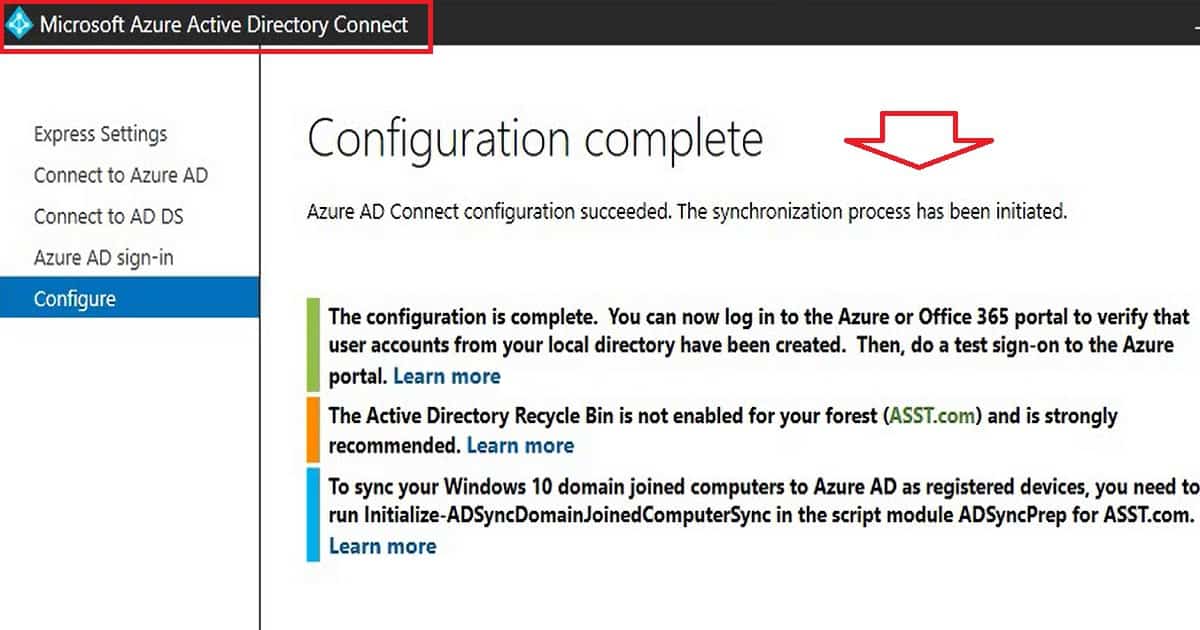
There are different types of user accounts in the modern workplace and identity world. These three types of user accounts are relevant for SCCM functionalities like Tenant Attach. Three of them related to SCCM and Intune are:
- On-prem accounts -> User Accounts that are only available in on-prem and not synced to cloud.
- Cloud Only accounts -> User Accounts that only available in cloud and not available in on-prem active directory.
- Directory synced accounts -> User accounts which are created in on-prem AD and synced to Azure AD using AAD connect.
Let’s check Azure AD to confirm whether a user is a cloud user or not. You can confirm this cloud user from Azure Active Directory as well.
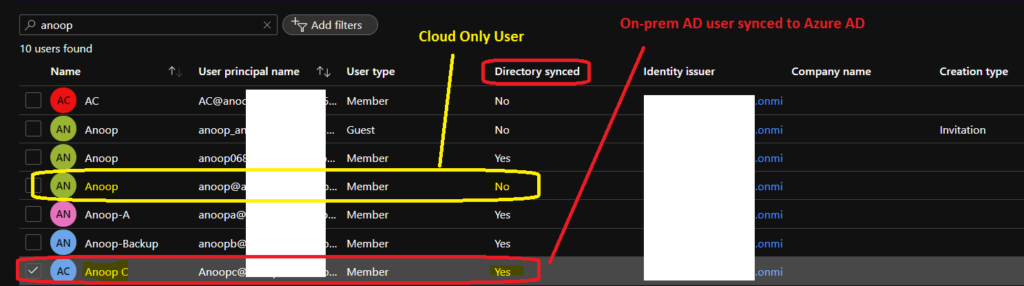
You can confirm whether the cloud user by going into to properties of a user account -> User logon name attribute. Make sure the correct cloud UPN is selected instead of the domain name. You can confirm whether the user is could user or not from the following steps:
- Open DSA.msc.
- Right-click active directory users and computers.
- Search for the user name Anoop. From the results, right-click on properties and select Account tab.
- Check whether User Logon Name: UPN details should be there to make the cloud user enabled for SCCM.
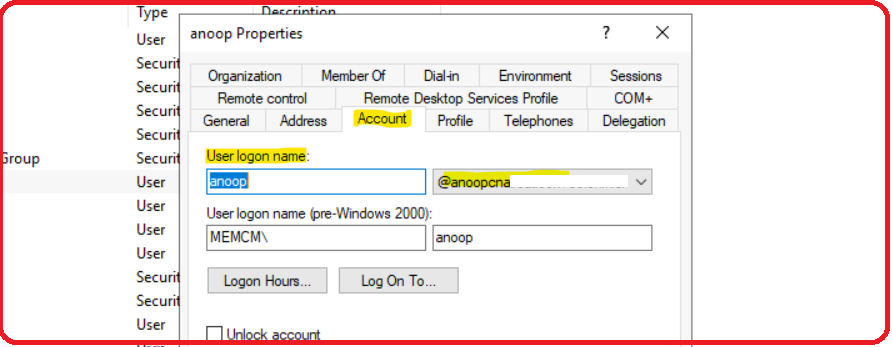
IsDomainUser = 1 IsCloudUser=1
There are different types of users available in the modern workplace and identify world as explained above. Let’s take the example of Cloud user and Domain user. You can use Azure AD Connect to sync the users and devices between on-prem AD and Azure AD.
- Domain User = 1 => This value is enabled (1) when the user ID is created and available in on-prem active directory.
- Cloud User = 1 => This value is enabled (1) when the user ID is available in cloud (Azure AD) via AAD connect sync or the user ID is created and available only in Azure AD.
The conclusion is if you see IsDomainUser = 1, IsCloudUser = 1 in SCCM log files like PolicyAgent.log, that means the on-prem user ID is synced with Azure Active directory. The tenant attach, and co-management features might work for these types of users.
If you see IsDomainUser = 1, IsCloudUser = 0 in SCCM log files, that means the user ID is not synced to Azure AD, and the tenant attach, and co-management features might not work for these users.
If you see IsDomainUser = 0, IsCloudUser = 1 in SCCM logs, that means the user ID is not available in the on-prem Active directory, and it’s only available in Azure AD. I have not seen this scenario yet, and I’m not sure whether this is a supported scenario for SCCM or not.
Resources
- SCCM Related Posts Real World Experiences Of SCCM Admins (anoopcnair.com)
- SCCM Video Tutorials For IT Pros – HTMD Blog #2 (howtomanagedevices.com)
- Fix Intune Sync Issue with Error 0x80072f0c
Author
Anoop is Microsoft MVP! He is a Solution Architect in enterprise client management with over 17 years of experience (calculation done in 2018). He is Blogger, Speaker, and Local User Group HTMD Community leader. His main focus is on Device Management technologies like SCCM 2012, Current Branch, and Intune. He writes about ConfigMgr, Windows 11, Windows 10, Azure AD, Microsoft Intune, Windows 365, AVD, etc…..…




Hi Anoop, Thank for this post.
I have a question in relation to below:
On our clients logs we have IsDomainUser = 1, IsCloudUser = 0 in SCCM log files
We have co-management enabled in our environment but only for certain things but there are number of entries on the machine logs ” Failed to determine if user ‘S-1-5-21-1078081533-413027322-725345XXX-XXXXX’ is cloud user. Error 0x80004005″. Any reason why we have this error in our log file?
Thanks,
Sheetal
Staff0x80004005 is access denied … But it’s worth checking why it shows CloudUser NO at one place and yes at another place. Can you run the SQL query mentioned in https://www.anoopcnair.com/fix-intune-sync-error-0x80072f0c-issue/ to confirm …have you enabled Azure AD user discovery? Which version of SCCM you are in? I think Azure AD user discovery is not mandatory for latest versions.