






SCCM Message Processing Engine – Journey of Status State Messages to MPE
Hi, Today we will discuss the SCCM Message Processing Engine – Journey of Status State Messages to MPE. Let’s go through the journey of status messages to state messages. Also, check out more about the new SCCM Message Processing Engine(MPE).
This is the post where I will predict how SCCM will change in the future. This post shows how SCCM is becoming more modern and evolving faster than cloud technologies. Let’s see what the SCCM Message Processing Engine journey is.
Microsoft SCCM Support Escalation engineer Umair Khan tweeted about the most underrated and unknown component present from SCCM 1802 and evolving since. He mentioned about Message processing engine (MPE) component in SCCM. It seems MPE makes future SCCM faster.
In this post, you will see the evolution of SCCM from status messages to SCCM Message Processing Engine (MPE).

Is SCCM Still Slow?
The change started with SQL-based replication, which was introduced in the product with SCCM 2012. SCCM has changed a lot since the release of the SCCM Current Branch.
SCCM still manages over 70% of Windows devices, and no proven competition exists. All these changes of SCCM passed without any destruction to the organization.
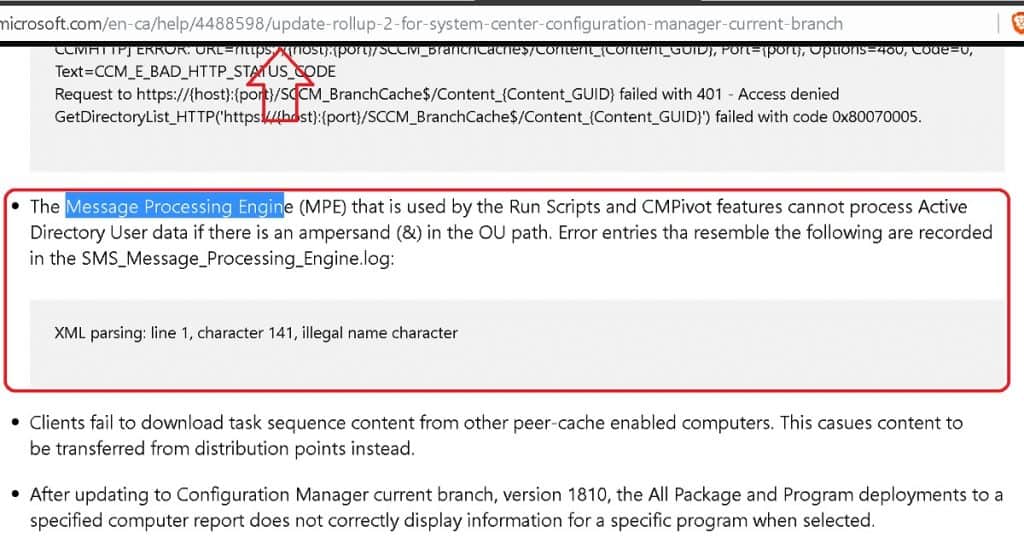
You must have seen the references for this MPE component in the SCCM 1810 RU2 KB4488598.
Status to State Message
SCCM changed its client-server communication channel (well, most of it) from status messages to state messages at the start of the SCCM 2012 version. Most of the SCCM admins have seen the following diagram in Steve Ritchie’s blog post.
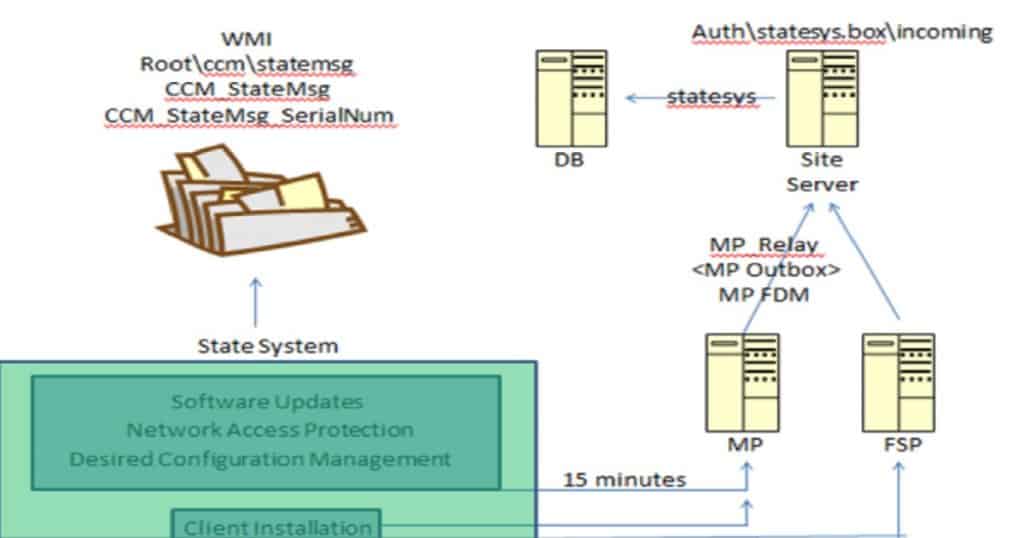
SCCM Fast Channel Communication
State messages were not real-time communication between the SCCM client and Server. SCCM Product group introduced SCCM Fast Channel Notification (BGB-Push notification).
The SCCM Fast Channel Notification is used for many features in SCCM’s current branch versions, but I don’t think it’s used for all SCCM client-server communications.
I think that fast channel notification (BGB) will soon become the primary communication channel for SCCM client Server features.
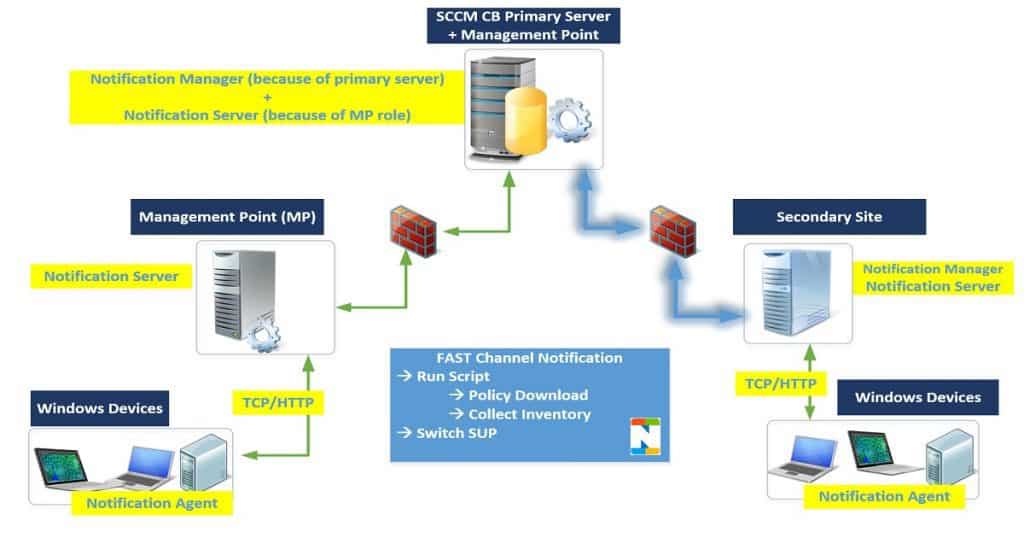
SCCM Message Processing Engine
Umair’s tweet made me drill down some of the details about the SCCM Message Processing Engine (MPE). As per the tweet, the SCCM MPE component was introduced in SCCM 1802.
The SCCM MPE component is another game-changer in fast, real-time communications between site servers like CAS and child primary servers.
What is the Message Processing Engine Thread in SCCM?
As per the tweet, the SCCM Message Processing Engine component is a high-speed message subscription channel. I have included more details below based on my quick analysis.
Inbox Folder – MPE.BOX
The MPE.BOX is the inbox folder used for the message processing engine component.
You can refer to the log called SMS_Message_Processing_Engine.log to get more analysis about the MPE component.
SMS Message Processing Engine Component
SMS Message Processing Engine Component is part of SMS Executive Service, and you would be able to see this thread in all your SCCM site servers.
The SMS Message Processing Engine component makes SCCM site communication much faster.
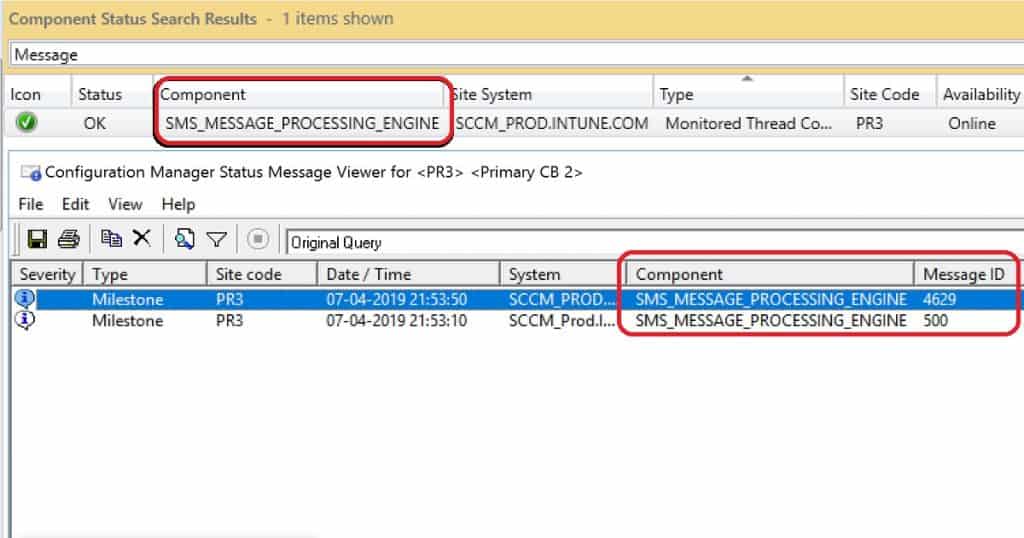
The following is one of the configuration manager component messages that you can get from the SMS Message Processing Engine component.
SMS_MESSAGE_PROCESSING_ENGINE Message ID 4629 Component Status Summarizer detected that the availability of component "SMS_MESSAGE_PROCESSING_ENGINE" on computer "SCCM_PROD.INTUNE.COM" has changed to Online.
More Significant Role of Message Processing Engine
It seems all the SCCM cloud-related notification is based on the SCCM Message Processing Engine.
I can see many references to all the following SCCM features in the MPE log file called SMS_Message_Processing_Engine.log.
- Run Script
- CMPivot from CAS
- Cloud DP,
- SCCM CMG
- Windows Store for Business
- Cloud Connection
- M365 Service Connection Worker?
- Telemetry Worker
Check out the following SMS_Message_Processing_Engine.log file entries to get more details.
SMS_EXECUTIVE started SMS_MESSAGE_PROCESSING_ENGINE as thread ID 4484 (0x1184).
WARNING: Successfully stopped worker Microsoft.ConfigurationManager.MessageProcessingEngine.MessageProcessingEngine
 WARNING: Successfully stopped worker Microsoft.ConfigurationManagement.ApplicationManagement.Wsfb.BusinessAppProcessWorker
 WARNING: Successfully stopped worker Microsoft.ConfigurationManager.ServiceConnector.M365AWorker
 Current CMG deployment package hash is vp1mr8oh6laicm50YLPqe7MLtiLX2Z1cT9dzHA79r7k=
 CreateUpgradeTaskForPackageChange: Triggered to create upgrade task for service type CloudProxyService with current package hash vp1mr8oh6laicm50YLPqe7MLtiLX2Z1cT9dzHA79r7k=.
 Current CDP deployment package hash is PlQzjFBQ/3zEOlLLvjrkJ+Kn+Z5BMMCbw0p2E4X6rRU=
 WARNING: Unable to open registry key 'SOFTWARE\Microsoft\SMS\COMPONENTS\SMS_SERVICE_CONNECTOR\M365AConfig'.
Installed DBMON triggers
Prediction – Future of SCCM
SCCM will be much faster than all the other cloud technologies. It seems to me that soon, SCCM will move away from Inbox based communication system. I’m excited about the new revolutions of SCCM.
Resources
- Video Guide to Troubleshoot SCCM CB Fast Channel Push Notification Issues
- SCCM CMPivot Fast Channel Making SCCM Faster
- SCCM Run Script Deployment Step-by-Step Guide
We are on WhatsApp. To get the latest step-by-step guides and news updates, Join our Channel. Click here –HTMD WhatsApp.
Author
Anoop C Nair is Microsoft MVP! He is a Device Management Admin with more than 20 years of experience (calculation done in 2021) in IT. He is a Blogger, Speaker, and Local User Group HTMD Community leader. His main focus is on Device Management technologies like SCCM 2012, Current Branch, and Intune. He writes about ConfigMgr, Windows 11, Windows 10, Azure AD, Microsoft Intune, Windows 365, AVD, etc




Discussion