






SCCM Patch Status SQL Query Based on Particular Collection | ConfigMgr
Let’s find out SCCM Patch Status SQL Query Based on Particular Collection. I have seen many questions in HTMDForum that we want the patch report, how to write a SQL query to write a report on patching, etc.
In this post, you will learn how to make a working SCCM patch status SQL query to find the patch status from your configuration manager (a.k.a ConfigMgr) database. You can customize the query as per your needs.
The following is a sample query that will help you understand the tables and views required to get the SCCM patching report working. Hence, we have done a formidable job for you.
When setting up your query, remember to replace the Collection ID, Article ID, and, optionally, the BulletinID to ensure that the query works correctly. This customization will help tailor the query to your needs and provide you with relevant information.

- May 2024 Windows 11 KB5037771 KB5037770 Patches and 2 Zero-Day Vulnerabilities
- FIX SCCM Agent Installation Error 0x80200010
- SCCM Management Insights Rules to Maintain Clean and Healthy Infra
- SCCM 2203 Upgrade Guide with Top 5 Best New Features
- SCCM Server In-place OS Upgrade to Server 2022 Guide
| Index |
|---|
| SCCM Patch Status SQL Query |
| Results – SCCM Patch Status SQL Query Based on Particular Collection |
NOTE! – Many other SCCM custom reports are available from Karthikeyan in the following post. SQL Query All SCCM Applications with no Deployments | ConfigMgr.
SCCM Patch Status SQL Query
Once you have initiated the client push installation method, you can track the patch installation status (a.k.a. patching) using the following query. This is the simplest way to get the patch reports from ConfigMgr.
- Open the SQL Management Studio.
- Click on the New Query button.
- Select the CM_MEM database from the drop-down menu.
- MEM is the ConfigMgr site code.
- Copy the following SQL query to find the report for particular patches.
- Click on the Execute button.
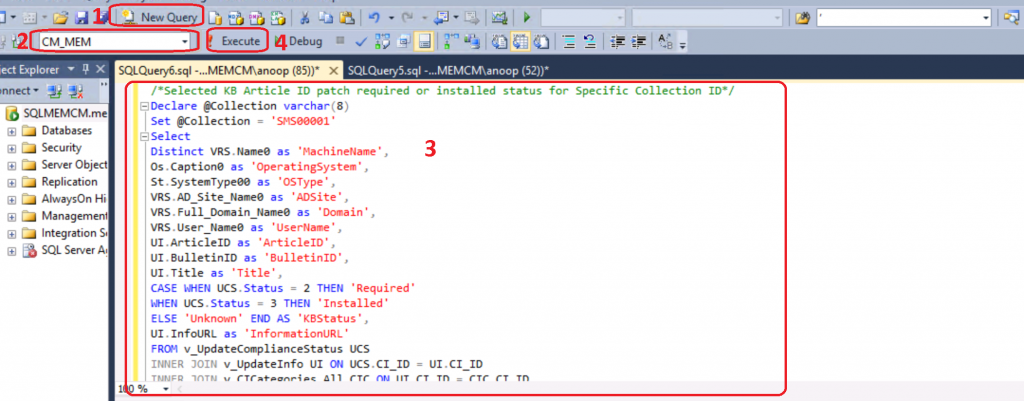
NOTE! – Make sure to replace collection IDs, Article IDs, and Bulletin IDs before running the query.
/*Selected KB Article ID patch required or installed status for Specific Collection ID*/
Declare @Collection varchar(8)
Set @Collection = 'SMS00001' /*Enter the collection ID*/
Select
Distinct VRS.Name0 as 'MachineName',
Os.Caption0 as 'OperatingSystem',
St.SystemType00 as 'OSType',
VRS.AD_Site_Name0 as 'ADSite',
VRS.Full_Domain_Name0 as 'Domain',
VRS.User_Name0 as 'UserName',
UI.ArticleID as 'ArticleID',
UI.BulletinID as 'BulletinID',
UI.Title as 'Title',
CASE WHEN UCS.Status = 2 THEN 'Required'
WHEN UCS.Status = 3 THEN 'Installed'
ELSE 'Unknown' END AS 'KBStatus',
UI.InfoURL as 'InformationURL'
FROM v_UpdateComplianceStatus UCS
INNER JOIN v_UpdateInfo UI ON UCS.CI_ID = UI.CI_ID
INNER JOIN v_CICategories_All CIC ON UI.CI_ID = CIC.CI_ID
INNER JOIN v_CategoryInfo CI ON CIC.CategoryInstanceID = CI.CategoryInstanceID
INNER JOIN v_R_System VRS ON UCS.ResourceID = VRS.ResourceID
INNER JOIN v_GS_OPERATING_SYSTEM Os on UCS.ResourceID = Os.ResourceID
INNER JOIN Computer_System_DATA St on UCS.ResourceID = st.MachineID
INNER Join v_FullCollectionMembership Col on UCS.ResourceID = Col.ResourceID
WHERE VRS.Operating_System_Name_and0 like '%Workstation%'
and Col.CollectionID = @Collection
and UI.articleid in ('4561600','4557957','4025338') /*Enter the article ID*/
and UI.BulletinID in ('ms17-010','ms17-008') /*Enter the Bulletin ID*/
and active0 = 1 and client0 = 1
Order by 10
Results – SCCM Patch Status SQL Query Based on Particular Collection
The SQL query for patch status is very helpful in terms of troubleshooting software update issues. I have seen many scenarios where SCCM admins struggle to install the details patches on Windows 10 devices.

Resources
- PowerShell Script to Import Multiple CSV Files to Pivot Table SCCM Patch Report
- How to get a report with Friendly scan errors
We are on WhatsApp. To get the latest step-by-step guides and news updates, Join our Channel. Click here –HTMD WhatsApp.
Author
Deepak Rai is a Technical Lead with over 14 years of experience in IT. He specializes in SCCM, Intune, and Azure. Throughout his career. Deepak has worked on various platforms such as Active Directory, Exchange, Veritas NETBACKUP, Symantec Backup Exec, NDMP devices like Netapp, EMC Data Domain, Quantum using Backup Exec 2010 and 2012, and HP StorageWorks 4048 MSL G3. He also has experience in data deduplication-related troubleshooting. Ultimately, he returned to his roots as an IT Engineer focusing on SCCM technology.




how to find collectio ID in sccm
StaffFrom Assets and Compliance node. You can raise question at HTMDFORUM.com so that we can have a detailed discussion
Hello,
Is it possible to know the patch installed status(Installed, Failed or timed out etc.,) along with error codes(0, 3010, 1618, etc.,)
Example with the below fields:
Collection Name, Host Name, OS Name, Patch Update Name, Status, Installed date
Thank you.
When patching starts and finishes for a collection does this information stored in a SQL table anywhere ?
StaffYes it’s stored.
This will get you started https://docs.microsoft.com/en-us/mem/configmgr/develop/core/understand/sqlviews/software-updates-views-configuration-manager
Hi,
I’m using your query, and the issue i have is that some servers that aren’t being reported
– i checked those few odd servers not being reported, and they are a member of my “All Windows Server Collection” i am targeting
– i thought it might be because those servers do not actually have a Software Update Group being deployed to them—which is true. However, I have other servers the query is returning which also don’t have any SUG being deployed to them. So that doesn’t seem to be the case.
– i used the third party recast tool, and for the most part, the reported servers and unreported servers appear to have all the same collection memberships
Any idea why a few servers are not showing up on this query?
StaffHello Brian,
Sure we can look into it. So first thing is if the servers which are not reporting the compliance data have SCCM Client installed and healthy in the console. If Client is healthy then we need to check if software update scan is completing for those servers and state message is being forwarded to the SCCM. For prompt response and further troubleshooting let’s take it to our forum http://forum.howtomanagedevices.com/ and we can work together to fix this issue.
Do we have query to get Installed patch list in a single system.
StaffYes we have it. Anoop Sir wrote about it. https://www.anoopcnair.com/configmgr-default-reports-software-updates-sccm/
Hello,
I tried this query, it’s executing successfully but some how I am getting result only for 2 devices as install and not installed updates result. in collection we have 15 devices. Any idea for those Inactive or Noclient devices
HI ,
How to find BulletinID for any KB, or for KB5034119, i am trying find for Server machines,
I just found this query it is precisely what I need in time sensitive situation. However, although I know the KB is installed the query returns no results. I am trying to query for KB5040422/MS24-JUL3. I have edited the UI.articleid and UI.bulletinID, articleID with and without KB#######, bulletinid with and without upper case the query runs no errors but no results either. Any suggestions as to what I did wrong
We have 3 patches deployed everymonth. Third party , Office patches and microsoft patches and we wanted to get compliance for all the machines of all the patches in a single query from SCCM. Do we have chance for that