






SCCM Server OS Upgrade WSUS Error Failed to Decrypt Password
Let’s discuss the SCCM Server OS Upgrade WSUS Error Failed to Decrypt Password. SCCM server OS upgrade is critical to keeping pace with SCCM current branch (CB) updates in your SCCM environment.
As you must be aware, we need a minimum server OS version of Windows Server 2012 to upgrade the SCCM CB infra to 1702. This SCCM server OS upgrade is required for SCCM site servers and Site System Servers like MP, SUP, etc… SCCM CB 1707 DPs are still supported with server OS 2008 and above.
In this post, I cover SCCM Server OS Upgrade WSUS Error that I faced after SCCM CB primary/CAS server OS in-place upgrade. More details about the SCCM Server OS Upgrade Checklist are in the post “SCCM CB 1702 Upgrade of CAS and Primary Sites A Real-world Experience.”
I blogged about the SCCM server OS upgrade WSUS reinstallation steps in the following post, “SCCM Server OS Upgrade WSUS SUP Notes from Real World.” In that post, I covered all the tasks that we need to take care of before and after the SCCM server and OS in-place upgrade.

- SCCM Server OS Upgrade WSUS SUP Notes from Real World
- SCCM Server In-place OS Upgrade to Server 2022 Guide
- New Features in SCCM Technical Preview 2401
- New Key Features of SCCM 2309 | Top Improvements
- Download SCCM 2309 Early Ring Version using PowerShell Script
- SCCM Versions Build Numbers Client Console Site
- End of Support Dates for SCCM CB Current Branch | ConfigMgr | SCCM End of Life
- SCCM Unsupported Deprecated or Removed Features
Table of Contents
SCCM Server OS Upgrade WSUS Error Failed to Decrypt Password
In one scenario, I could not perform WSUS Sync on the SCCM CB site server after completing the post-OS in-place activities. The error in the WSUSCtrl.log was “Failed to decrypt user password (P). error = 0X8009200c.” The actual translation meaning of error 0X8009200c is “Cannot find the certificate and private key to use for decryption.” A solution to the above error is given at the end of this post.
| SCCM Server OS Upgrade WSUS Error Failed to Decrypt Password |
|---|
| Failed to decrypt password of the user (P). error = 0X8009200c |
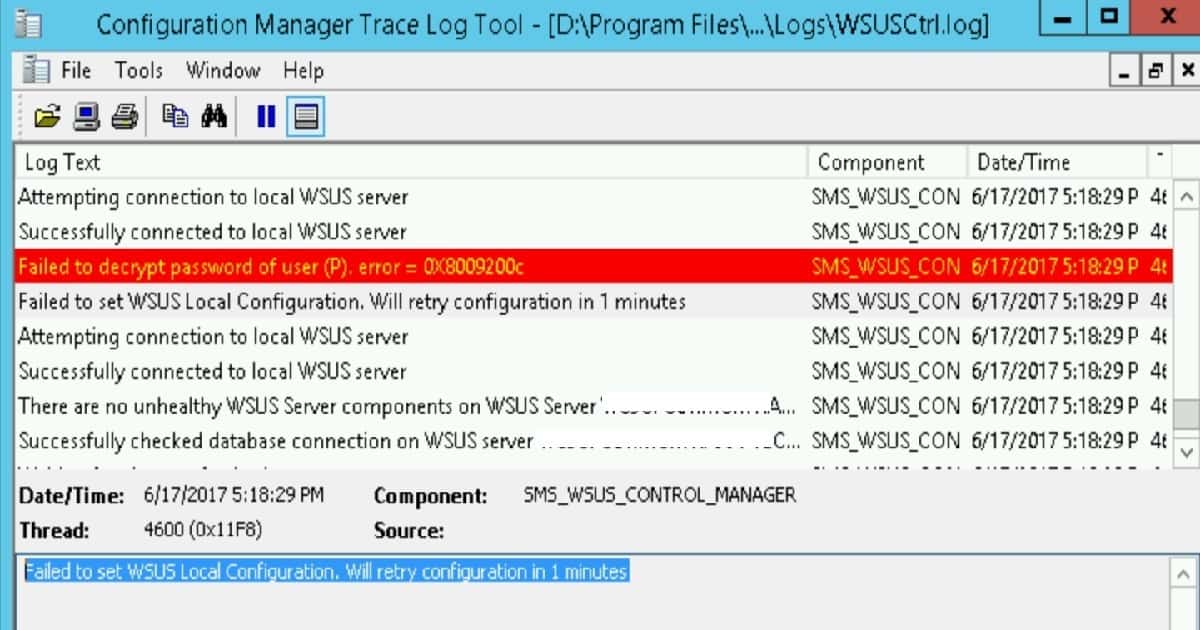
WSUSCtrl.log File Snippet – SCCM Server OS Upgrade WSUS Error Failed to Decrypt Password
Failed to decrypt password of user (P). error = 0X8009200c
Failed to set WSUS Local Configuration. Will retry configuration in 1 minutes
I have also seen errors in the WSUSSYNC.log file when you have not completed the WSUS configuration after WSUS installation. To complete the configuration, you don’t need to go through the WSUS post-installation tasks. Instead, we need to connect to the exact shared location and DB server. This will help us to complete all the previous configurations.
WSYNCMGR.log File Snippet SCCM Server OS Upgrade WSUS Error Failed to Decrypt Password
System.Net.WebException: Unable to connect to the remote server ---> System.Net.Sockets.SocketException: No connection could be made because the target machine actively refused it [::1]:8530~~   at System.Net.Sockets.Socket.DoConnect(EndPoint endPointSnapshot, SocketAddress socketAddress)~~   at System.Net.ServicePoint.ConnectSocketInternal(Boolean connectFailure, Socket s4, Socket s6, Socket& socket, IPAddress& address, ConnectSocketState state, IAsyncResult asyncResult, Exception& exception)~~   --- End of inner exception stack trace ---~~   at Microsoft.UpdateServices.Administration.AdminProxy.CreateUpdateServer(Object[] args)~~   at Microsoft.SystemsManagementServer.WSUS.WSUSServer.ConnectToWSUSServer(String ServerName, Boolean UseSSL, Int32 PortNumber)
Remote configuration failed on WSUS Server.
Setting new configuration state to 3 (WSUS_CONFIG_FAILED)
Sync failed: WSUS server not configured. Please refer to WCM.log for configuration error details.. Source: CWSyncMgr::DoSync
STATMSG: ID=6703 SEV=E LEV=M SOURCE="SMS Server" COMP="SMS_WSUS_SYNC_MANAGER" SYS=ServerName SITE=CAS PID=2852 TID=4608 GMTDATE=Sat Jun 17 16:19:06.908 2017 ISTR0="CWSyncMgr::DoSync" ISTR1="WSUS server not configured. Please refer to WCM.log for configuration error details." ISTR2="" ISTR3="" ISTR4="" ISTR5="" ISTR6="" ISTR7="" ISTR8="" ISTR9="" NUMATTRS=0
If you start going through the post-installation steps of WSUS as suggested by server 2012 R2, “Add roles and features wizard,” you will get similar errors, as I have noted below. You don’t have to complete this task. Rather, just launch the WSUS console and click on the RUN button to complete the WSUS installation process.
The log file is located at C:\Users\anoop.nair\AppData\Local\Temp\tmp14EC.tmp
Post-install is starting
Fatal Error: Failed to start and configure the WSUS service
Resolution for Failed to Decrypt Password of User ERROR
To resolve the error “Failed to decrypt password of the user (P). error = 0X8009200c“, I just restarted the SCCM CB server. After the restart, WSUS Sync started working perfectly fine, and the CAS server could send the notification to its child sites.
Resources
Upgrade on-premises infrastructure that supports SCCM/ConfigMgr
We are on WhatsApp now. To get the latest step-by-step guides, news, and updates, Join our Channel. Click here. HTMD WhatsApp.
Author
Anoop C Nair is Microsoft MVP! He is a Device Management Admin with more than 20 years of experience (calculation done in 2021) in IT. He is a Blogger, Speaker, and Local User Group HTMD Community leader. His main focus is on Device Management technologies like SCCM 2012, Current Branch, and Intune. He writes about ConfigMgr, Windows 11, Windows 10, Azure AD, Microsoft Intune, Windows 365, AVD, etc.




Discussion