






SCCM SQL Service Broker ConfigMgrRCMQueue is Getting Disabled Configuration Manager ConfigMgr
SCCM SQL Service Broker ConfigMgrRCMQueue is Getting Disabled Configuration Manager ConfigMgr. I recently received a comment from Johan Pol on how to Check the backlog of Inboxes in SCCM 2012.
The command was regarding an issue related to the Service broker queue “ConfigMgrRCMQueue“.
One old secondary server site entry has not been removed from DB, and those old entries are causing issues with DB replication. Also, ConfigMgrRCMQueue is getting disabled again and again.
The secondary site attached to the SCCM / ConfigMgr 2012 hierarchy was removed/deleted, but the entries from the SCCM 2012 console were not removed. Other secondary server replication links are getting impacted. Always use the recommended way “Preinst /delsite” to remove (secondary) sites from the SCCM 2012 database.

The /DELSITE option does not uninstall the site on the computer specified by the ChildSiteCodeToRemove parameter. This option only removes the site information from the Configuration Manager site database.
- FIX SCCM SQL Replication Issues using Replication Link Analyzer
- Troubleshoot and FIX SCCM SQL Backlog Issues using SSMS
- FIX SCCM SQL-Based Database Replication Failure Between CAS Primary
| Index |
|---|
| SCCM SQL Service Broker ConfigMgrRCMQueue |
SCCM SQL Service Broker ConfigMgrRCMQueue
After searching, I found similar issues discussed in the TechNet forum thread here. So, I considered simulating the issue in a lab environment and providing more information. ####Warning#### Do NOT perform this in production environment.
Microsoft does not support directly editing SCCM 2012 DB. Contact CSS to perform this action for you. You can take the following steps to test and resolve the issue in your lab environments.
1. How to validate the broker service is enabled and running select is_broker_enabled, * from sys.databases where name = ‘CM_PR1‘ When is_broker_enabled = 1, then broker service is enabled. In this case, the Service broker is OK.

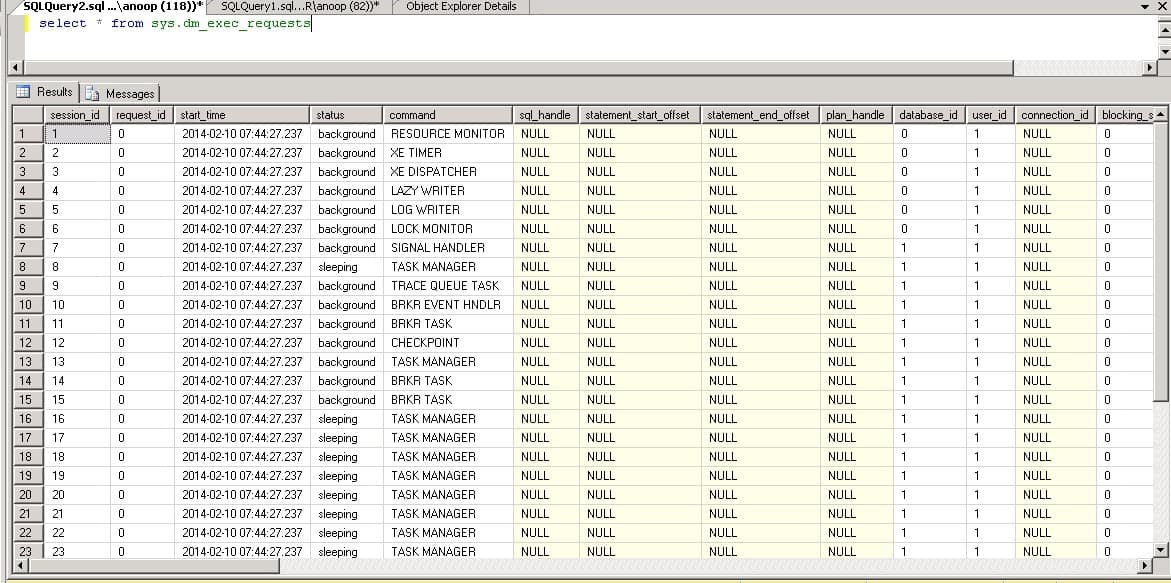
2. To validate the requests executed by the SQL server, select * from sys.dm_exec_requests returns information about each request executing within the SQL Server. Most of the status looks good.
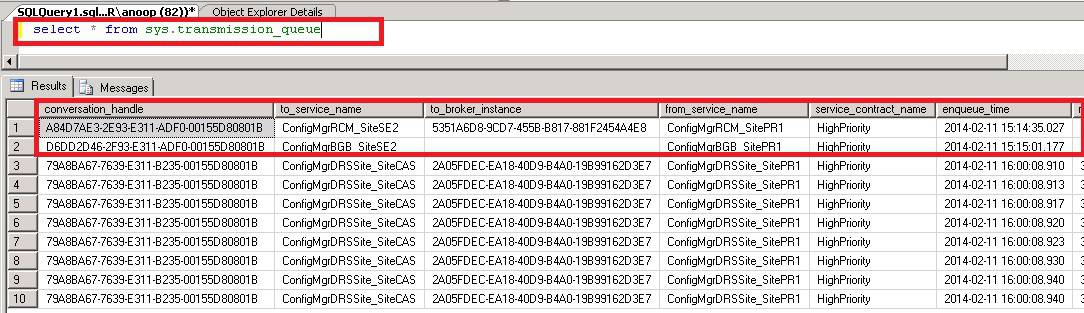
3. List of transaction details created to validate data is being written to or received. When we still have the data of the old secondary over here, that may cause problems with ConfigMgrRCMQueue. Select * from sys.transmission_queue ConfigMgrRCM_SiteSE2 and ConfigMgrBGB_SiteSE2 are two conversations related to my old secondary site SE2.
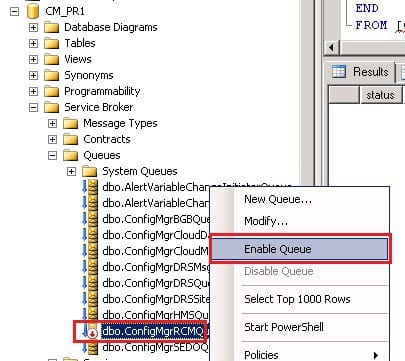
4. ConfigMgrRCMQueue is getting disabled again and again the problem. The old site conversations we’ve seen in step 3 may create issues that may disable ConfigMgrRCMQueue….. How to get into ConfigMgrRCMQueue and enable the ConfigMgrRCMQueue : CM_PR1 -> Service Broker -> Queues ->ConfigMgrRCMQueue
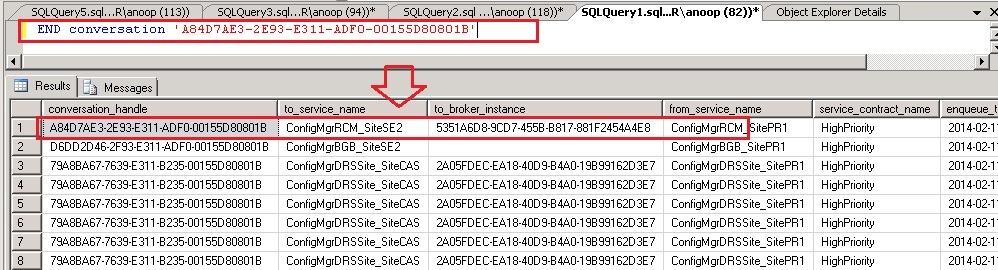
5. How to remove the unwanted or orphan conversations listed in ConfigMgr DB Here, old secondary site SE2 entries (conversations) create problems. This conversation handle (conversations_handle) mentioned below is related to that secondary site. To remove the conversation, run the following command with conversation_handle ID. END CONVERSATION ‘conversation_handle’ END conversation ‘A84D7AE3-2E93-E311-ADF0-00155D80801B’END CONVERSATION ‘conversation handles’ More troubleshooting tips on SQL Service Broker here.
Resources
SCCM Related Posts Real World Experiences Of SCCM Admins
We are on WhatsApp now. To get the latest step-by-step guides, news, and updates, Join our Channel. Click here. HTMD WhatsApp.
Author
Anoop C Nair is Microsoft MVP from 2015 onwards for consecutive 10 years! He is a Workplace Solution Architect with more than 22+ years of experience in Workplace technologies. He is a Blogger, Speaker, and Local User Group Community leader. His main focus is on Device Management technologies like SCCM and Intune. He writes about technologies like Intune, SCCM, Windows, Cloud PC, Windows, Entra, Microsoft Security, Career etc…




Anoop,
Thank you as very much, I always learn something new and practical from your posts.
Thank you so much,
Renato
Good Morning Anoop,
hope all is well with you.
i need your assistance with ConfigMgrRCMQueue system queues.
we have a total of 103 secondary servers and 1 primary server, all servers are reporting in the console but the ConfigMgrRCMQueue keep going into disable mode. i deleted old convesssion handle but that dint seem t help. how can i establish which conversation is causing it to be disabled.
i checked endpoint login certificates and all seem to be in order..
please help