






SCCM Task Sequences with UI++Now Open Source on GitHub
Let’s discuss SCCM Task Sequences with UI++Now Open Source on GitHub. Microsoft Introduced UI++ for SCCM task sequences as open source on GitHub. This feature is launched to allow/find someone to maintain this in the long run.
Do you know what UI ++ is? UI++ is a dynamic user interface (UI) generation tool that has recently been made open-source on GitHub. It is designed to display information to the interactive user, solicit input, and perform actions based on that input.
UI ++ including populating task sequence variables during System Center SCCM (ConfigMgr) Operating System Deployment (OSD). It is highly customizable, allowing you to modify the number of dialogs, colors, icons, and text displayed.
It can be used both within and outside of task sequences, making it a versatile tool for various scenarios. In this blog post i will help you to know more about UI++ for SCCM Task Sequences Now Open Source on GitHub.

Table of Contents
SCCM Task Sequences with UI++Now Open Source on GitHub
UI++ for SCCM is designed by JasonSandys Principal Product Manager at Microsoft. Its initial public open-source code released on December 14, 2024. Mr JasonSandys designed this source code with hard work over the past 15 years.
- Fix Task Sequence Delays In Windows 11 24H2 During Bare Metal Deployment In SCCM
- Comprehensive Guide to Upgrading SCCM to Version 2409
- Complete Guide to Automate the Microsoft Intune Daily Tasks using of Graph X Ray
- Moving Cloud PCs Across Regions Granular Move Enhanced Tracking and Reporting Windows 365 Frontline Support
Necessary Task or Requirements of UI++ for SCCM
To implement UI++ for SCCM, here are the necessary tasks and requirements. The below table shows the Necessary Task or Requirements of UI++ for SCCM.
| Necessary Tasks | Details |
|---|---|
| Download UI++ | The first thing is to download UI++. You can download the UI++ ZIP file from the official source. Make sure to unblock the ZIP file after downloading. |
| Extract and Create a Package | Extract the contents of the ZIP file and create a package in SCCM. This package will include the necessary files for UI++. |
| Customization | Customize the UI++ XML file to define the dialogs, colors, icons, and text that will be displayed |
| Task Sequence Integration | Integrate UI++ into your task sequences. You can add it as a step in the task sequence or use it as a PreStart command. |
| Testing and Validation | Test the implementation to ensure that UI++ is functioning as expected. |
UI++ for SCCM Setup Languages and Brain Dump Overview
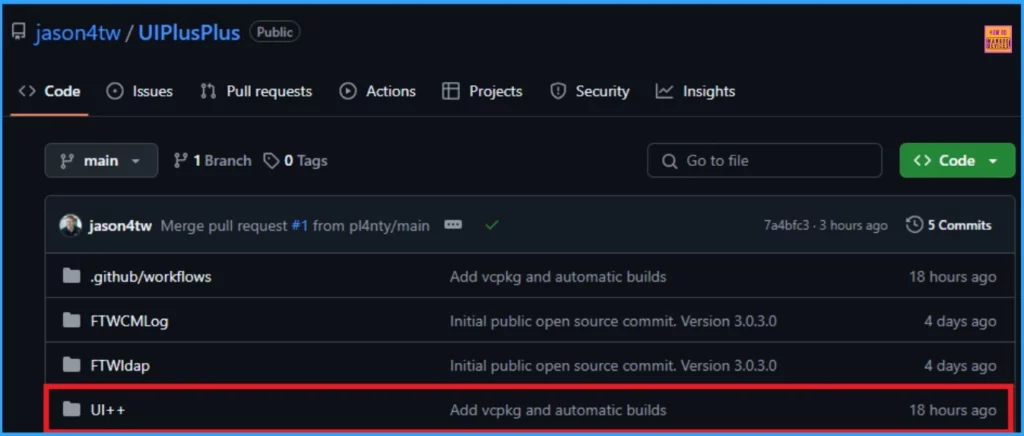
The section you provided outlines the necessary steps and requirements for setting up and building UI++ for SCCM. There are some languages used on UI++ for SCCM. It includes C++ 88.0%, C 10.0&, Makefile 1.7%, CMake 0.3%. The below table shows the Short Brain Dump.
| Brain Dump | Details |
|---|---|
| Visual Studio 2022 | You need to have Visual Studio 2022 installed. |
| Visual C++ with MFC Static Libraries | Ensure that you have the Visual C++ development environment with MFC (Microsoft Foundation Class) static libraries. |
| Curl Libraries | Download the curl libraries from here. UI++ version 3.0.3.0 uses curl version 7.83.1. |
| Update Project Settings | In the UI++ project, update the Additional Library Directories under General -> Linked to point to the newly compiled curl libraries. |
| Build Output | After building the solution, the binaries (FTWCMLog.dll, FTWldap.dll, and UI++.exe) will be placed in the appropriate sub-folder of the solution’s Build folder. |
Need Further Assistance or Have Technical Questions?
Join the LinkedIn Page and Telegram group to get the latest step-by-step guides and news updates. Join our Meetup Page to participate in User group meetings. Also, Join the WhatsApp Community to get the latest news on Microsoft Technologies. We are there on Reddit as well.
Resource
Author
Anoop C Nair has been Microsoft MVP from 2015 onwards for 10 consecutive years! He is a Workplace Solution Architect with more than 22+ years of experience in Workplace technologies. He is also a Blogger, Speaker, and Local User Group Community leader. His primary focus is on Device Management technologies like SCCM and Intune. He writes about technologies like Intune, SCCM, Windows, Cloud PC, Windows, Entra, Microsoft Security, Career, etc.




Discussion