






Potential Impact on SCCM with Kerberos Protocol changes | November Patches KB5019980 KB5019959
Potential Impact on SCCM with Kerberos Protocol changes deployed with November 2022 Cumulative Patches KB5019980 and KB5019959. We see reports on social media that there are some potential impacts on user authentication.
Update: 18th Nov 2022: Microsoft released a bunch of OOB updates or patches for domain controllers to fix the Sign-in and Kerberos issue with different operating systems. More details – Bug Fix OOB Update Sign In And Kerberos Authentication Issue | Domain Controllers.
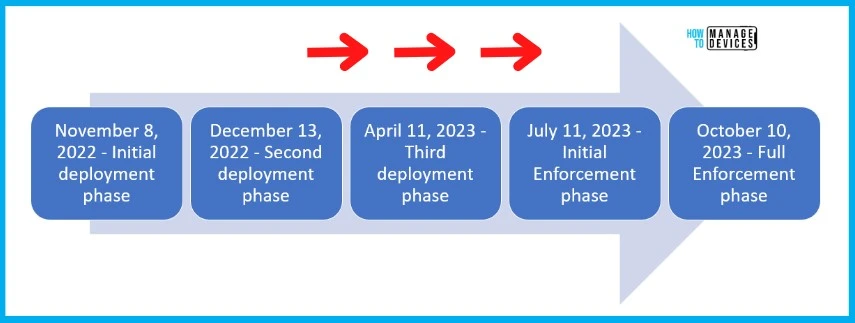
Microsoft is planning to implement changes to Kerberos and Netlogon protocols. These protocol changes won’t happen overnight but the plan is to have a phased deployment. There will be 4 phases for this deployment.
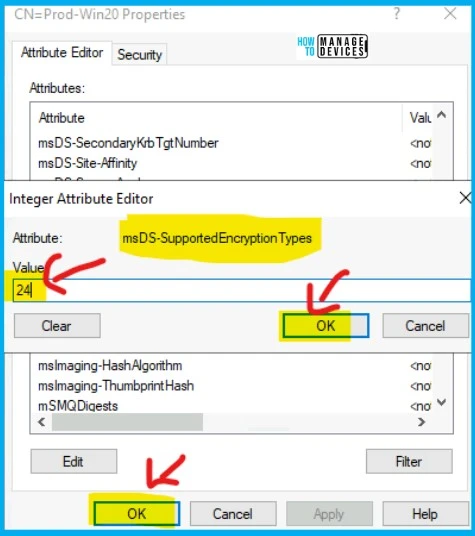
If you have explicitly defined encryption types on your user accounts that are vulnerable to CVE-2022-37966. HTMD published a post where the fix is to change the attribute MSDS-supportedencryptiontypes value to decimal 24.

The explicit settings like the above might potentially impact SCCM services after applying November security patches KB5021131 and KB5020805. There is a confirmation from Microsoft on this point. More details are available in the below section.
CVE-2022-38023 and CVE-2022-37967
Microsoft released the November security patches to fix vulnerabilities explained in the following CVEs – CVE-2022-38023 and CVE-2022-37967. The recommendation from Microsoft is to install the following KBs on all the Domain Controllers.
The Kerberos and Netlogon change will be released in phases. November patches are the initial phase for deployment. The Enforcement phase for updates released on or after April 11, 2023.
The initial deployment just adds PAC signatures to the Kerberos PAC buffer and adds measures to address security bypass vulnerability in the Kerberos protocol.
| Kerberos and Netlogon changes | Dates |
|---|---|
| Initial deployment phase | November 8, 2022 |
| Second deployment phase | December 13, 2022 |
| Third deployment phase | April 11, 2023 |
| Initial Enforcement phase | July 11, 2023 |
| Full Enforcement phase | October 10, 2023 |
Authentication Failure after November Security Patches
Steve Syfuhs and Fabian Bader reported this on Twitter and there are similar reports on Reddit as well. But Microsoft has confirmed this issue. The Nov 2022 Cumulative Patches KB5019980 and KB5019959 caused the issue.
There are reports on Social media that Kerberos’s pre-authentication failed. KDC has no support for encryption type. This only happens when the msDS-SupportedEncryptionTypes property is explicitly set.
“Certain auths are failing when users have their msDS-SupportedEncryptionTypes attribute explicitly being set to AES only (decimal 24, hex 0x18).”
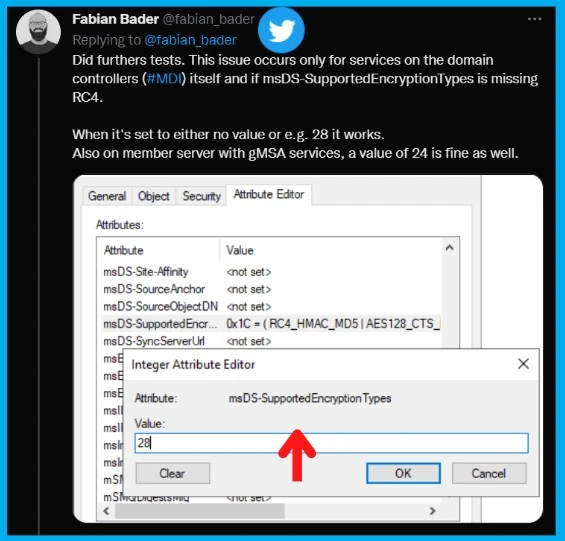
Fabian confirms that this issue occurs only for services on the domain controllers (#MDI) itself and if msDS-SupportedEncryptionTypes is missing RC4. When it’s set to either no value or e.g. 28 it works. Also on the member server with gMSA services, a value of 24 is fine as well.
Update 17th Nov 2022 – After the Windows updates that are dated on or after November 8, 2022 are installed, the following registry keys are available for the Kerberos protocol. Refer to Microsoft Documentation for more details.
DefaultDomainSupportedEncTypes: Configurable value to state what the default Supported Encryption Type for an Active Directory user or computer if their ms-DS-SupportedEncryptionType attributes is not set.
| Registry key | Value | Data type | Default value | Restart required? |
|---|---|---|---|---|
| HKEY_LOCAL_MACHINE\System\CurrentControlSet\services\KDC | DefaultDomainSupportedEncTypes | REG_DWORD | 0x27 | No |
SCCM Software Distribution Issues after November Patches
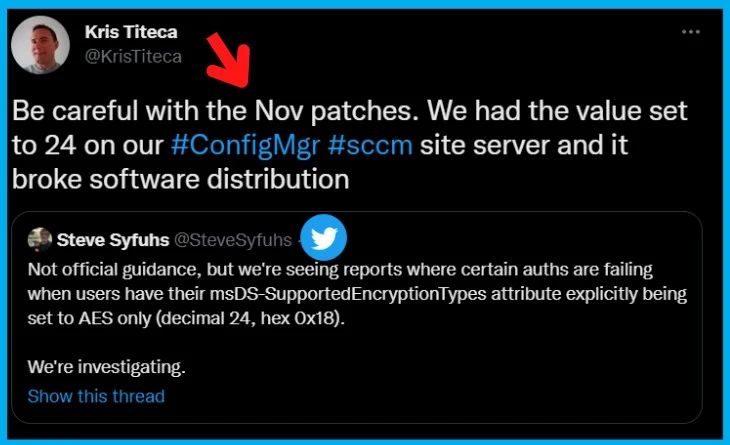
We don’t think this is a widely spread issue because we see only one Twitter user reported it. But Kris Titeca warns SCCM admins to be more careful before deploying Nov 2022 security patches to the environment because that could cause SCCM Software Distribution issues.
As per Kris Titeca, “Be careful with the Nov patches. We had the value set to 24 on our #ConfigMgr #sccm site server and it broke software distribution.” Again Microsoft has not confirmed anything on this topic. Let us know if you see the same behavior.
NOTE! – HTMD’s Recommendation is to test test test patches before installing them on the SCCM production environment.
Workaround
The workaround is to remove the patches from your DCs or change the GPO to include RC4 again or manually change the value to 28. There are other workarounds shared by Dave Kawula also shared in the below paragraph. Always take backup or test this in a lab environment before trying it out in production DCs.
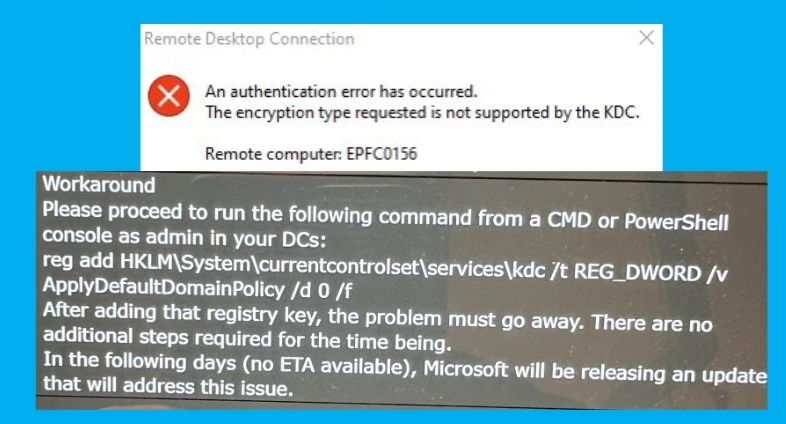
An authentication Error has occurred. The encryption type requested is not supported by the KDC.
Remote Computer: EPFC0156
Workaround
1. Run the following command from CMD or PowerShell console as admin in your DCs:
reg add HKLM\System\currentcontrolset\Services\kdc /t REG_DWORD /v ApplyDefaultDomainPolicy /d 0 /f
- After adding that registry key, the problem must go away. There are no additional steps required for the time being.
SCCM Policy Deployment Issues because of Kerberos
We quickly wanted to share another potential issue with SCCM policies because of Kerberos protocol changes. Deepak published a post long back with a policy deployment issue and fix using Kerberos changes. You can refer to the post – Fix Kerberos Error 0x80090342 SCCM Endpoint Protection Policy Deployment Issues.
The fix for this Kerberos error 0x80090342 with msDS-supportedencryptiontypes Attribute. The computer account in the account directory should have a corresponding attribute named MSDS-supportedencryptiontypes set to decimal 24.
The above reports talk about user authentication-related issues but this could potentially have a computer authentication-related impact as well. Most of the time SCCM uses system-based Kerberos authentication. We will keep you all posted if there are any further updates to the issues.
SCCM PXE stopped working after DC patch
There are further reports that SCCM PXE stopped working after the security patch installation on Domain Controllers. Peter Braune reported the following SCCM PXE errors after patching DC. Changes to msDS-SupportedEncryptionTypes = 28 fixed the issue for many clients.
PXE stopped working after DC patch.
PXE::MP::IsKnownMachine failed; 0x80070490
msDS-SupportedEncryptionTypes = 28
ldap_child[344475]: Failed to initialize credentials using keytab
Another Twitter user Andras Gyorffy shared the following error. This is also because the Kerberos Protocol changes November Patches KB5021131 and KB5020805.
ldap_child[344475]: Failed to initialize credentials using keytab [MEMORY:/etc/krb5.keytab]: KDC has no support for encryption type. Unable to create GSSAPI-encrypted LDAP connection. on Rocky Linux 8.6
Sign in failures and other issues related to Kerberos authentication
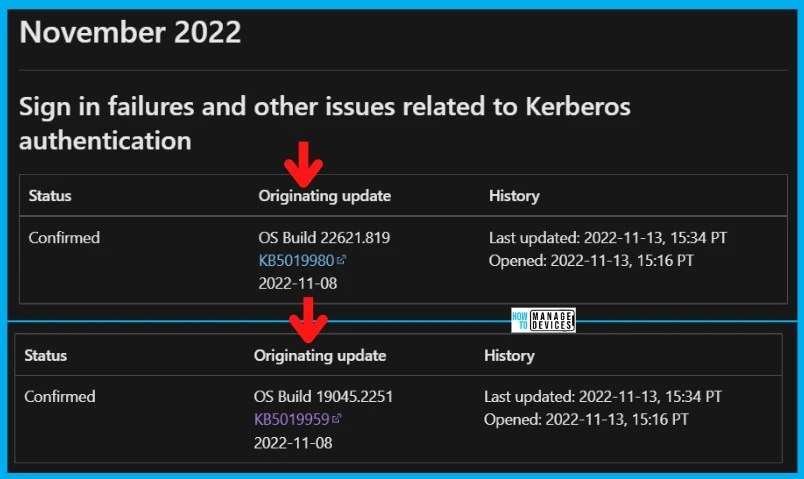
Microsoft confirmed the Sign in failures and other issues related to Kerberos authentication after installing the security patches – Windows 11 KB5019961 And KB5019980 and Windows 10 KB5019959. OS build version OS Builds 22621.819 and 19045.2251.
After installing updates released on November 8, 2022, or later on Windows Servers with the Domain Controller role, you might have issues with Kerberos authentication. This issue might affect any Kerberos authentication in your environment. Some scenarios which might be affected:
- Domain user sign-in might fail. This also might affect Active Directory Federation Services (AD FS) authentication.
- Group Managed Service Accounts (gMSA) used for services such as Internet Information Services (IIS Web Server) might fail to authenticate.
- Remote Desktop connections using domain users might fail to connect.
- You might be unable to access shared folders on workstations and file shares on servers.
- Printing that requires domain user authentication might fail.
NOTE! – When this issue is encountered you might receive a Microsoft-Windows-Kerberos-Key-Distribution-Center Event ID 14 error event in the System section of Event Log on your Domain Controller with the below text. Note: affected events will have “the missing key has an ID of 1”:
Author
Alok is a Master of Computer Applications (MCA) graduate. He loves writing on Windows 11 and related technologies. He likes to share his knowledge, quick tips, and tricks.




Hello, after the patch on November we have the problem with some services on Citrix Delivery controller. I cant even start Citrix Studio after the update. In the Active directory we have
msDS-SupportedEncryptionTypes = 24
So do you think, set this to 28 should work and I should be able to start the services on that computer?
I had same error, it fixed by changing the value to 28
“Failed to initialize credentials using keytab [MEMORY:/etc/krb5.keytab]: KDC has no support for
encryption type. Unable to create GSSAPI-encrypted LDAP connection.” on Red Hat Enterprise Linux 8.6
Had the same issue on RHEL 9 joining a new host after the November update. Same error with the KDC has no support for encryption type.
Changed the value of msDS-SupportedEncryptionTypes from 24 to 28 and restarted the sssd service on the RHEL 9 host and the error went away and I was able to login via AD credential again.