






How to Fix Server Unavailable Error when Opening Automatic Replies for Shared Mailboxes in Classic Outlook
Let’s discuss how to fix the Server Unavailable Error when Opening Automatic Replies for Shared Mailboxes in Classic Outlook. If you are using Classic Outlook and see a “Server Unavailable” error when trying to access Automatic Replies for a shared mailbox, it may be due to a known issue in recent builds.
This issue has been reported in Outlook builds starting from 18510.10000 and was first identified in Version 2505 (Build 18827.20128). The error typically occurs when a shared mailbox is added as either a primary or additional account in the Outlook profile.
We already covered a known issue in Classic Outlook where error 0xc0000409 causes the application to crash when opening or creating a new email. This problem happens because Outlook cannot access the Forms Library, which is required for composing or viewing emails.
In this post, we will walk you through how to fix the “Server Unavailable” error that occurs when trying to open Automatic Replies for shared mailboxes in Classic Outlook. This issue typically affects users who have added a shared mailbox as a primary or additional account and are using newer Outlook builds.

Table of Contents
What is the Issue with Automatic Replies in Outlook?
When using a shared mailbox added as either a primary or additional account in an Outlook profile, trying to access the Automatic Replies setting results in the following error:
“Your automatic reply settings cannot be displayed because the server is currently unavailable. Try again later.” .
Fix Server Unavailable Error when Opening Automatic Replies for Shared Mailboxes in Classic Outlook
Microsoft is aware of the issue and is expected to release a fix in a future update. Here is a detailed explanation of the available workarounds for fixing the “Server Unavailable” error when opening Automatic Replies for shared mailboxes in Classic Outlook.
- Global Issue Impacting Outlook 2016 MSI Users in January 2025
- How to Fix Calendar Time Selection Issue in Outlook When Selecting Multiple Calendars and Timeslots
- Outlook for Mac Email Recall Tips for Resending and Fixing Email Errors
Use Outlook Web Access (OWA) to Set Automatic Replies
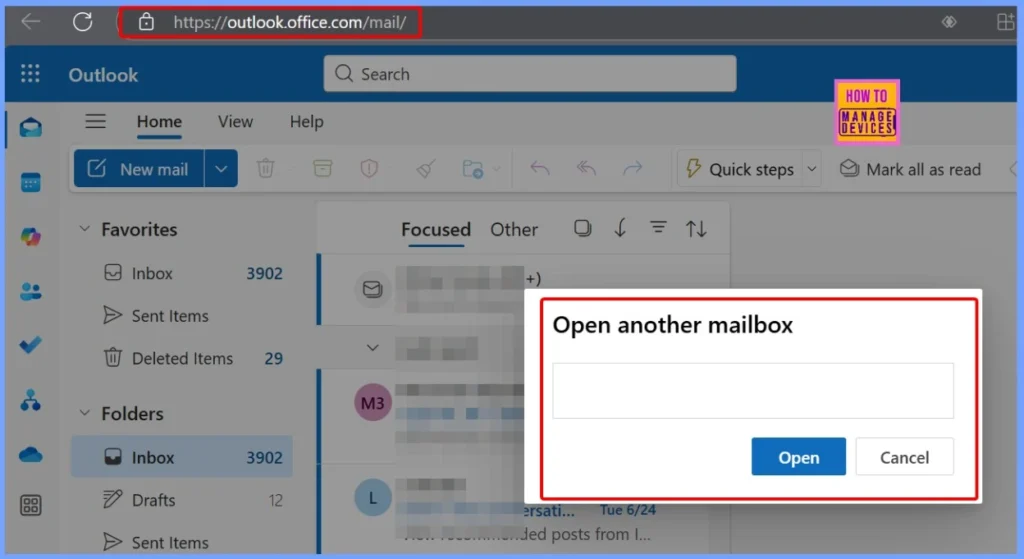
Since the issue is specific to the Outlook Desktop client, one quick and effective workaround is to use Outlook Web Access (OWA) to configure automatic replies. To do this, open a browser and navigate to https://outlook.office.com, then sign in using your Microsoft 365 credentials.
- Click on your profile picture in the top right corner.
- Select “Open another mailbox”, then enter the name of the shared mailbox and open it.
- Once inside the shared mailbox, click the Settings gear icon at the top.
- Navigate to:Account > Automatic Replies
- Configure the automatic replies from there.
Switch to the Semi-Annual Enterprise Channel
This issue happens in the Current Channel builds of Outlook. To avoid the problem, you can switch to the Semi-Annual Enterprise Channel, which is a more stable and carefully tested version of Microsoft 365. This channel receives fewer updates, but they are well-tested and less likely to include new bugs like this one.
- The bug was introduced in builds 18510.10000+.
- The fix is expected to be rolled out before this bug reaches the Semi-Annual Channel.
- By switching to this channel, you ensure Outlook is on a tested build that doesn’t include this issue.
- Global Issue Impacting Outlook 2016 MSI Users in January 2025
- How to Fix Calendar Time Selection Issue in Outlook When Selecting Multiple Calendars and Timeslots
- Outlook for Mac Email Recall Tips for Resending and Fixing Email Errors
How to Switch using a Registry Key
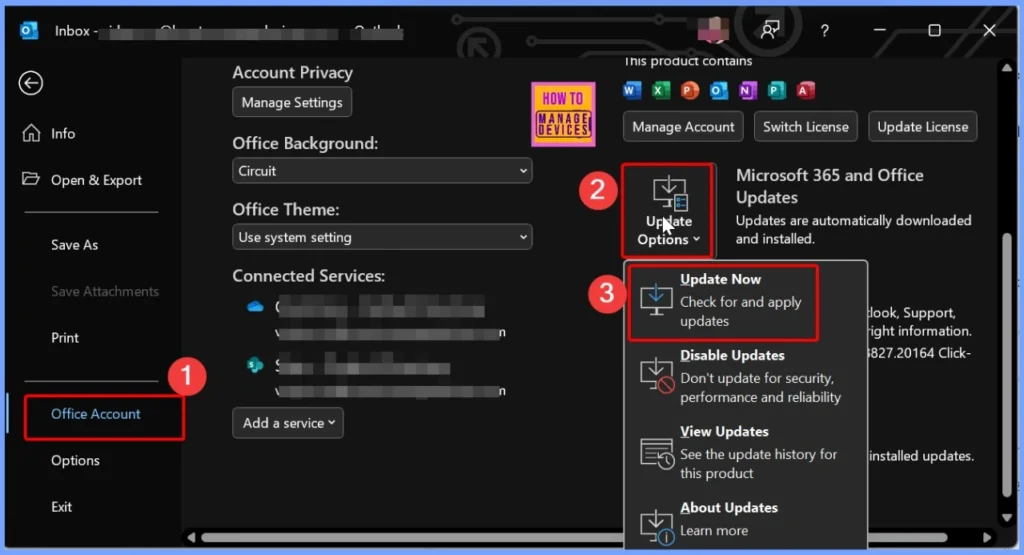
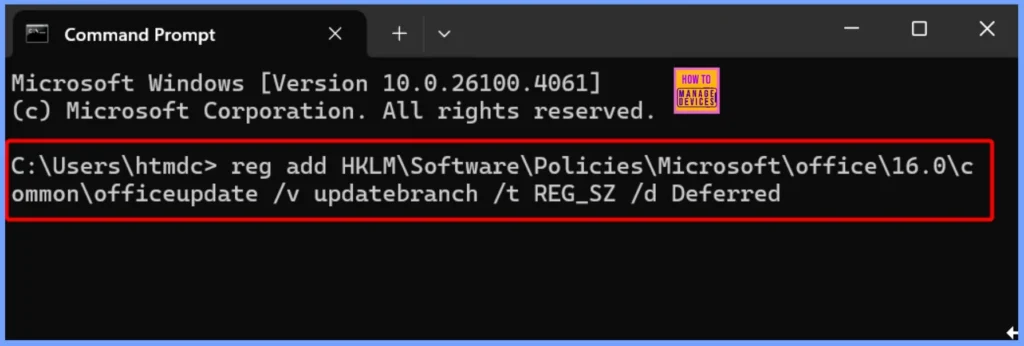
You can easily switch to the Semi-Annual Enterprise Channel. Open Command Prompt as an administrator and run the below command. After running the command, open Outlook and go to File > Office Account > Update Options > Update Now. This will start the process of switching your Office installation to the Semi-Annual Enterprise Channel.
reg add HKLM\Software\Policies\Microsoft\office\16.0\common\officeupdate /v updatebranch /t REG_SZ /d Deferred
Revert to a Previous Build
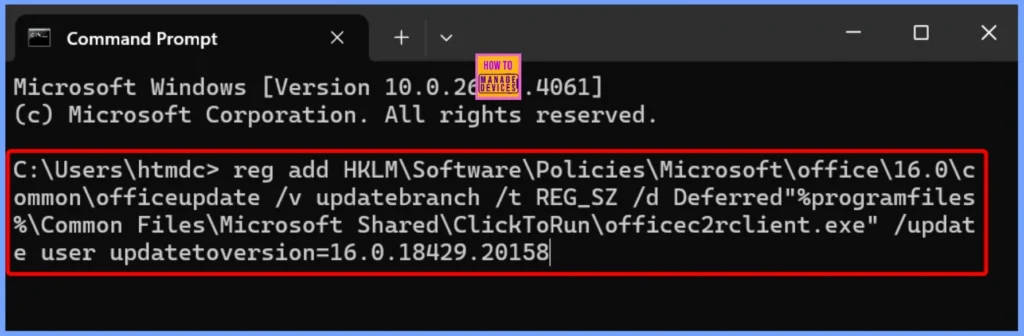
If you want to check whether the error is caused by a recent Outlook update, you can roll back to a previous version that worked fine. The recommended version is 2501 (Build 18429.20158), which does not have this issue.
- To do this, open Command Prompt as Administrator and run the following command.
- This will downgrade Outlook to the selected version.
- Once you are done testing and want to go back to the latest version, open Outlook and go to File > Office Account > Update Options > Update Now to update Outlook again.
“%programfiles%\Common Files\Microsoft Shared\ClickToRun\officec2rclient.exe” /update user updatetoversion=16.0.18429.20158
Need Further Assistance or Have Technical Questions?
Join the LinkedIn Page and Telegram group to get the latest step-by-step guides and news updates. Join our Meetup Page to participate in User group meetings. Also, join the WhatsApp Community to get the latest news on Microsoft Technologies. We are there on Reddit as well. You can see these details have been discussed in Reddit and other social media forums.
Reference:
Cannot open the Automatic Replies setting of a shared mailbox in Classic Outlook
Author
Anoop C Nair has been Microsoft MVP for 10 consecutive years from 2015 onwards. He is a Workplace Solution Architect with more than 22+ years of experience in Workplace technologies. He is a Blogger, Speaker, and Local User Group Community leader. His primary focus is on Device Management technologies like SCCM and Intune. He writes about technologies like Intune, SCCM, Windows, Cloud PC, Windows, Entra, Microsoft Security, Career, etc.




Discussion