






Share Notes with the Meeting or Take Notes on Your Own stopped working | Outlook Blank Page Title Issue
Hi, we are discussing a new topic related to the Share Notes with the Meeting or Take Notes on Your Own stopped working issue. This issue is related to the Outlook Blank Page Title Issue. As you all know, Outlook has recently been integrated with all 365 applications, and many issues have been reported with Outlook.
Now, Microsoft officially confirms that there is an issue. Page Title is blank when you send a meeting from classic Outlook to OneNote. This issue mainly happened after the update to the office version 2410. It happens to users when they try to send meetings from classic Outlook to Onenote.
This issue is not entirely fixed, but Microsoft provides workarounds for those issues. We know that issues always cause trouble and affect users’ workflows. Microsoft Outlook and OneNote Integration are the best enhancements that improve users’ productivity.
When these issues arise, Microsoft continually devises workaround steps that improve everything. In this post, we will briefly overview the blank page title when you send a meeting from classic Outlook to OneNote.

What are the Benefits of Integrating Outlook and OneNote?
Share Notes with the Meeting or Take Notes on Your Own stopped working
Above, we discussed an overall view of the Page Title being blank when you send a meeting from classic Outlook to OneNote. However, a recent update to Office (Version 2410) has caused a bug that leaves the Page Title blank in OneNote when you send a meeting from classic Outlook.
| Issue |
|---|
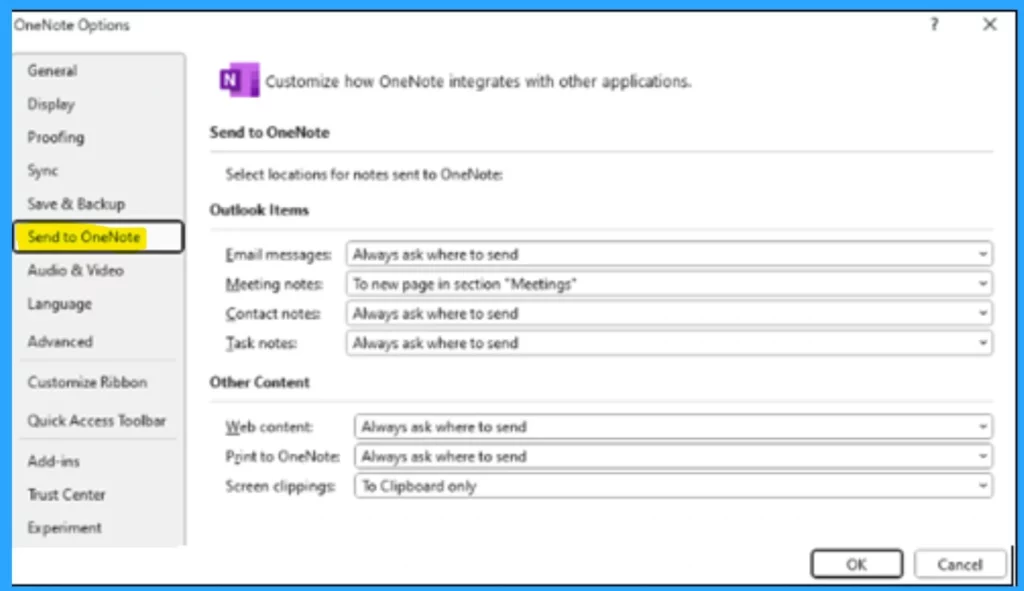
| After updating Office to version 2410, users reported that the page title was blank when they sent a meeting from classic Outlook to OneNote Desktop. This issue happens when the user chooses “Take notes on your own” or “Share notes with the meeting” and sets Meeting notes as “To new page in the section.” |
- FIXED Microsoft Outlook Outage Worldwide Users Face Email Logins Blocked App Crashes Reported
- Fix Outlook Error when Updating Meetings in Personal or Shared Calendar
- Classic Outlook Startup Crashes Caused by ucrtbase.dll and Learn How to Run Clean Rules Command
Workaround for the Issue Outlook Blank Page Title Issue
This issue may happen for many reasons. When we can’t get the proper title, locating and managing meeting notes is tough. Recently, Microsoft announced some workarounds, suggesting that the affected users manually copy the title.
- Suppose the user gets the page title blank when they send a meeting from classic Outlook to OneNote Desktop. In that case, the user can manually copy the meeting title from Outlook and paste it on the OneNote page title.
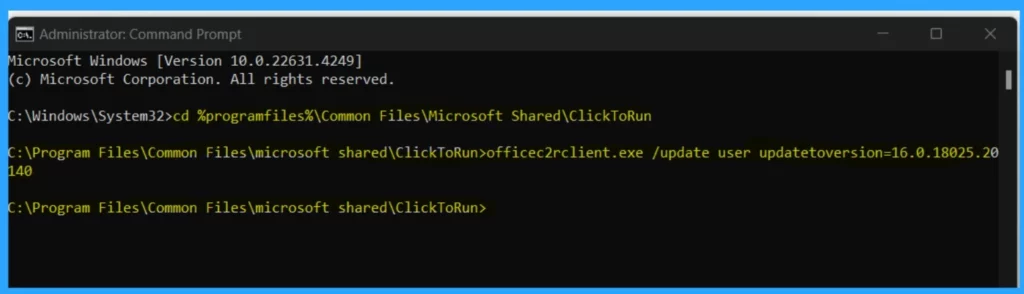
- Another method they suggest is to revert the office to a previous version. So you can use it before version 2410; this reversion can be done through a command.
- Open a Command Prompt as administrator.
- Then copy and paste the below command.
- You can check the update history for available builds and revert to a previous version.
cd %programfiles%\Common Files\Microsoft Shared\ClickToRun
officec2rclient.exe /update user updatetoversion=16.0.18025.20140
Need Further Assistance or Have Technical Questions?
Join the LinkedIn Page and Telegram group to get the latest step-by-step guides and news updates. Join our Meetup Page to participate in User group meetings. Also, Join the WhatsApp Community to get the latest news on Microsoft Technologies. We are there on Reddit as well.
Author
Anoop C Nair has been Microsoft MVP for 10 consecutive years from 2015 onwards. He is a Workplace Solution Architect with more than 22+ years of experience in Workplace technologies. He is a Blogger, Speaker, and Local User Group Community leader. His primary focus is on Device Management technologies like SCCM and Intune. He writes about technologies like Intune, SCCM, Windows, Cloud PC, Windows, Entra, Microsoft Security, Career, etc.




Discussion