






Entra ID Auth Methods WHfB Authenticator push Authenticator passwordless Authenticator passkey
Entra ID Auth Methods WHfB, Authenticator push’ Authenticator passwordless The authenticator passkey Did you know that Microsoft Entra ID has different authentication methods?
The Username + Password method is used only for the initial login. Authenticator Lite in Outlook is a second step for added security, known as multi-factor authentication (MFA). Authenticator Number Match and Voice Calls can be used as a second step for MFA and resetting your password, but they must be used alongside a first step, such as your password.
Methods like FIDO2 Passkeys and Windows Hello for Business (WHfB) provide strong security because they meet the requirements for multi-factor authentication (MFA). However, they cannot be used for self-service password resets (SSPR) in Entra ID. It is important to note that these MFA methods can still be used to change your password through My Security Info, but this process differs from SSPR because you need to know your current password to change it.
In this post, you will find all the details about the different authentication methods in Entra ID and learn how each works differently. Each method has a specific purpose: some are used only for logging in, while others are for extra security.

Table of Contents
What are Microsoft Entra ID Authentication Methods?
Microsoft Entra ID authentication methods allow users to sign in to their accounts and verify their identity securely. These methods help protect accounts by adding layers of security.
What are Passwordless Authentication Methods?
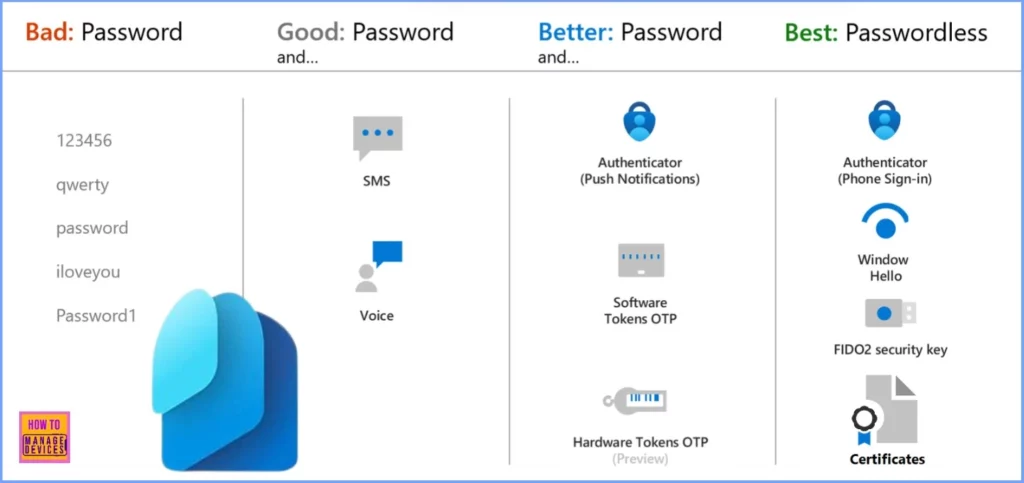
Passwordless methods include Windows Hello, Passkeys (FIDO2), and the Microsoft Authenticator app.
Why Does Microsoft Recommend Passwordless Authentication?
Passwordless methods offer a more secure sign-in experience, as they reduce the risk of password-based attacks.
Can I Still Use a Username and Password to Sign In?
Yes, usernames and passwords can still be used, but Microsoft encourages switching to passwordless options to enhance security.
How can I Switch to a Passwordless Method?
In your security settings, you can set up passwordless authentication through Entra ID by choosing methods like Windows Hello, Passkeys, or the Microsoft Authenticator app.
Entra ID Auth Methods WHfB Authenticator push Authenticator passwordless Authenticator passkey
Microsoft Entra Multi-Factor Authentication (MFA) provides enhanced security during user sign-ins by adding more than just a password. When MFA is enabled, users are asked to confirm their identity through various methods, such as responding to a push notification, inputting a code generated by a software or hardware token, or answering a text message or phone call.
- How to Create and Use Passkeys in Windows
- What is the Face Check Feature in Entra
- New Entra Phishing Resistant Passwordless Authentication | Zero-Trust Security Strategy | Explicit Verification
Enhancing Security with Microsoft Entra Authentication Methods
With MFA, users may be prompted to verify their identity through additional methods. Microsoft recommends enabling combined security information registration. This allows users to register for MFA and self-service password reset (SSPR) simultaneously.
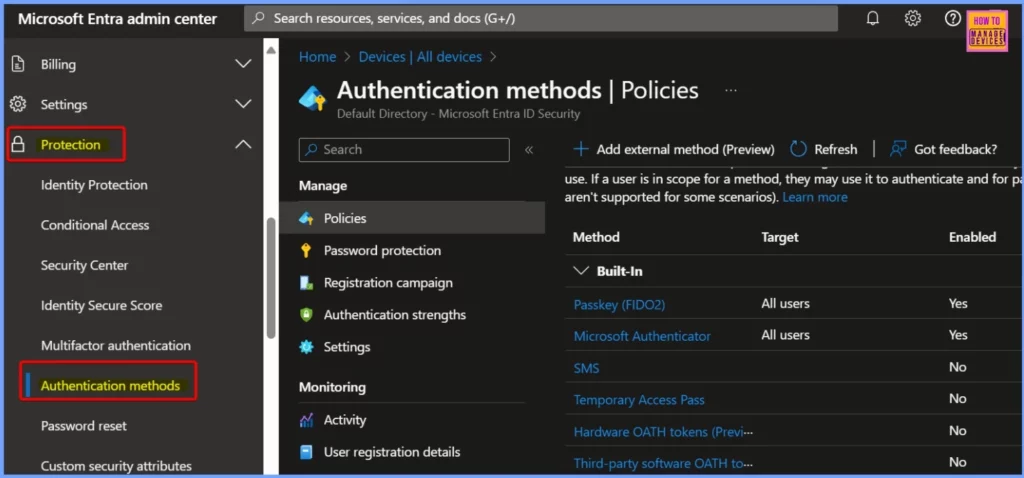
- Access the Entra Admin Center. Go to Protection > Authentication methods > Authentication method policy.
All-in-One Authentication Solution
The Microsoft Authenticator Passkey is the ultimate authentication method in Entra ID, covering every need in one solution. It serves as the primary login, offers multi-factor authentication (MFA), and enables self-service password reset (SSPR), all in a single.
Read More – How to Enable Passkeys in Microsoft Authenticator
Authentication and Verification Methods Available in Microsoft Entra ID
password or a FIDO2 security key are the primary means for signing into applications or devices. Other methods are designed to provide an additional layer of security. They can only be used as a secondary option, especially during Microsoft Entra multi-factor authentication (MFA) or self-service password reset (SSPR).
| Entra Authentication Methods | Primary authentication | Secondary authentication |
|---|---|---|
| Windows Hello for Business | Yes | MFA* |
| Microsoft Authenticator push | No | MFA and SSPR |
| Microsoft Authenticator passwordless | Yes | No* |
| Microsoft Authenticator passkey | Yes | MFA and SSPR |
| Authenticator Lite | No | MFA |
| Passkey (FIDO2) | Yes | MFA |
| Certificate-based authentication | Yes | MFA |
| OATH hardware tokens (preview) | No | MFA and SSPR |
| OATH software tokens | No | MFA and SSPR |
| External authentication methods (preview) | No | MFA |
| Temporary Access Pass (TAP) | Yes | MFA |
| SMS | Yes | MFA and SSPR |
| Voice call | No | MFA and SSPR |
| Password | Yes | No |
- Native Authentication for Microsoft Entra External ID | Complete Control Over Login Experience
- How to Setup Passwordless Login for Microsoft Accounts
- Entra External ID Now Supports SMS as an MFA Option
Need Further Assistance or Have Technical Questions?
Join the LinkedIn Page and Telegram group to get the latest step-by-step guides and news updates. Join our Meetup Page to participate in User group meetings. Also, Join the WhatsApp Community to get the latest news on Microsoft Technologies. We are there on Reddit as well.
Resources
Authentication methods and features – Microsoft Entra ID | Microsoft Learn
Author
Anoop C Nair has been Microsoft MVP from 2015 onwards for 10 consecutive years! He is a Workplace Solution Architect with more than 22+ years of experience in Workplace technologies. He is also a Blogger, Speaker, and Local User Group Community leader. His primary focus is on Device Management technologies like SCCM and Intune. He writes about technologies like Intune, SCCM, Windows, Cloud PC, Windows, Entra, Microsoft Security, Career, etc.




Discussion