






Shared Links are Now Generally Available in Edge Version125 on Mobile
Exciting News! Shared Links are Now Generally Available in Edge Version 125 on Mobile. As you know, Microsoft Edge has released version 125 for mobile devices, enhancing user experience with new features. Edge is an amazing web browser that always introduces excellent features for users.
You know, version 125 introduced a crucial feature in this update called Shared links, which are now generally available, making it easier for users to share web content. Now you think, what is the purpose of it? The shared links feature is essential nowadays, so first, thanks to Microsoft 365 files being added to Outlook and Teams, people no longer have to waste time looking through old messages for important links they shared.
With the Shared link option now, we can easily find and download Microsoft 365 files like Word docs, Excel sheets, and PowerPoints. It’s similar to iMessage. Microsoft is working hard to improve phone browsing, such as adding a feature called Shared Links. This feature is now rolling out on both Android and iOS devices.
This new feature will be a significant improvement for users. It will reduce the effort required to search old messages for links and files. Now, it gets very quickly, including Microsoft 365 files, shared by colleagues via Outlook and Teams. In this post, we can look into the overall details of Shared Links in Edge Version125 on Mobile.

- Easy to Change Display Language in Microsoft Edge
- Enable Disable Copilot Rewrite Feature on Microsoft Edge
- MS Edge Browser Automatic Options to Organize Tabs Stay Organized with Tab Groups
What is Shared Links in Edge Version125 on Mobile?
Shared Links are Now Generally Available in Edge Version125 on Mobile
We discussed many things about hard Links in Edge Version125 on Mobile. This feature is now rolling out on Android and iOS devices. The Shared Links feature in Edge works like the shared links in iMessages for Safari users on iPhone or iPad. To access shared links, follow the steps.
Note: The shared links feature replaces “Collections” in the Microsoft Edge overflow menu
- Launch the Microsoft Edge app on your mobile device
- Click the hamburger menu and choose
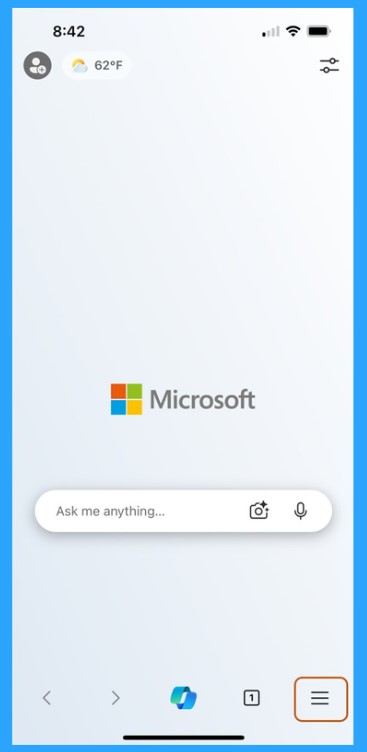
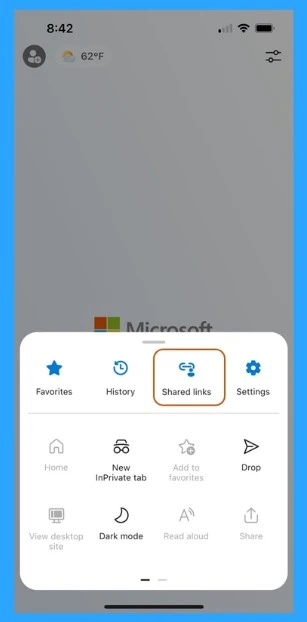
When you click on the hamburger menu, you will see many options, such as favourites, History, etc. There, you can find the new Shared link option. In these shared links, you can find links and files shared via Outlook or Microsoft Teams, including Microsoft 365.
- Turn On or Off Tab Performance Detector in Microsoft Edge
- Remove or Change Reading Pane Layout in Outlook for Windows 11
- Enable Disable MS Teams Notify When Available Settings
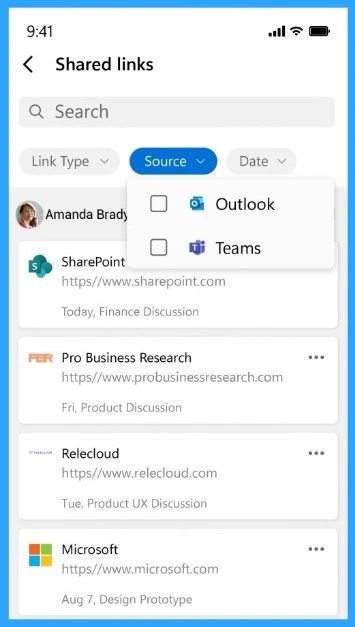
When you select shared links, the window includes a search bar, sorting options, and a list of shared links with icons indicating the file type or service. For example, there is an option for link type, source type, and date. Also, here, you can see that the source option has 2 options(Outlook and Teams).
| Share links Sources | Info |
|---|---|
| Outlook | You can get shared links and files through Outlook. You don’t need to spend time on searching for those links on Email. |
| Teams | You can now get shared links from teams. If colleagues sent any important links or files in the past, you can find them with this new feature. |
Reference
Release notes for Microsoft Edge Mobile Beta Channel
We are on WhatsApp. To get the latest step-by-step guides and news updates, Join our Channel. Click here –HTMD WhatsApp.
Author
Anoop C Nair is Microsoft MVP! He is a Device Management Admin with more than 20 years of experience (calculation done in 2021) in IT. He is a Blogger, Speaker, and Local User Group HTMD Community leader. His main focus is on Device Management technologies like SCCM 2012, Current Branch, and Intune. He writes about ConfigMgr, Windows 11, Windows 10, Azure AD, Microsoft Intune, Windows 365, AVD, etc.




Discussion