






Fix SCCM Scan Failed to Add Update Source for WUAgent | ConfigMgr
Let’s find a fix for SCCM Scan Failed to Add Update Source for WUAgent. Software Update Scan Issues in SCCM Due to Proxy Settings When the proxy settings are configured on the core servers. They can cause communication blocks for clients trying to reach the WSUS server. All client communications intended for the WSUS/SCCM server (FQDN) are halted at the proxy server.
- FIX Failed to Search on WUAgent Error 0x8007000e for SCCM Clients
- SCCM Troubleshooting Scan Errors Patching Software Update Related Endpoint Manager
| Index |
|---|
| Fix SCCM Scan Failed to Add Update Source for WUAgent |
| Solution – Scan Failed to Add Update Source for WUAgent |
Fix SCCM Scan Failed to Add Update Source for WUAgent
We deployed patches to Windows Server 2008 R2 SP1 using SCCM and waited until the deadline. Like any other error, this issue is a bit particular because it generates a single-line mistake with a generic code and two different errors and error codes.
The screenshot is given below:
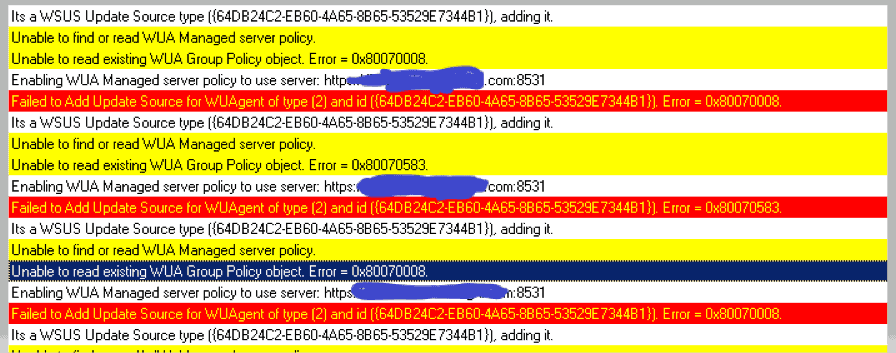
When jumping directly to the solution, let’s understand the root cause for better understanding. The screenshot was taken from WUHandler.log during troubleshooting.

For more details on how to collect or read SCCM logs, please refer to the article below: – https://www.anoopcnair.com/sccm-logs-files-configmgr-memcm/
We deployed patches to Windows Server 2008 R2 SP1 using SCCM and waited until the deadline. The deadline was crossed, and maintenance windows were over. Nothing triggered.
When we started troubleshooting, we found that the file that applies the group or SCCM policies shows the old modification date. However, it should look like the one below and have a recent date and time.
| Name | Date modified | Type | Size |
|---|---|---|---|
| Registry.pol | 7/25/2020 11:04 PM | POL file | 79 KB |

Solution – Scan Failed to Add Update Source for WUAgent
The fix for the issue is to rename the Registry.pol and restart the SMS agent services.
- Go to the below path: C:\Windows\System32\GroupPolicy\Machine
- Rename the Registry.pol file.
- Take a copy of this file before you rename it.
- Now restart CCMEXEC- SMS Agent Host service and trigger SCAN.
- After this step, we started reading WUAhandler:
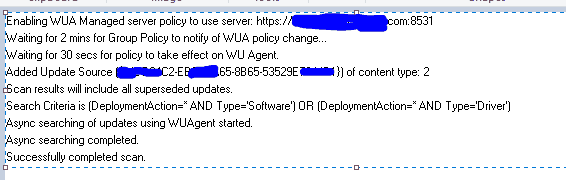
The scan was completed successfully, and after triggering the “Software Update Deployment Evaluation Cycle,” patches were exposed in the Software Center.
It was installed and rebooted. The server is Compliant. Happy Learning. You can also try renaming the Software Distribution Folder if you still see any errors in WUAHandler. Steps below:
- Start an elevated command prompt.
- Run the following commands, hitting enter after each line:
net stop wuauserv
cd %systemroot%
ren SoftwareDistribution SoftwareDistribution.old
net start wuauserv - Reboot
Disclaimer – The information provided on the site is for general informational purposes only. All information on the site is provided in good faith; however, we make no representation or warranty of any kind, express or implied, regarding the accuracy, adequacy, validity, reliability, availability, or completeness of any information on the website.
Resources
- Fix SCCM Scan Issues with Software Updates Patching | ConfigMgr
- SCCM How to Get a Troubleshooting Report for Patching Software Update Related Scan Errors
- How to troubleshoot software update scan failures in System Center 2012 Configuration Manager
We are on WhatsApp. To get the latest step-by-step guides and news updates, Join our Channel. Click here –HTMD WhatsApp.
Author
Deepak Rai is a Technical Lead with over 14 years of experience in IT. He specializes in SCCM, Intune, and Azure. Throughout his career, he has worked on various platforms such as Active Directory, Exchange, Veritas NETBACKUP, Symantec Backup Exec, NDMP devices like Netapp, EMC Data Domain, Quantum using Backup Exec 2010 and 2012, and HP StorageWorks 4048 MSL G3. He also has experience in data deduplication-related troubleshooting. Ultimately, he returned to his roots as an IT Engineer focusing on SCCM technology.




More than solution I would like to know y it’s happening, and renaming registry file is temporary solution
StaffGood Question. Characteristically it happens because of Corrupt local group policy.
There are several methods to fix this and fix mention in this blog is one of them.
Few more are:
Most of them look self explainarry by reading the statement itself. The only way not clear is point 3 which i am mentioning below:
1. Delete or move registry.pol file
2. Move or delete secedit.sdb file
3. Use Command Prompt
4. Perform DISM and SFC scans
5. Disable Certificate Services Client – Certificate Enrollment Policy
6. Delete the contents of the History folder
For No 3.
Start Command Prompt as an administrator.
When Command Prompt starts, run the following commands:
RD /S /Q “%WinDir%\System32\GroupPolicyUsers”
RD /S /Q “%WinDir%\System32\GroupPolicy”
gpupdate /force
hi Deepak Rai,
thank you for your instruction. they help me a lot in troubleshoot my SCCM.
now i have bunch of error when client try to update / receive update from SCCM. as i checked log i got this msg ” Post to http://sccmsrv/ccm_system/request failed with 0x87d00323.” and ” Scan failed with error = 0x80240438 ” in WUAHandler.log
Could you give me some instruction how to troubleshoot the issue?
StaffHey Van Khoa Nguyen,
Sorry for the delayed response. I was just revisiting my blogs just to make sure i don’t have anything unanswered and found your question. We are responding to all the question promptly on our forum. https://forum.howtomanagedevices.com/login/