






Setup Synced Passkeys in Entra ID for Credentials to be Phishing‑Resistant and Portable Across Devices
Let’s discuss Setup Synced Passkeys in Entra ID for Credentials to be Phishing‑Resistant and Portable Across Devices. At Ignite 2025, Microsoft announced that Entra ID now supports Synced Passkeys across multiple credential providers.
This new feature is currently in preview and it represent the next step in passwordless authentication, balancing strong security with user convenience. This new feature making Entra one of the first enterprise identity platforms to embrace them.
With Setup Synced Passkeys users can authenticate with passkeys stored in cloud providers like Apple iCloud Keychain, Google Password Manager, 1Password, and Bitwarden. As you know that, Before this, Entra only supported device‑bound passkeys (stored locally on a TPM or hardware security key).
Synced passkeys expand usability by letting credentials follow the user across devices. The rollout is part of Microsoft’s broader passwordless strategy and Zero Trust alignment, aiming to make secure sign‑in easier and more scalable for enterprises.

Table of Contents
Setup Synced Passkeys in Entra ID for Credentials to be Phishing‑Resistant and Portable Across Devices
With this new capability, credentials to be phishing‑resistant and portable across devices, solving usability and recovery challenges. While they improve convenience, organizations must evaluate trust in the provider and enforce Conditional Access policies to ensure compliance.
| Advantages |
|---|
| For End users it easies passwordless sign‑in across devices without re‑enrollment. |
| For Admins, it Simplifies rollout of passwordless authentication at scale. |
| For security Teams, it maintains phishing resistance while reducing reliance on device‑bound credentials. |
- How to Enable Passkeys in Microsoft Authenticator
- Passkeys Now Available in Microsoft Entra ID
- Cloud PC Support for FIDO Devices and Passkeys on macOS and iOS
How to Setup Synced Passkeys in Entra ID
Here I am going to shows the demo which is showned on Ignite 2025 event by Nichole Peterson Senior Product Marketing Manager at Microsoft. Sign in to Microsoft Entra admin center > Go to Authentication Methods > Policies > Passkeys (FIDO2).
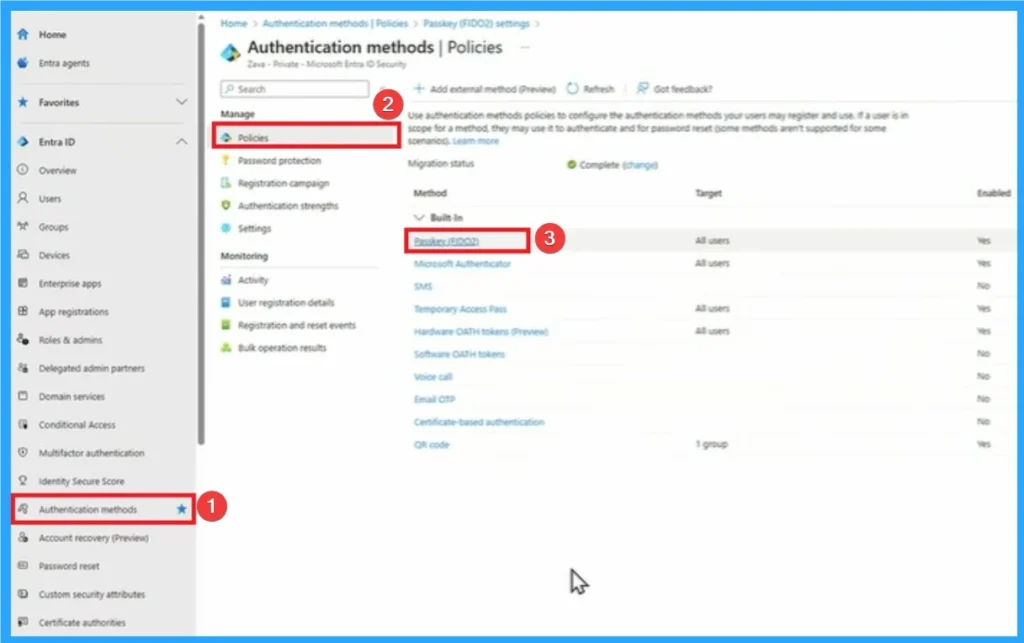
Enable and Target
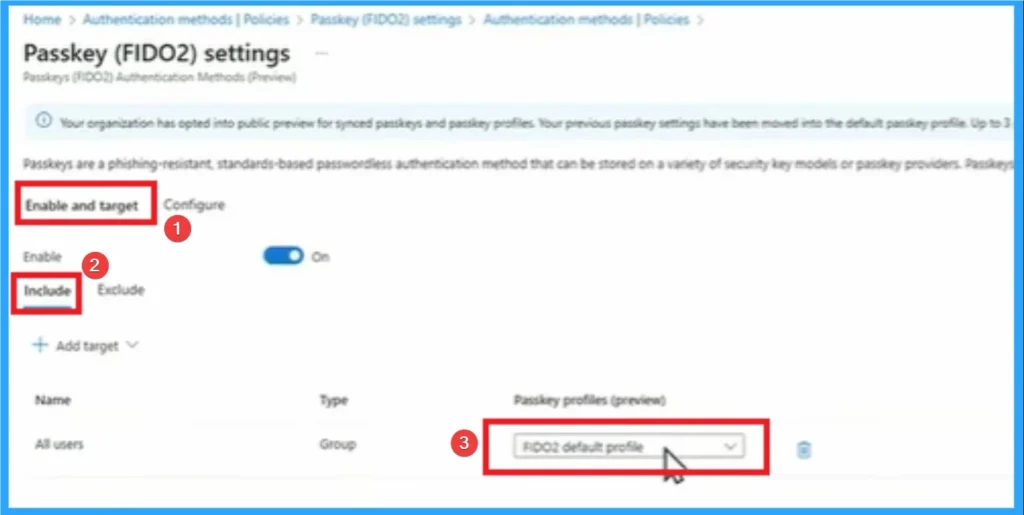
On this window you can see the option to Enable and Target Passkeys. Here 2 options are provided which are included and excluded. And here the passkey profile is FIDO2 which is the default profile, Click on that.
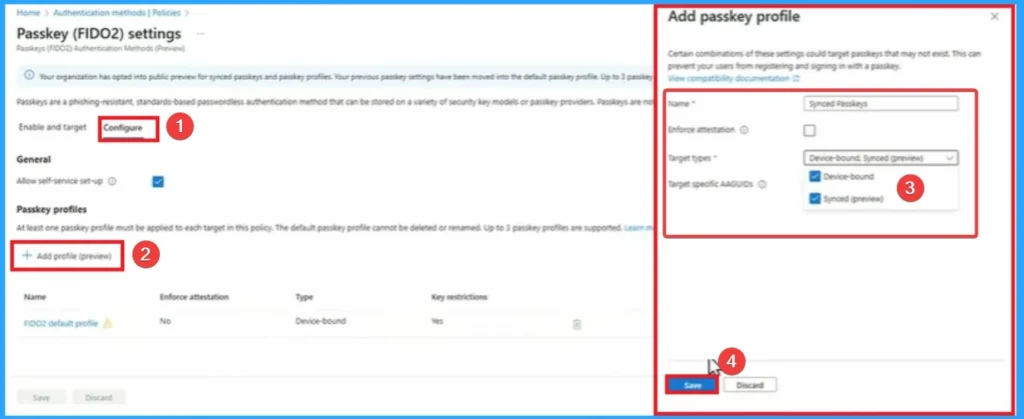
Configure Passkeys
On the Configure Passkey tab, you can add profile for passkeys. Click on the Add profile button and enter the Name and Target type for Passkeys. Here the Name is Synced Passkeys and Target types are device-bound, synced(preview). Then click on the Save button.
Complete Sync Passkeys
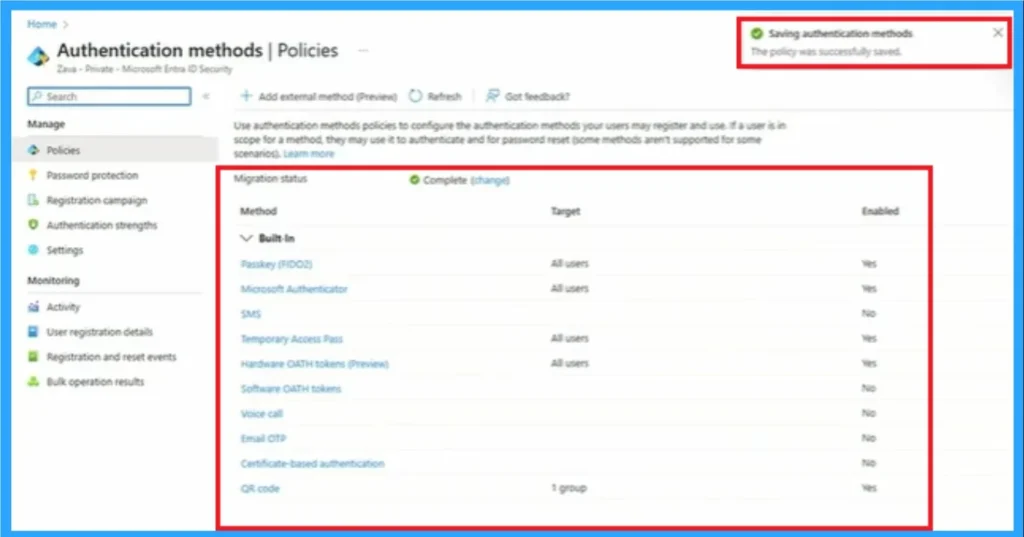
After clicking on the Save button, you will get the notification on the portal as saved authentication method. The screenshot below shows the notification and Authentication methods changed.
Need Further Assistance or Have Technical Questions?
Join the LinkedIn Page and Telegram group to get the latest step-by-step guides and news updates. Join our Meetup Page to participate in User group meetings. Also, Join the WhatsApp Community to get the latest news on Microsoft Technologies. We are there on Reddit as well.
Author
Anoop C Nair has been Microsoft MVP from 2015 onwards for 10 consecutive years! He is a Workplace Solution Architect with more than 22+ years of experience in Workplace technologies. He is also a Blogger, Speaker, and Local User Group Community leader. His primary focus is on Device Management technologies like SCCM and Intune. He writes about technologies like Intune, SCCM, Windows, Cloud PC, Windows, Entra, Microsoft Security, Career, etc.




Discussion