






Troubleshooting the Intune Device Limit Issue on macOS
Let’s Discuss Troubleshooting the Intune Device Limit Issue on macOS. As you all know that sometimes macOS Device Enrollment enrolling a macOS device into Microsoft Intune, users may sometimes encounter an error that prevents them from completing the process.
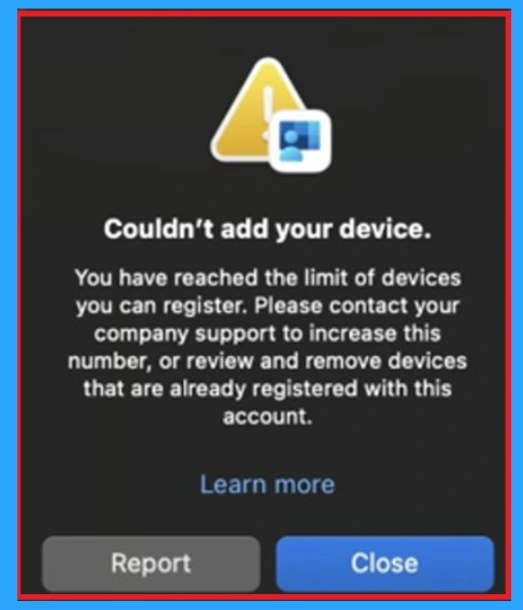
The error appears as a pop-up message stating Couldn’t add your device and when the maximum number of devices a user is allowed to register has already been reached. This device limit helps organizational policy and ensures that administrators can maintain control over how many devices are enroll with each account.
Each organization defines a maximum number of devices that a single user can register. Once that limit is over, any new macOS enrollment attempts will fail with this error. For example, some companies allow 5 devices, while others allow 10. If you already have that many devices linked, your new Mac cannot be added.
This usually happens to people who have used many work devices over time. Because of this, you may reach the device limit and showing this type of error messages. So, let’s look how this error will solve and what are the workarounds for this.

Table of Contents

Troubleshooting the Intune Device Limit Issue on macOS
Above we discuss an overall view on this issue of Device Limit Error. Now let’s look the details of this error. When you try to set up your Mac with Microsoft Intune, you might see an error message that says “Couldn’t add your device. You have reached the limit of devices you can register”.
- This means you already have the maximum number of devices connected to your account.
- Your company decides this limit so that admins can manage all devices properly.
| Error Message |
|---|
| You have reached the limit of devices you can register. Please contact your company support to increase this number, or review and remove devices that are already registered with this account. |
- FIX Autopilot V2 Enrollment Error 80180014 Issue with Corporate Device Identifier Format
- Intune MDM Enrollment Error Code 80180005
- Fix MDM Authentication Error Code 80180002
Workarounds
There are suggessting some Workarounds for this. Device limit is for security and control so,every user could add unlimited devices, it would be hard for IT to track and protect all of them. By setting a limit, the organizations makes sure only the devices you really use are connected.
Remove old or Unused Devices
This is the one of the important workaround that you can do. For that Intune admin center and open Devices > All Devices. Search for the affected user by entering their User Principal Name (UPN). This will show a list of all devices currently enrolled under that user’s account. Here you can remove the Inactive accounts
You can Ask IT Admins to Increase the Limit
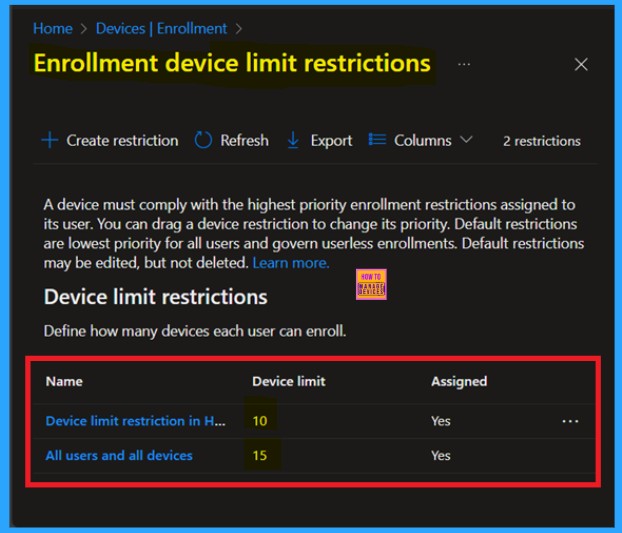
If you really need more devices and removing older ones is not enough, your IT team can increase the device limit for your account. Most organizations allow around 5 to 10 devices per user, but this can be changed in Microsoft Entra (Azure AD) settings. Once the limit is set, you can enroll your Mac along with your other devices.
Need Further Assistance or Have Technical Questions?
Join the LinkedIn Page and Telegram group to get the step-by-step guides and news updates. Join our Meetup Page to participate in User group meetings. Also, Join the WhatsApp Community to get the latest news on Microsoft Technologies. We are there on Reddit as well.
Author
Anoop C Nair has been Microsoft MVP for 10 consecutive years from 2015 onwards. He is a Workplace Solution Architect with more than 22+ years of experience in Workplace technologies. He is a Blogger, Speaker, and Local User Group Community leader. His primary focus is on Device Management technologies like SCCM and Intune. He writes about technologies like Intune, SCCM, Windows, Cloud PC, Windows, Entra, Microsoft Security, Career, etc


Discussion