






Troubleshoot Persistent Upload Failure when Submitting Private APKs via Intune Managed Google Play
Let’s discuss Troubleshoot Persistent Upload Failure when Submitting Private APKs via Intune Managed Google Play. Intune admins reporting issue while uploading private APK within Intune Managed Play Store portal. When trying to upload APK error messages are occurred.
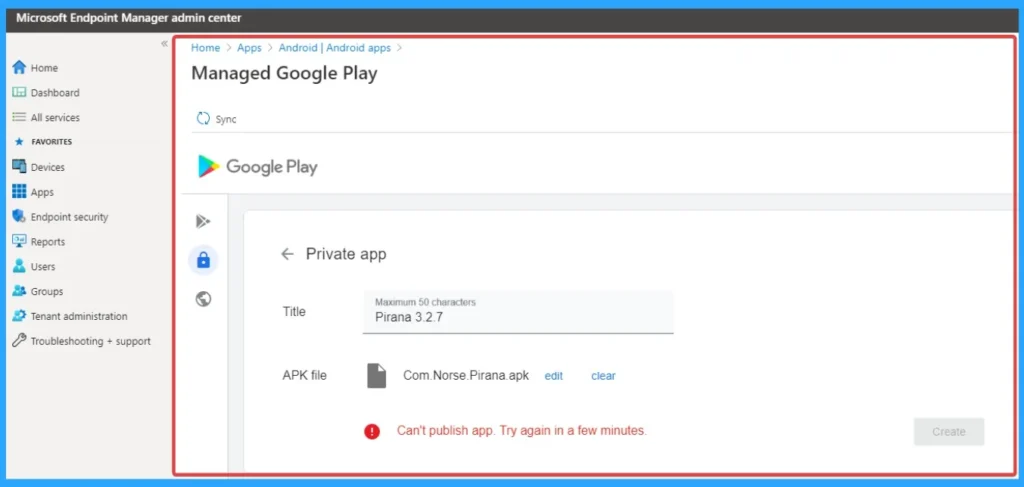
When uploading the APK file it errors, “Can’t publish app. Try again in a few minutes.” This error message is very generic and suggests its just a system global error but it’s been on going for a few days now. Admin This error message is very generic and suggests its just a system global error but it’s been on going for a few days now.
Due to this issue, Private app rollouts are blocked, causing delays in testing, piloting, or production deployment. When the Admin repeatedly uploading the APK without proper version code increments can lead to confusion or misconfiguration.
Some users confirmed similar issues, especially with versioning (e.g., needing a higher version code for updates). Others noted that Intune creates a developer account automatically when adding apps to the Private Play Store, even if you don’t have a paid Google developer account.

Table of Contents
Troubleshoot Persistent Upload Failure when Submitting Private APKs via Intune Managed Google Play
Due to this admins users and developers are frustrated. Developers without a paid Google Play account may feel stuck, as Intune’s portal lacks detailed error feedback. Potential for deploying outdated or incorrectly signed APKs if not carefully validated.
- How to Resolve Intune Android APK Deployment Failure via Managed Google Play
- How to Fix Intune Android App Installation Error 0xc7d14fb9
- How to Fix Intune Android App Installation Error 0xC7D14FBB
Reasons of Issue
Due to technical and platform-related reasons behind the APK upload failure in Intune Managed Google Play. The error message “Can’t publish app. Try again in a few minutes.” is often linked to backend service disruptions or portal instability. The below table shows other reasons.
| Reasons |
|---|
| APK Versioning Conflicts |
| APK Signing Issues |
| Unsupported API Levels |
Workarounds
There some Workarounds are possible to resolve this issue. You can follow Intune Graph API or PowerShell, Upload via Google Play Console, Validate APK Before Upload, Contact Microsoft Support.
Graph API or PowerShell
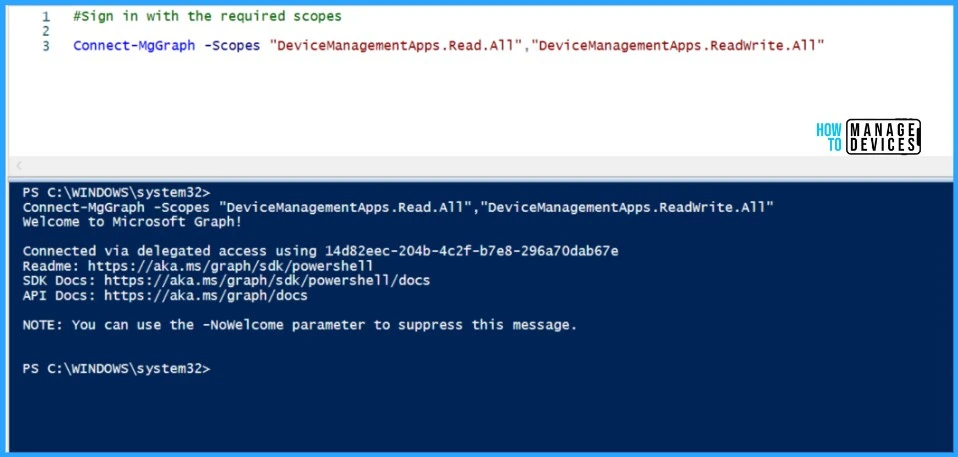
Graph API: Use the mobileApps endpoint to upload and assign Android LOB apps. PowerShell: Use the Microsoft.Graph.Intune module to script app uploads and assignments.
Upload via Google Play Console
Upload the APK directly to the Google Play Console under your organization’s developer account. This method provides detailed error feedback, helping you pinpoint signing, versioning, or compatibility issues.
Validate APK Before Upload
Confirm APK is signed correctly. Check that the version code is incremented. Ensure the target API level is supported by Intune.
Need Further Assistance or Have Technical Questions?
Join the LinkedIn Page and Telegram group to get the step-by-step guides and news updates. Join our Meetup Page to participate in User group meetings. Also, Join the WhatsApp Community to get the latest news on Microsoft Technologies. We are there on Reddit as well.
Author
Anoop C Nair has been Microsoft MVP for 10 consecutive years from 2015 onwards. He is a Workplace Solution Architect with more than 22+ years of experience in Workplace technologies. He is a Blogger, Speaker, and Local User Group Community leader. His primary focus is on Device Management technologies like SCCM and Intune. He writes about technologies like Intune, SCCM, Windows, Cloud PC, Windows, Entra, Microsoft Security, Career, etc


Discussion