






Troubleshoot and Compare Devices with Intune Copilot Prompt
Today, we will disuss Troubleshoot and Compare Devices with Intune Copilot Prompt. As you all know, BYOD (Bring Your Own Device) is important in MS Intune. The policy allows users to use their devices, such as tablets and laptops, to access company resources and data.
We know Copilot’s capability with these devices is very easy. It offers powerful features for comparing devices and resolving compliance issues, which is especially useful for organizations managing BYOD policies. Ensuring compliance across different devices can be challenging.
But Intune Copilot smooths this process by allowing administrators to compare non-compliant devices to compliant ones, identify issues, and take corrective actions to maintain security and compliance. It will also enable administrators to create custom prompts for accessing real-time data, such as network configuration details for specific devices.
When a custom prompt is submitted, Copilot processes the request and delivers the necessary information, enabling administrators to make informed decisions and troubleshoot effectively. In this post, you can see a demo for Comparing Device Issues in a BYOD Environment in Intune with the help of Copilot.

Table of Contents
Troubleshoot and Compare Devices with Intune Copilot Prompt
Above, we discussed an overall thing about Comparing Device Issues in a BYOD Environment in Intune. When troubleshooting device issues in a BYOD environment, comparing those with issues can be very helpful. Intune’s Copilot feature simplifies this process by offering a compare device.
- This tool allows you to quickly identify the differences between the 2 devices, making it easier to pinpoint the cause of the problem.
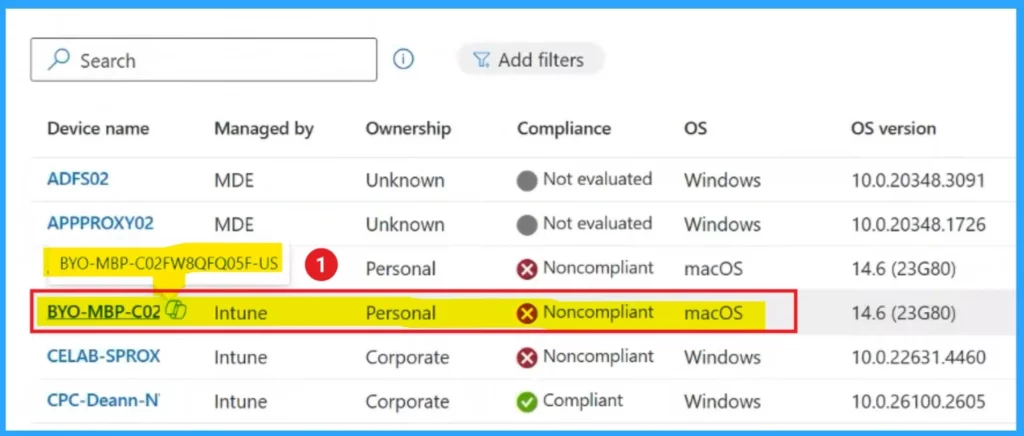
- First, log into the MS Intune admin center.
- Go to Devices> All Devices.
- You need to enter the name or ID of a working device to compare it with the issue one. This helps you see the differences and figure out what’s causing the issue.
- Intune Company Portal Setup for Personal Windows 10 Device Intune Enrollment Options
- How to Create Azure AD Dynamic Device Groups for Windows BYOD CYOD Devices Microsoft Intune
- BYOD MTD CYOD Strategies Work along with Intune ConfigMg
Prompt For Copilot
First, select the “Compare Device” option to compare devices in Intune’s Copilot. Then, enter the name or ID of a device that is functioning correctly. For example, if the device that is working properly is named “CPC-Dean,” type that name into the prompt to initiate the comparison.
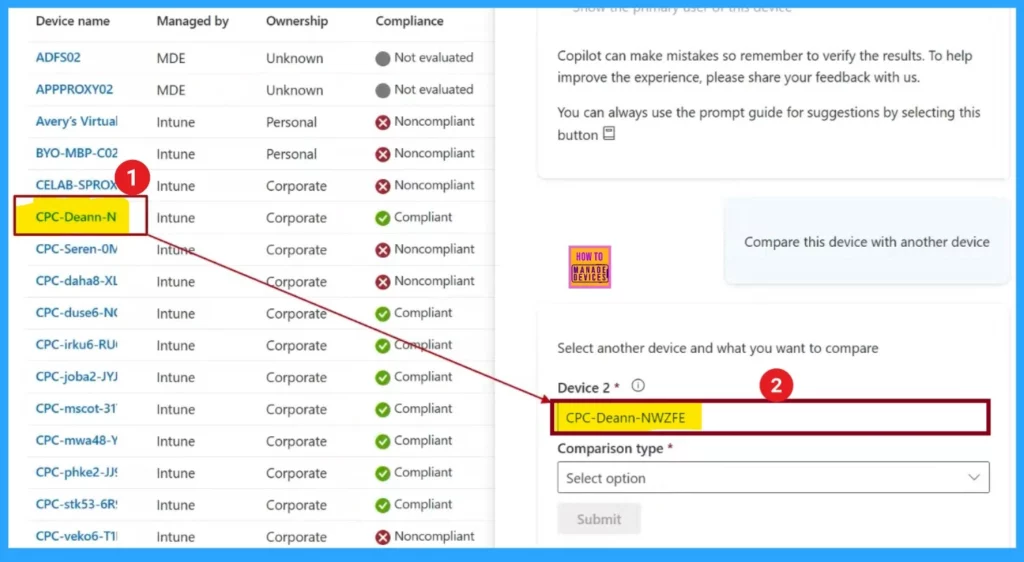
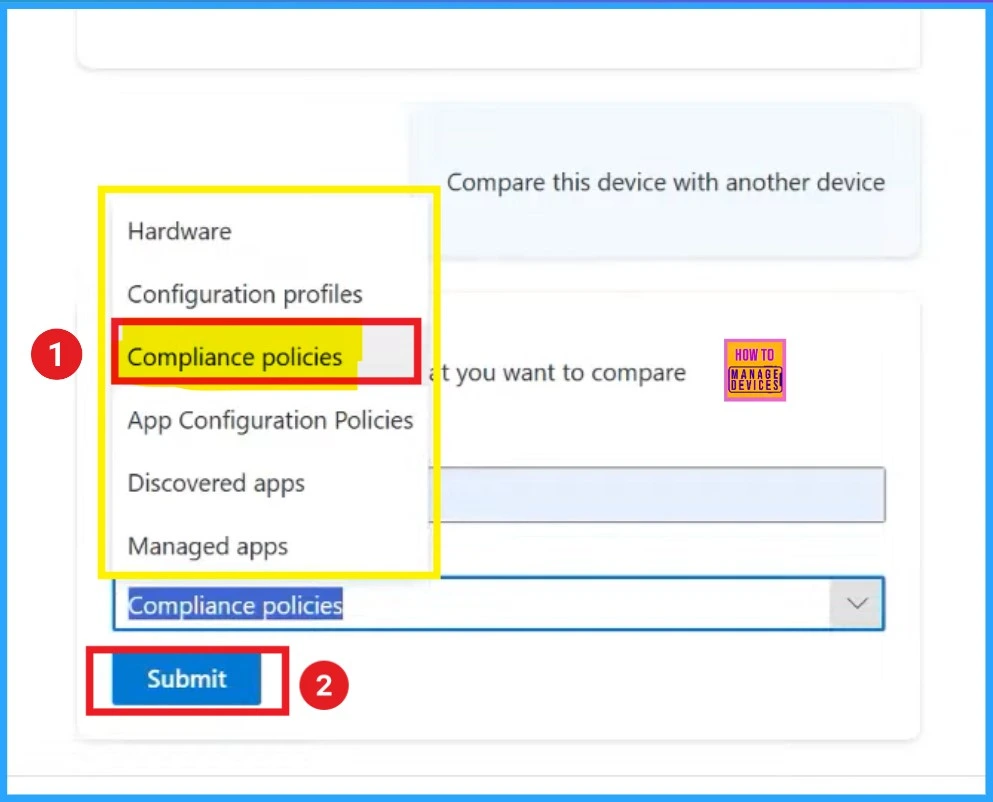
After selecting the devices to compare, you will choose the Comaprison Type. Here you have the options for compliance policies, hardware settings, or other features. If you need how the devices follow rules and policies, you would choose to compare the compliance policies.
- Then click on the Submit.
| Comparison Type |
|---|
| Hardware |
| Configuration profiles |
| Compliance policies |
| App Configuration Policies |
| Discovered apps |
| Managed apps |
Copilot Report
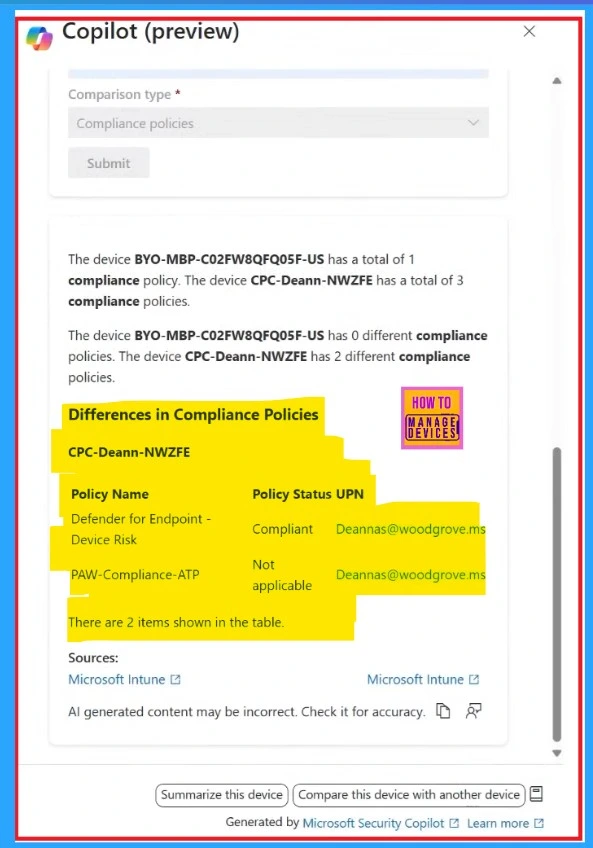
Now you can see the copilot result. When you compare the devices, Copilot will generate a detailed report that highlights the differences in compliance policies between the 2 devices. This report helps you identify issues that may be affecting the device.
If the first comparison doesn’t give enough details, you can quickly compare with another device using sameup prompts.
Reference
Effective prompt engineering for IT pros
Need Further Assistance or Have Technical Questions?
Join the LinkedIn Page and Telegram group to get the latest step-by-step guides and news updates. Join our Meetup Page to participate in User group meetings. Also, Join the WhatsApp Community to get the latest news on Microsoft Technologies. We are there on Reddit as well.
Author
Anoop C Nair has been Microsoft MVP for 10 consecutive years from 2015 onwards. He is a Workplace Solution Architect with more than 22+ years of experience in Workplace technologies. He is a Blogger, Speaker, and Local User Group Community leader. His primary focus is on Device Management technologies like SCCM and Intune. He writes about technologies like Intune, SCCM, Windows, Cloud PC, Windows, Entra, Microsoft Security, Career, etc.


Discussion