






How to Uninstall Remove SCCM Client Using CCMClean exe | ConfigMgr
Today, I will explain How to Uninstall Remove SCCM Client Using CCMClean exe | ConfigMgr. How do you uninstall and remove the SCCM client using CCMClean exe? This is one of the most viewed posts on this site.
I don’t know the reason behind those stats. How do you want to uninstall the ConfigMgr client or the SCCM client? And why?
Since SMS 2003 days, we’ve been using CCMClean.exe to uninstall or remove the client components.
Microsoft does not support removing or uninstalling SCCM 2007, 2012, or Current Branch (CB) clients using CCMClean.exe. So, what does that mean?

- Best Way To Uninstall SCCM Client | Remove ConfigMgr Client
- Enable Windows 10 Servicing Using SCCM | ConfigMgr | WSUS.
| Index |
|---|
| How to Uninstall Remove SCCM Client using CCMClean exe | ConfigMgr |
How to Uninstall Remove SCCM Client using CCMClean exe | ConfigMgr
Well, it’s not tested (extensively) and is not certified by Microsoft for the products ConfigMgr 2007/2012/CB. However, it may or may not work. In my experience, the CCMClean.exe successfully removes/uninstalls ConfigMgr/SCCM 2007, 2012, and CB client components. More details are below.
Download – Direct Download –> CCMClean.exe
Or Else (Download thevSMS 2003 toolkit and run it to install all the files – go to the installation directory, it includes CCMClean.exe )
We can run the CCMClean.exe on remote machines using PSEXEC.exe. You should have administrative privileges on that remote machine.
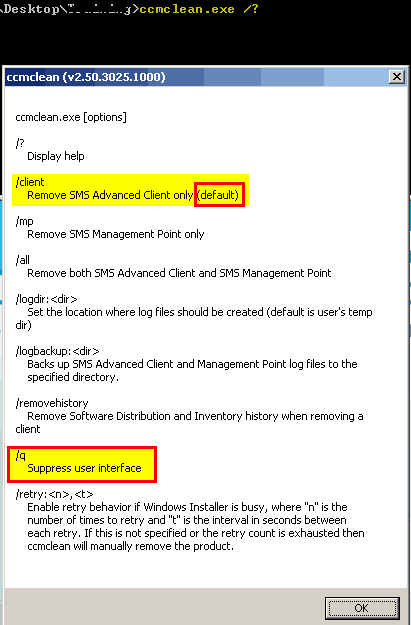
The command-line parameters can be used with CCMClean.exe.
- Try to check out using “CCMClean.exe /?”
- Silent install –> ccmclean.exe /q
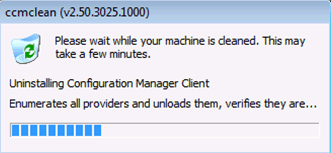
I’ve tested CCMClean.exe on the SCCM / ConfigMgr 2012 client, and it worked perfectly !!!
a) Verify the CCMClean.log file to get more details
Logfile location = “C:\Users\administrator\appdata\local\temp” OR %temp%
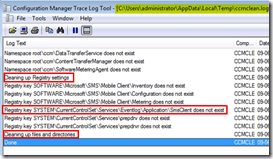
b) Check the event log for some more details or confirmation
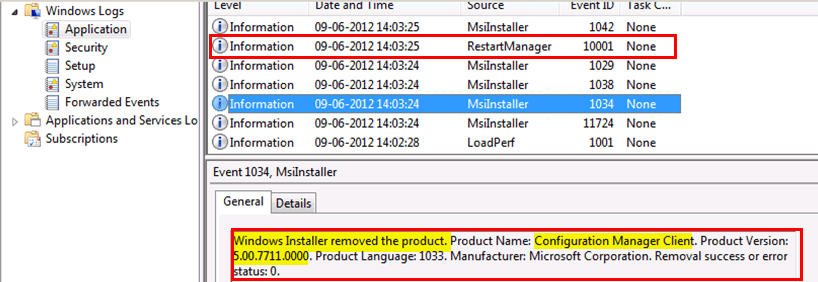
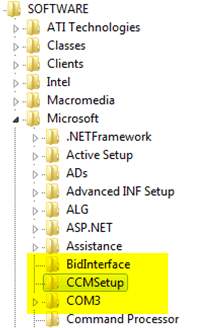
c) CCM registry entry has been REMOVED
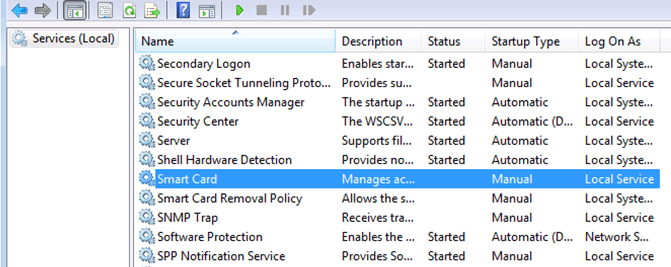
d) SMS Agent Host service has been REMOVED
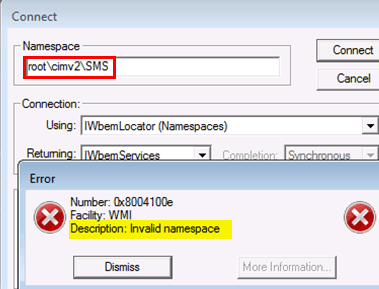
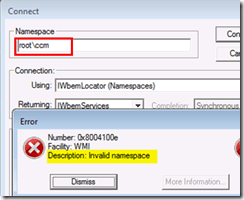
e) WMI namespaces (root\ccm and root\cimv2\SMS) have been REMOVED
You can confirm whether the Uninstallation or Removal of SCCM Client is working or not.
We are on WhatsApp. To get the latest step-by-step guides and news updates, Join our Channel. Click here –HTMD WhatsApp.
Author
Anoop C Nair has been Microsoft MVP from 2015 onwards for 10 consecutive years! He is a Workplace Solution Architect with more than 22+ years of experience in Workplace technologies. He is also a Blogger, Speaker, and leader of the Local User Group Community. His main focus is on Device Management technologies like SCCM and Intune. He writes about technologies like Intune, SCCM, Windows, Cloud PC, Windows, Entra, Microsoft Security, Career, etc..




Why bother if “ccmsetup.exe /uninstall” does the job as well, and is supported?
No need to bother. “people like me” are fond of ccmclean.exe 🙂
For me ccmsetup.exe /uninstall doesn’t clear everything out on every machine and ccmclean does. I will stay with ccmclean.
I agree with Anoop on this , ccmclean is more effective and cleans the WMI and registry traces from the machine .
I had removed sccm client though ccmclean.exe in sccm 2007 updated client as found it worked.
Thanks for this. BTW, ccmsetup.exe /forceinstall is added for SCCM 2012 SP1. Do you think /forceinstall is strong enough so that we don’t have to run ccmclean.exe, reboot then try re-install?
hi Pae,
you dont have to run ccmelean.exe,with SP1, existing client will be uninstalled and then a new client will be installed.
I would NEVER use ccmsetup.exe /uninstall – never clears out everything fully, CCMClean is by a long distance the best tool for this job.
I am new to SCCM .I have uninstall the client .Can you please help me to install the client again on server .
StaffHi !- If it’s one server I would try manual install. See,
http://technet.microsoft.com/en-us/library/bb693546.aspx
I am getting error messages after running the “ccmclean.exe /Client” , error1. “failed to connect to namespace root\ccm\softwareMeteringAgent(80070422) , error2. “failed to open to WMI namespace ‘\\.\root\ccm\SoftwareMeterringAgent’ (80070422) , error3. Failed to run command line “”C:\windows\ccmsetup\ccmsetup.exe” /uninstall” (740)
Though i have already Run Ccmsetup.exe /uinstall , i have SCCM2012 environment… but ccmsetup.log showing me following lines:
“Unable to delete file C:\WINDOWS\ccmsetup\ccmsetup.exe (0x80070005). Continuing.
Failed to clean ccmsetup files for uninstallation.
Task ‘Configuration Manager Client Upgrade Task’ does not exist
CcmSetup is exiting with return code 0”
so i thought it may not uninstalled in a proper way then i came across your article.
StaffCheck clientmsi.log for “return value 3”. This will give more details.
Thanks Anoop for your quick response, Appreciate it !!!
Hi Anoop, I am trying to fix a problem with the MP and BITS Server Extension on my site server and after several deinstall/reinstall cycles of BITS, MP and client I’m now just desperate enough to try uninstalling the client with ccmclean.exe rather than the ‘supported’ methods. Is there any issue with running it on an SCCM 2012 site server, with the /client switch?
Thanks
Rich
StaffHi Richard ! – I’ve not seen any issue with /client switch on the site servers.
Regards
Anoop
Wow! That was fast. Thanks Anoop, I’ll give it a go later today.
Cheers
Rich
Worked like a change. Thank you.
Thank you, this worked like a charm. I had a machine that ccmsetup.exe (2007) /uninstall did nothing, manually removed the client but the 2012 install always failed. Ran this few times for gave some errors first time, then tried the 2012 install and boom! Took 2 days of work and so simple solution in the end.
StaffGlad to know it worked for you Tom !
Hi! I had to uninstall a lot of configmgr clients, and they still appear as installed in the configmgr console. I’ve confirmed that they are uninstalled 🙂
Is there any way I can force a “cleaning” of the repository so that they appear as uninstalled?
StaffYou may need to look at the predefined maintenance tasks and schedule it accordingly to remove these records from SCCM DB.For eaxmple https://www.anoopcnair.com/2013/10/22/predefined-maintenance-task-sccm-configmgr-2012-r2/
I had to remove the computer objects in the ConfigMgr console and run a new AD system discovery. ConfigMgr reported successfully that there are no ConfigMgr client installed on the computer objects.
StaffHappy to hear that 🙂
Hi Anoop,
Could you please give me the command line to uninstall client remotely through ccmclean.exe via psexec
StaffCan you try using PSEXEC which I mentioned here https://www.anoopcnair.com/2013/01/23/how-to-run-application-or-process-from-system-context-or-account/ with ccmclean.exe /q
Regards
Anoop
Thanks Anoop !!
Hi Anoop,
We are facing a unique issue with windows 8 systems. We have SCCM 2012 SP1 installed in the organization.
Whren we push SCCM client on windows 8 systems, after a few minutes / hours the SCCM client uninstalls automatically.
Have checked the ccmsetup.log and it shows that the command ccmsetup.exe /uninstall has been initiated.
The issue is that we have not initiated any uninstall command on the client neither manually nor from the console.
This issue is happenning on all WIndows 8.1 systems.
Don’t know what the issue is ? Can you please help ?
Regards,
JD
StaffJD ! – Have you checked the Group Policies and Event logs that may give you some more idea to troubleshoot ! Regards
Anoop
Hi Anoop,
Thanks for the reply, I have checked the Group Policies & Event logs, nothing over there.
During trouble shooting i discovered that in our SCCM environment we have SCCM SP1 CU4. But all the clients were at version 5.00.7804.1000 whereas they should be 5.00.7804.1500. Also client version 5.00.7804.1000 is not supported on Windows 8.1.
So I deployed 5.00.7804.1500 on couple of Windows 8.1 systems but still the client gets uninstalled.
When I check the ccmsetup.log the commandline used is “\\\client$\ccmsetup.exe /uninstall”
As a workaround I have removed the share client$ . Can you tell me if this share is required or not and will there be any adverse affect of removing it ?
Keeping it under observation.
Regards,
JD
StaffI’m sure that Client$ share something specific to your environment. Where is this Client$ share located ? Is it in SCCM server or SCCM Client machine?
Regards
Anoop
The commandline used is “\\sccmservername\client$\ccmsetup.exe /uninstall”
The folder that was shared as client$ is “D:\Program Files\Microsoft Configuration Manager\inboxes\Client ” . It is on the SCCM primary server. Do we have a client folder at this location and is it shared by default ?
JD
StaffNo. If I’m not wrong. This is a custom share, which somebody must have created. Also there could be some packages or applications running from SCCM console.
Hi I keep getting this on install of sccm I can’t see the client installed anywhere. “You cannot install the management point on a computer with an earlier version of the Configuration Manager client installed. Upgrade the client to the current version, remove the client, or select a different computer for the management point installation, and then try again”
2007 is installed on another server this is a fresh primary site 2012 install it allows me to carry on the install but then there’s no MP
is there any way to uninstall the client from SCCM? and there is a image that on my network that has been deployed by sccm and its wiping the PC one by one when clients click on it is there any way to stop this from happening?
StaffThis is interesting. I don’t how the wiping PCs is so easily done.
Hi Anoop,
I have a scenario, where I am trying to Setup a client push installation on laptops with SCCM 2012 R2.
We have a old domain with SCCM 2007 and once the laptops are moved to new domain, I am trying to push the client to it,.
Please could you let me know the procedure to remove the old client and install the new one.
I trying forcefully removing it, and it didn’t work.
Is there any automated way of doing it, or should I create a script and using it with the push client installation?
please help.
Thanks
Vinoop
For me, this tool does’t work because, he try to delete ccmsetup folder in c:\windows\system32 but my folder is in c:\windows
Hello, Anoop.
I know this is an old thread, but I continually run into the following message while running CCMClean.exe to uninstall CM12 SP1 clients:
Installation succeeded. Windows Installer has requested a reboot.
I feel it is absurd that the OS requests this, as no administrator or technician has time nor desire to contact a user and request that they interrupt their current session just for a reinstall of the CCM client (likewise, no user wants to do it – nor should they have to do it). SCCM 2007 was never like this, from what I recall.
I’ve tried shutting down both the SMS Agent Host Service and the CmRcService prior to the uninstall, but it’s usually the same result. Is anyone aware of what, exactly, the Windows Installer needs a reboot for to complete the uninstallation and whether or not there are any workarounds? I’ve seen it move files into the Windows temporary directory for deletion, but it should just be able to delete it anyways because CCMExec should not longer be active and utilizing the files in question, so I’m at a loss. If another service or process is using those files, then I’d love to know what it is so I can kill that process in my uninstaller script prior to executing CCMClean.
Thanks in advance!
Hi Willie,
I am also interested about your question to Annop,
I hope he will answer ! 🙂
Have a nice day.
Hi Anoop .. In our SCCM 2012 environment We have VDI machines .. In daily basis we found 20-30 machine’s SCCM client corruption issue .. Therefore we use following manual steps for each VDI machines one by one which takes couple of hours … How can we go for an Automation kind of batch file or script to do this job on schedule basis by providing the VDI corrupted client machine name from Primary Server instead of these manual steps.. Thanks
Now Mannnula steps are here ….
SCCM Client remediation steps:
1. Check ccmsetup logs for installation failure errors. etc : Failed with error code XXX
2. If the installation is failed performed clean uninstallation and reinstallation
Uninstallation
1. Run c:\windows\ccmsetup\ccmsetup.exe /uninstall – monitor ccmsetup.log
2. Run ccmclean.exe and wait for the process to complete ( process monitor)
3. Rename CCMSetup,CCM,CCMCache folders in c:\windows
4. Make sure C:\windows\SMSCFG.ini is deleted, if not rename it
5. Make sure no task scheduler named Configuration manager under Microsoft task scheduler , if exist delete it ( delete the task in it before deleting the folder)
6. Make sure registry key HKLM\Software\Microsoft – CCM & CCM setup is no more – if not rename them
Installation
1. Copy all the setup files (CM2012Client$) to local drive from ( c:\temp) \\MFCSCCMPKL02 \CM2012Client$\
2. Run the command as – cscript.exe c:\temp\CM2012Client$\SCCM-ClientInstall.vbs /RunLocal:true
3. Monitor the c$\Windows\ccmsetup\Logs – ccmsetup.log for error code 0
4. While the setup is running, monitor task manager – CCMSetup to CCMExec – meaning setup is success and its moving to contacting the SCCM server for further assignments
4. For WMI errors try to rebuild the WMI repository
1. Stop the Windows Management Instrumentation service
2. Rename repository folder in c$\Windows\System32\wbem to repository.OLD
3. Restart the Windows Management Instrumentation service
4. Monitor new folder called repository will be created on the same location
5. If the installation log already success then
1. Check the SMSHost service status, it should be on automatic and running
3. Also rename C:\windows\SMSCFG.ini and restart the SMSHost service
4. Check whether new SMSCFG.ini created on the same location
Common log files to check during troubleshooting
Installation
1. CCMSetup.log (c$\Windows\ccmsetup\Logs) – to monitor the successfull SCCM client installation
2. client.msi.log (c$\Windows\ccmsetup\Logs) – Records setup tasks performed by client.msi. Can be used to troubleshoot client installation or removal problems
If installation is success:
3. ClientLocation.log (c$\Windows\CCM\Log) – to check whether the machine contacting the SCCM management point
4. ClientIDManagerStartup.log (c$\Windows\CCM\Log) – to check whether the client has valid certificate created to contact SCCM server(s)
5. ccmeval.log (c$\Windows\CCM\Log) – Client evaluation logs
Hi Anoop, ccmclean.exe is no longer available for download. Are there any alternatives to this tool?
Thanks,
David
StaffHi David ! – Updated the post with download link!
usuefull tool, thanks !
ccmsetup /uninstall failed to do own job for some reason, clean tool did it in few secs
Anoop,
The link to your ccmclean.exe is dead.
Further Google come up empty handed in a search for ccmclean.exe.
Need to try it out, I have 1810 rollup 2 clients that wont unstall via ccmsetup /uninstall.
Thanks for your time and that one time you bailed me out on a SQL table problem during support call about 10 years ago 🙂
StaffHello Shawn – I just checked and I was able to download the CCMClean.exe from https://goo.gl/AE8Kf4
Possible that your corporate proxy or ISP is blocking it?
Is there an official MS source for CCMClean? Using random program from the webs against production machines is a bit faux pas! 🙂
Thank you,
Tony
StaffI don’t recommend to directly use this in production environment. I always do my due diligence by testing this in lab environment and make sure that everything is ok. Once you are 100 comfortable, pls use it in production with your own risk. BTW, I didn’t modified anything in terms of this exe.
There really should be a new version.
Of all applications that always get updated but SCCM installer/uninstallers still from 2007?
Pretty sure a new version would remove all past bugs with unable to totally remove files/directories
hello,
not able to download the ccm.exe
On another note, i have 100+ with sccm cleint not responding. Is there any possiblities to run same via batch patch and what is the script pls
StaffI still see it’s available to download as mentioned in the post
can you share where to find CCMClean.exe? looks like gone from all places