






Update Compliance Deprecated End of Support
This post provides you with details about the Update Compliance deprecated and what the replacement is. Let’s also check future changes that might affect update compliance retirement.
Update Compliance is deprecated and is no longer accepting new onboarding requests. Update Compliance has been replaced by Windows Update for Business reports. If you’re currently using Update Compliance, you can continue to use it, but you can’t change your CommercialID.
To facilitate the transition, current users can continue to use Update Compliance. Support for Update Compliance will end on March 31, 2023 when the update compliance deprecated.
Update Compliance is no longer an active solution, giving way to Windows Update for Business reports instead. You no longer allow new enrollments into Update Compliance nor the option to regenerate or generate a new CommercialID.

So the question comes, what next with update compliance deprecated, With the announcement of the general availability of Windows Update for Business reports, the evolution of Update Compliance solution? The Windows Update for Business is designed for rapid innovation, it combines organizational and device-level reporting with actionable data and insights.
Transition Plan for Windows Update for Business Reports – Update Compliance Deprecated End of Support
Windows Update for Business reports is built based on the feedback of many Update Compliance users and all who have participated in the preview. With a revamped user experience, richer update deployment data, and better alert monitoring, these new reports will help you with better management.
If you are an existing Update Compliance user, the legacy experience will continue to be supported and work as you’re accustomed to for a limited time, until a full transition has been made. However, Microsoft Update compliance no longer accepts new enrollments for the Update Compliance solution. What this means:
- On November 30th, Update Compliance will no longer be available for download in the Azure marketplace.
- On November 30th, the ability to re-generate a CommercialID for existing deployments will be disabled.
For all new enrollments, plan to use Windows Update for Business reports experience within Azure Monitor and align with eligibility requirements.
The existing Update Compliance experience will remain supported for existing customers for a limited period after general availability. This time will allow us to ensure parity in the experiences and give organizations time to plan their transition.
Enroll in Windows Update for Business Reports
If you’ve already enabled the public preview of what we earlier called Azure Workbooks for Update Compliance, you’re all set. If you haven’t, you can enroll your tenant once you have met the prerequisites:
- Signed up for Azure Active Directory (Azure AD enrolled or hybrid-joined).
- Configured devices to send diagnostic data to Microsoft with Windows Update for Business reports.
To request enrollment, You should have either assigned the Intune administrator, Windows Update for Business administrator, or Global administrator. Alternatively, the profile manager permission also works here.
Enroll in the Azure Workbook experience itself. You’ll practically follow the path from the Azure portal to Monitor > Workbooks > Windows Update for Business reports > Get started > Windows Update for Business reports enrolment. The full walkthrough is outlined in Enable Windows Update for Business reports.
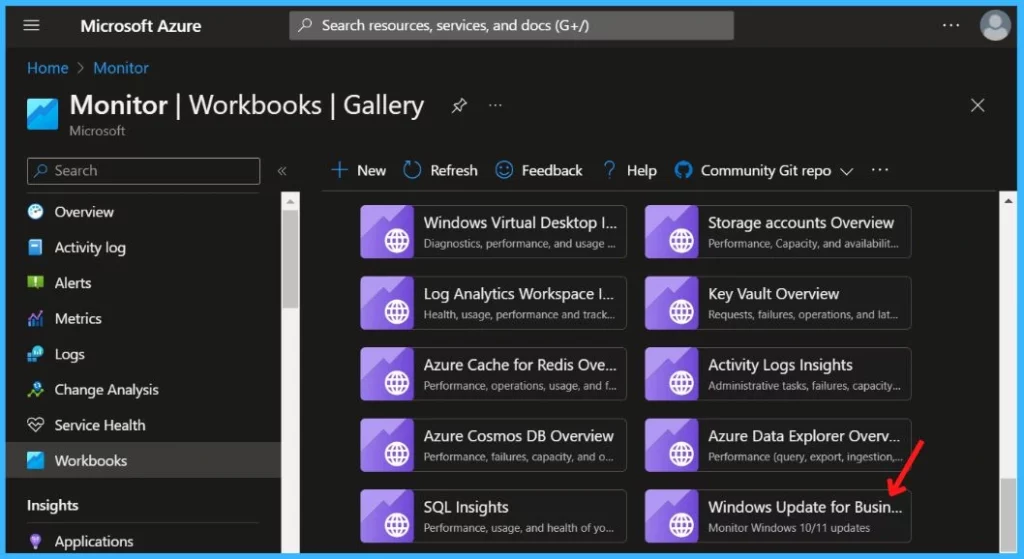
Now, you can access this new experience with the following reports:
- Quality updates: Monitor security updates across all devices, including expedited updates.
- Feature updates: Monitor feature updates across all devices, including end of service, applicable safeguards, and Windows 11 eligibility reporting.
- Delivery optimization (preview): Bandwidth savings % across all content types with additional reporting for devices using Microsoft Connected Cache.
Author
About Author – Jitesh, Microsoft MVP, has over five years of working experience in the IT Industry. He writes and shares his experiences related to Microsoft device management technologies and IT Infrastructure management. His primary focus is Windows 10 Deployment solution with Configuration Manager, Microsoft Deployment Toolkit (MDT), and Microsoft Intune.




Jitesh, is there a way to email these reports on a schedule? Thanks!