






Use SCCM Intune to Patch KB5008212 December 2021 Cumulative Update
You can use SCCM or Intune to patch KB5008212 December 2021 cumulative update. You can also use the same patch management method to deploy Windows 11 patch KB5008215 for December 2021.
Windows Update for Business (WUfB) or WSUS can deploy the monthly patches to Windows 10 and Windows 11 devices. The Windows 10 KB5008212 patch is applicable for Windows 10 21H2, Windows 10 21H1, Windows 10 20H2, and Windows 10 2004.
The December LCU KB5008212 is the last patch for Windows 10 2004. The version 2004 has reached the end of servicing as of this release on December 14, 2021. To continue receiving security and quality updates, Microsoft recommends that you update to the latest version of Windows 10.
Windows 11 patching is also important for the organization. Microsoft has released the LCU KB5008215 for December 2021. Windows 11 will change its build number to 22000.376 after the cumulative update KB5008215.

Let’s check the Windows 11 and Windows 10 version details after the installation of the December 2021 Cumulative update KB5008212 and KB5008215.
- Windows 11 21H2 – 10.0.22000.318
- Windows 10 21H2 – 10.0.19044.1415
- Windows 10 21H1 – 10.0.19043.1415
- Windows 10 20H2 – 10.0.19042.1415
- Windows 10 2004 – 10.0.19041.1415
Following are some of the useful posts created by HTMD Community to help with SCCM and Intune patch management.
- Configure Update Compliance Patch Management Reports using Intune and Log Analytics
- Difference Between WSUS Vs WUfB Intune Vs SCCM Patching Methods
- Monthly Patching Process using Intune
- Server Patching with Azure Update Management for Azure Servers
Use SCCM to Deploy Patch KB5008215 and KB5008212
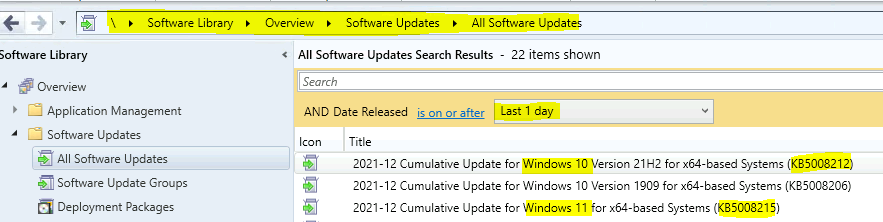
You can use SCCM to deploy the patch (LCU) KB5008212 and KB5008215. You will need to follow the SCCM software update deployment process to deploy the monthly cumulative update to Windows 10 and Windows 11 devices.
As you can see, the patches KB5008215 and KB5008212 for Windows 11 and Windows 10 are made available to the SCCM console. Now you can continue your organization’s monthly patch management process to deploy the December 2021 LCU.
- How to Create Deploy New Software Update Patch Package Using SCCM | ConfigMgr
- SCCM ADR Automatic Deployment Rule Creation Process
- ConfigMgr Software Updates Troubleshooting Tips | Fix Installation Issues
Use Intune to Deploy KB5008215 and KB5008212
Let’s check how to use Windows Update for Business policies to deploy the LCU patches for December. Microsoft released two patches for Windows 11 (KB5008215) and Windows 10 (KB5008212).
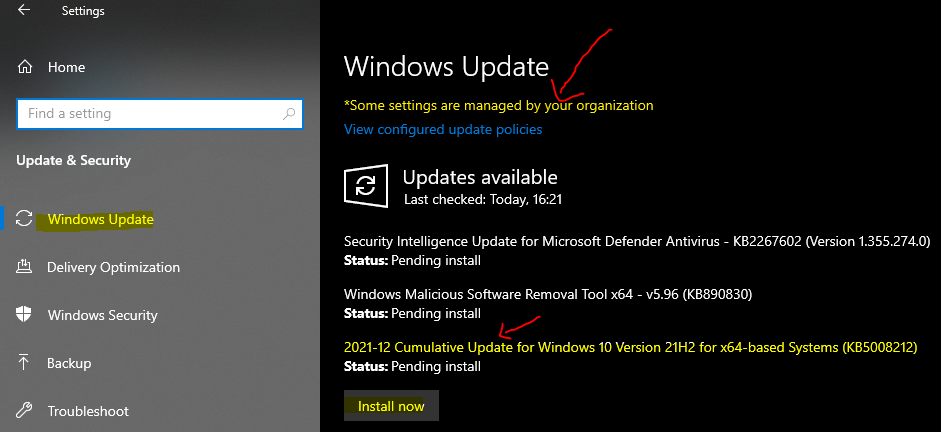
You will need to make sure the Intune Monthly Patch Deployment Using Intune process is already in place. Once the Intune update ring for Windows 10 or Later policies is deployed to Windows devices, devices will get the updates as shown in the screenshot below.
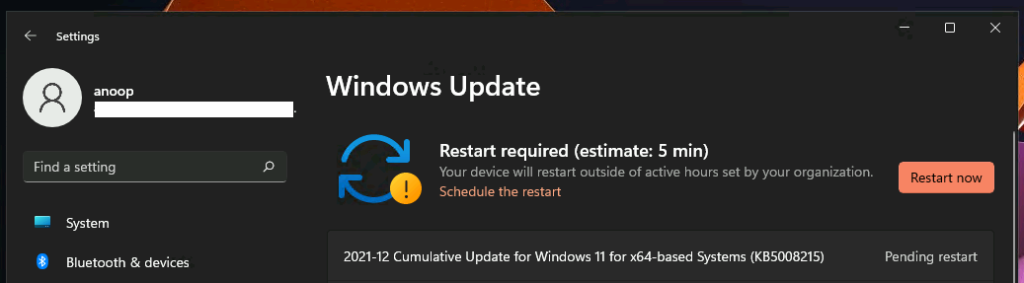
You can also see the Windows 11 December Cumulative update KB5008215 is waiting for restart. The update is already installed on Window 11 21H2 PC.
You can install this December 2021 cumulative update by going to Start – Settings – Windows Update. And try to click on the Check for Updates button.
Author
Anoop is Microsoft MVP! He is a Solution Architect in enterprise client management with more than 20 years of experience (calculation done in 2021) in IT. He is Blogger, Speaker, and Local User Group HTMD Community leader. His main focus is on Device Management technologies like SCCM 2012, Current Branch, and Intune. He writes about ConfigMgr, Windows 11, Windows 10, Azure AD, Microsoft Intune, Windows 365, AVD, etc……………




Discussion