






Windows 10 KB5051974 February 2025 Patch and 4 Zero Day Vulnerabilities and 55 Flaws
Let’s discuss the Windows 10 KB5051974 February 2025 Patch and 4 Zero Day Vulnerabilities. Microsoft addresses many improvements and fixed issues in the February 2025 Patch Tuesday updates, which users eagerly await.
As you know, Patch Tuesday updates are crucial for IT enthusiasts and admins to manage their daily activities and schedule updates. Windows 10 and 11 KB5051987 and KB5051989 have patch Tuesday updates; mainly, three versions have this update.
Fixed issues are mainly shown on the Patch Tuesday. This post shows significant fixed issues with Windows 10 on February 2025. One issue is the Capture Service and Snipping tool, which Microsoft recognizes. It stops responding due to this issue.
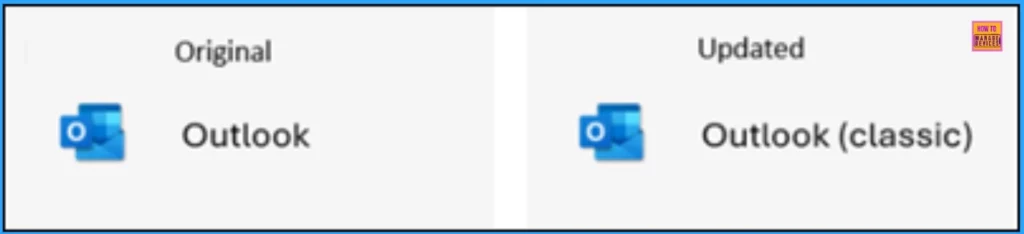
The biggest improvement of Windows 10 KB5051974 in February 2025 are shown here. Microsoft introduced the New Outlook for Windows app. Near classic Outlook, a new app icon appears in the Apps section on the Start menu.

Table of Contents
KB5051974 Zero Day Security Vulnerability for February 2025
Microsoft released 4 Zero day vulnerabilities in February 2025 patch Tuesday. CVE-2025-21418 Windows Ancillary Function Driver for WinSock Elevation of Privilege Vulnerability, CVE-2025-21391 Windows Storage Elevation of Privilege Vulnerability, CVE-2025-21377 NTLM Hash Disclosure Spoofing Vulnerability, CVE-2025-21194 Microsoft Surface Security Feature Bypass Vulnerability.
| CVE Number | CVE Title | Publicly Disclosed | Exploitability Assessment | Exploited |
|---|---|---|---|---|
| CVE-2025-21418 | Windows Ancillary Function Driver for WinSock Elevation of Privilege Vulnerability | No | Exploitation Detected | Yes |
| CVE-2025-21391 | Windows Storage Elevation of Privilege Vulnerability | No | Exploitation Detected | Yes |
| CVE-2025-21377 | NTLM Hash Disclosure Spoofing Vulnerability | Yes | Exploitation More Likely | No |
| CVE-2025-21194 | Microsoft Surface Security Feature Bypass Vulnerability | Yes | Exploitation More Likely | No |

- Top 83 Windows 11 Desktop Admin Interview Questions
- Windows 10 Version Numbers Build Numbers Major Minor Build Rev
- Updated Windows 10 End of Life Dates
February 2025 Windows 10 Patch
One of the fixed issue on Windows 10 is Bing will stop giving automatic suggestions in the search box when using the Chinese Pinyin Input Method Editor for search engine sites, like Baidu.
| Windows 10 22H2 |
|---|
| KB5051974 |
Updated Version of Windows 10 After Installing KB5051974 February 2025 Patch
Device security can be improved with The Windows 10 patch Tuesday update. You will get the latest version after the update. Each update includes a current version number and build number. The following list shows the details.
- Windows 10 Version Details – Windows 10 22H2 KB5051974
- Version Details – Windows 10 version 22H2– (KB5051974 (OS Builds 19044.5487 and 19045.5487)
- More Details on Windows 10 version Numbers: Windows 10 Version Numbers Build Numbers Major Minor Build Rev
New Improvements with Windows 10 February Patches
Microsoft addressed many improvements in the February 2025 Patch Tuesday Update, which enhances your experience on Windows 10. It adds the latest amendment to the GB18030 character set. The table below shows the details.
| New Improvements February Patches | Details |
|---|---|
| New Outlook for Windows app | Microsoft introduced the New Outlook for Windows app. Near classic Outlook, a new app icon appears in the Apps section on the Start menu. There are no changes to any settings or defaults. |
| Support for GB18030-2022 | This update adds the latest amendment to the GB18030 character set. |
| Windows Kernel Vulnerable Driver Blocklist file (DriverSiPolicy.p7b | Recent update for Windows adds to the Windows Kernel Vulnerable Driver Blocklist file (DriverSiPolicy.p7b). |
Issues Fixed with Windows 10 February Patch
This month, Windows 10 has many fixed issues that Microsoft recognizes. USB Print and IPP Over USB has an issue which is fixed by Microsoft. The following table shows the fixed issues.
| Fixes with Windows 10 February Patch | Details |
|---|---|
| Issue on Capture Service and Snipping Tool | An issue on Capture Service and Snipping tool which is recognized by Microsoft. It stop respond, when you press Windows logo key + Shift + S several times while Narrator is on. |
| Issue on Bing when using Chinese Pinyin input method editor (IME) | Due to this issue, Bing will stop giving automatic suggestions in the search box when using the Chinese Pinyin Input Method Editor for search engine sites, like Baidu. To get manual suggestions, use Ctrl + Tab or the chevron button (>). |
| Issue on USB audio device drivers, which is fixed | An issue was identified on USB audio device drivers, which is fixed by Microsoft. The code 10 error message, “This device cannot start” appears. This occurs when you connect to certain external audio management devices. |
| Fixed issue on USB Cameras | After you install the January 2025 security update, the device does not recognize the camera is on. Microsoft fixes this issue. |
| An issue on Virtual memory | An issue depletes virtual memory, which might cause some apps to fail. |
| Issue on Near Field Communication (NFC) readers | Near Field Communication (NFC) readers fail to read card Universal Unique Identifiers (UUID). This occurs after many point-of-sale (POS) app scans. |
| An issue on USB Print and IPP Over USB | There was an issue with USB Print and IPP Over USB. An installed printer failed when the spooler initialized. Microsoft Fixed this issue. |
Known Issues – Windows 10KB5051974 February Patch
There is one know issue is recognized on Windows 10. Dual boot setup has an issue which are continuing past few months. The issue details are shown on the table below.
| Summary | Originating Update | Details |
|---|---|---|
| Dual-boot setup for Windows and Linux in your device. It is occurred After installing the August 2024 Windows security update, (KB5041580) or the August 2024 preview update. | OS Build 19044.4780 | Working on a final resolution |
- Free Generic Windows 10 Product Keys from Microsoft
- Windows 10 21H2 Support is Ending in June
- Windows 11 24H2 Now Available Through WSUS | New Features and Enhancements
Intune and SCCM Windows 10 Feb Patch Deployment
Intune and SCCM are enterprise environments’ most commonly used patch management tools. These tools allow you to deploy Windows 10 KB5051974 February Cumulative Update using Intune + WUfB and SCCM + WSUS.
SCCM – Learn more about SCCM patch deployments from how to create a Deploy New Software Update Patch Package Using SCCM ConfigMgr. SCCM ADR Automatic Deployment Rule Creation Process.
Intune – You can expedite the deployment and Installation of Jan 2025 patches using Intune.
How to Manually Windows 10 Feb Patches for Offline Install
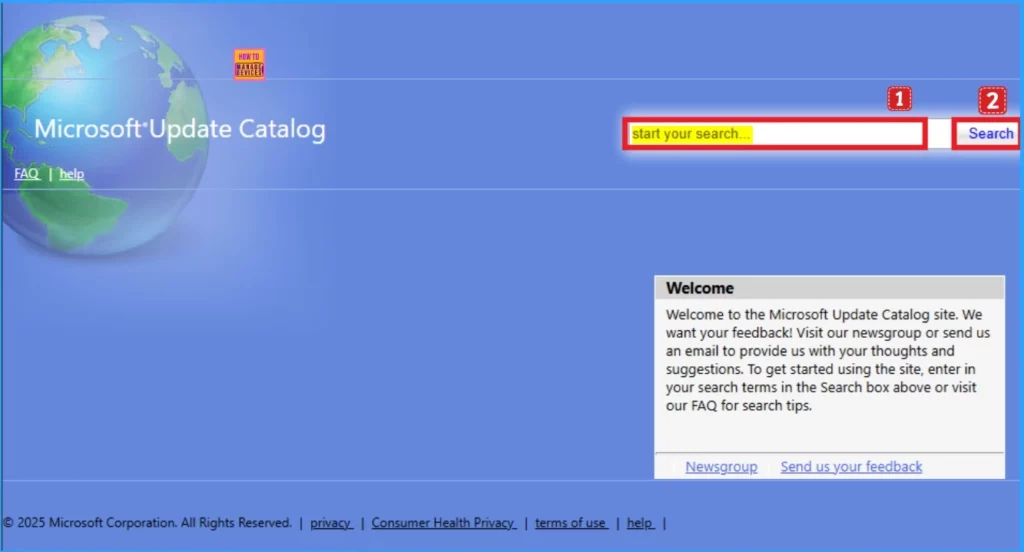
You can download the February 2025 Cumulative Update for Windows KB5051974 from the Microsoft Update Catalog website. The direct links for downloading the February 2025 Cumulative Updates for Windows 10 are in the table below.
To get direct download links to the hotfixes for the February 2025 LCU, you can check the Microsoft Update Catalog portal. Check this out: Microsoft Update Catalog – https://www.catalog.update.microsoft.com/ and Search Keyword 2025-02.
| Title | Product | Size | Direct Download |
|---|---|---|---|
| 2025-02 Cumulative Update for Windows 10 Version 22H2 for x64-based Systems (KB5051974) | Windows 10 22H2 | 675.9 MB | Download |
Need Further Assistance or Have Technical Questions?
Join the LinkedIn Page and Telegram group to get the latest step-by-step guides and news updates. Join our Meetup Page to participate in User group meetings. Also, Join the WhatsApp Community to get the latest news on Microsoft Technologies. We are there on Reddit as well.
Resource
February 11, 2025—KB5051974 (OS Builds 19044.5487 and 19045.5487)
Author
Anoop C Nair has been Microsoft MVP from 2015 onwards for 10 consecutive years! He is a Workplace Solution Architect with more than 22+ years of experience in Workplace technologies. He is also a Blogger, Speaker, and Local User Group Community leader. His primary focus is on Device Management technologies like SCCM and Intune. He writes about technologies like Intune, SCCM, Windows, Cloud PC, Windows, Entra, Microsoft Security, Career, etc.


Discussion