Skip to content
Windows 10 Product Key Change Home to Professional Upgrade | Activate

Windows 10 Product Key Change Home to Professional Upgrade | Activate

Written By Anoop C Nair
Last Updated June 27, 2024
Posted In Windows 10
SHARE

Hi, I will talk about Windows 10 Product Key Change Home to Professional Upgrade | Activate today. This quick guide will show you how to upgrade Windows 10 Home to a professional edition without formatting or reinstalling the System.

You can use the Windows 10 Product Key change option to upgrade from Home to Professional Edition. A product key is like a 25-character code you use to activate Windows. It checks that you’re not using Windows on more PCs than Microsoft allows.

You can’t use product keys from older versions for the Pro upgrade anymore. However, you can use a Windows 10 Pro key with Windows 11 and vice versa.

Windows 10 Pro includes all the stuff you get in Windows 10 Home and some extra features like Domain Join, Group Policy Management, BitLocker, Enterprise Mode Internet Explorer (EMIE), Assigned Access 8.1, Remote Desktop, Client Hyper-V, and Direct Access.

Patch My PC
Index
Windows 10 Computer Specifications
Activate Windows 10
Windows 10 Home to Professional Upgrade
Results – Windows 10 Product Key Change
Windows 10 Product Key Change Home to Professional Upgrade | Activate – Table 1

Windows 10 Computer Specifications

Let’s get the Windows 10 edition details from Windows 10 specifications.

  1. Click on the Start Menu
  2. Click on “Settings” ICON to display the settings options
  3. Click on the Settings option

NOTE! If you want to use Windows 10 Short keys, I shared them in the previous post, “Windows 10 Shortcut Keys Keyboard Shortcuts.”

Windows 10 Product Key Change Home to Professional Upgrade | Activate - Fig.1
Windows 10 Product Key Change Home to Professional Upgrade | Activate – Fig.1

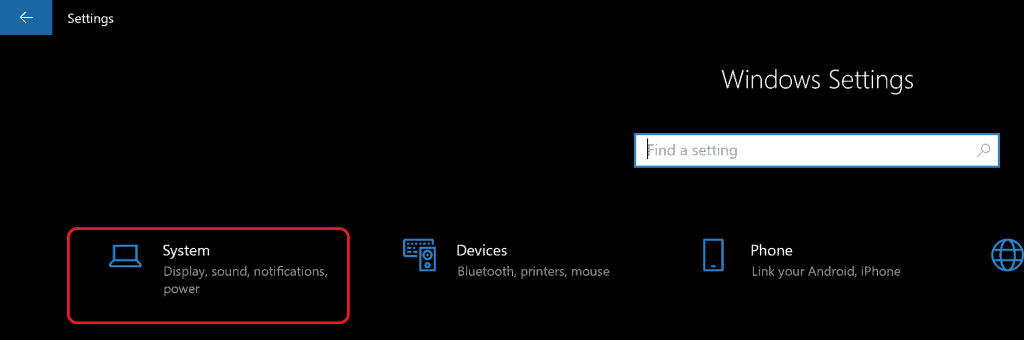
Click on System from the Windows 10 Settings application.
Windows 10 Product Key Change Home to Professional Upgrade | Activate - fig.2
Windows 10 Product Key Change Home to Professional Upgrade | Activate – Fig.2

Click on the About option from the System and Scroll down.

  • At the bottom of the About page – the Windows Specifications heading on the right side
  • Edition – Windows 10 Home
Windows 10 Product Key Change Home to Professional Upgrade | Activate - Fig.3
Windows 10 Product Key Change Home to Professional Upgrade | Activate – Fig.3

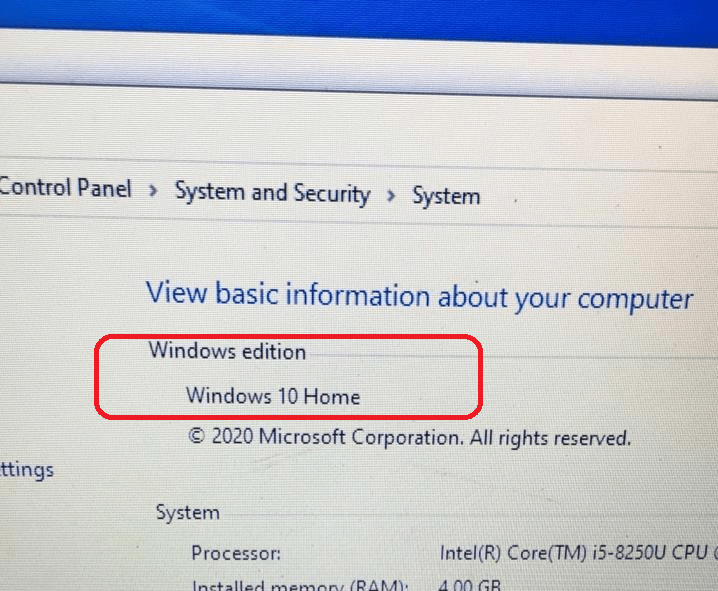
You can check the Windows 10 edition from Control Panel –> System and Security –> System.
Windows 10 Product Key Change Home to Professional Upgrade | Activate - Fig.4
Windows 10 Product Key Change Home to Professional Upgrade | Activate – Fig.4

Activate Windows 10

Before changing the Windows 10 Product Key from Home to Professional, you must ensure you have activated the Windows 10 Home version.

  • You can check whether your Windows 10 Home edition is activated from the link: ms-settings:activation?activationSource=anoopcnair.com.
  • Click on Activate Windows, as you can see in the below screenshot.

Windows 10 Product Key Change Home to Professional Upgrade | Activate - Fig.5
Windows 10 Product Key Change Home to Professional Upgrade | Activate – Fig.5

Let’s confirm that you have activated the Windows 10 edition. After successfully activating the Windows 10 Home edition, you should see the following messages: More details about activation.

  • Windows is activated
  • Windows is activated with a digital license.
  • Windows is activated with a digital license linked to your Microsoft account
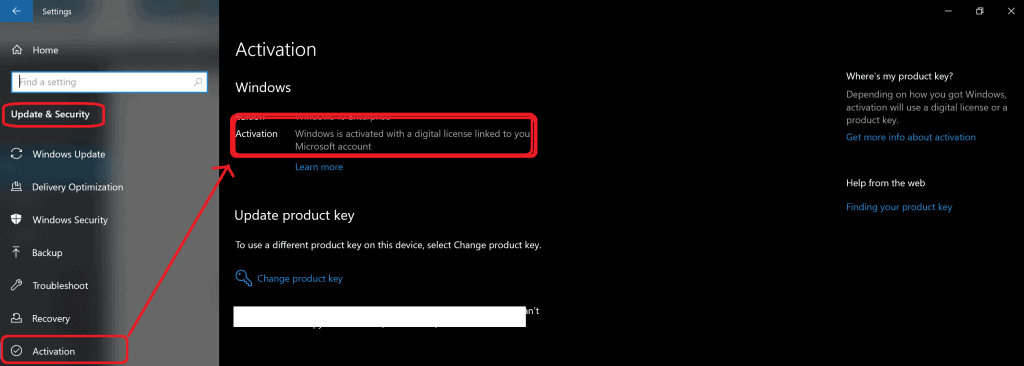
Windows 10 Product Key Change Home to Professional Upgrade | Activate - Fig.6
Windows 10 Product Key Change Home to Professional Upgrade | Activate – Fig.6

Windows 10 Home to Professional Upgrade

Now, let’s upgrade the Windows 10 home to professional.

  1. Click on the Start Menu
  2. Click on “Settings” ICON to display the settings options.
  3. Click on the Settings option.
Windows 10 Product Key Change Home to Professional Upgrade | Activate - Fig.7
Windows 10 Product Key Change Home to Professional Upgrade | Activate – Fig.7

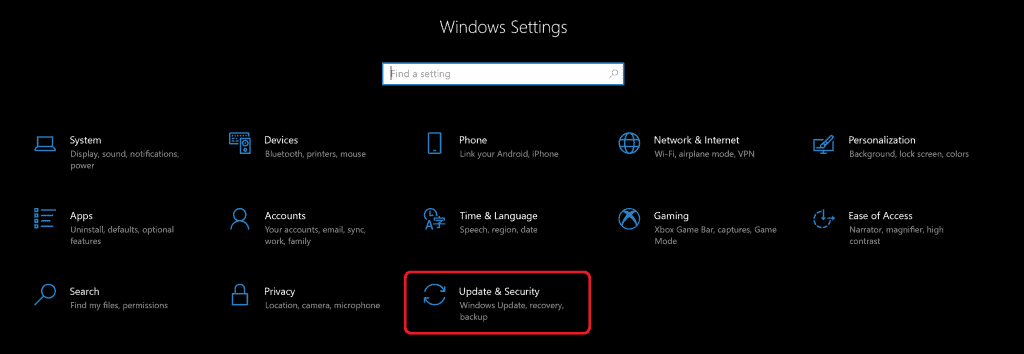
Click on Update & Security.

Windows 10 Product Key Change Home to Professional Upgrade | Activate - Fig.8
Windows 10 Product Key Change Home to Professional Upgrade | Activate – Fig.8

Click Activation, Scroll down to Update product key,

  • Click on the hyperlink Change Product Key.
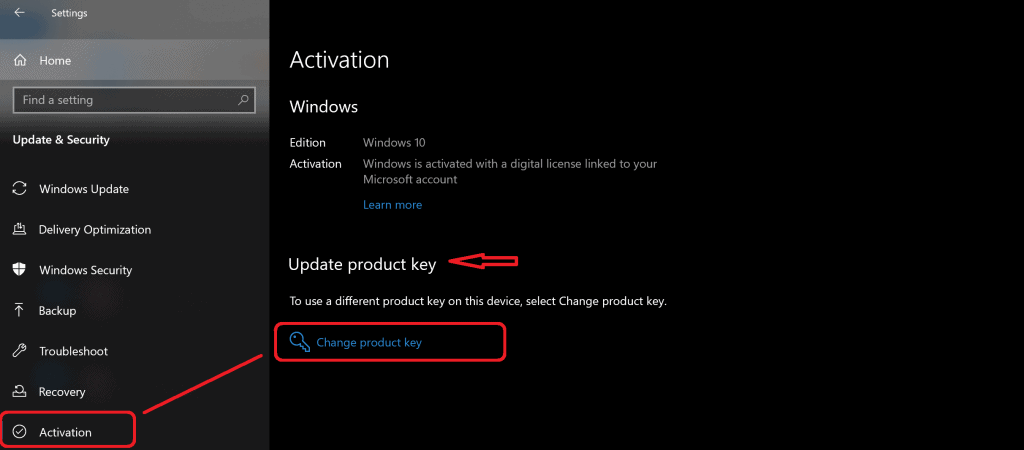
Windows 10 Product Key Change Home to Professional Upgrade | Activate - Fig.9
Windows 10 Product Key Change Home to Professional Upgrade | Activate – Fig.9

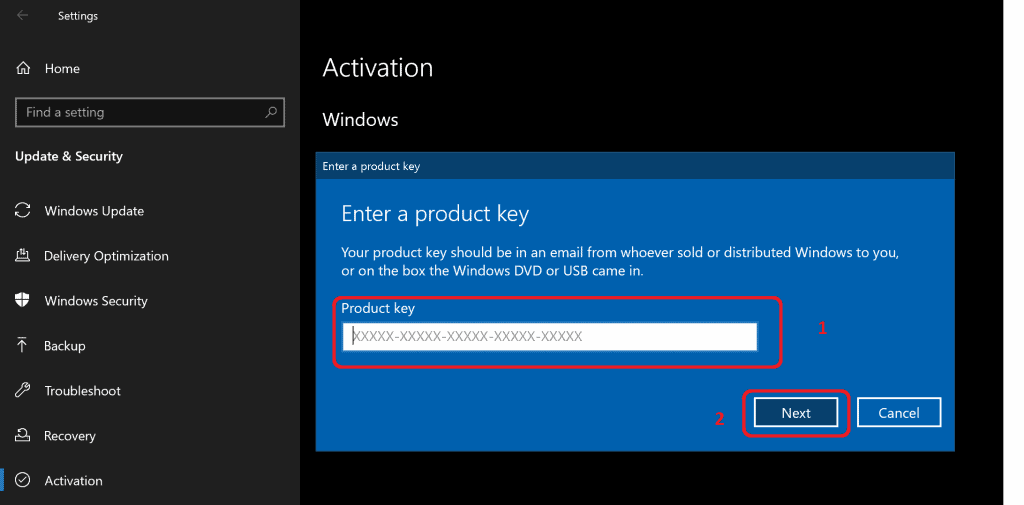
Enter the Windows 10 Professional Product Keys.

  • Click on the Next button to continue.
Windows 10 Product Key Change Home to Professional Upgrade | Activate - Fig.10
Windows 10 Product Key Change Home to Professional Upgrade | Activate – Fig.10

Results – Windows 10 Product Key Change

After upgrading Windows 10 Home to Professional without formatting your computer, check the results.

  • Navigate – Control Panel\System and Security\System
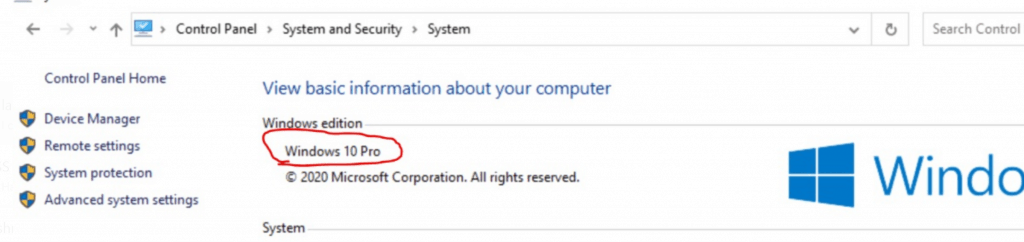
Windows 10 Product Key Change Home to Professional Upgrade | Activate - Fig.11
Windows 10 Product Key Change Home to Professional Upgrade | Activate – Fig.11

Resources

We are on WhatsApp. To get the latest step-by-step guides and news updates, Join our Channel. Click here –HTMD WhatsApp.

Author

Anoop C Nair is Microsoft MVP! He is a Device Management Admin with more than 20 years of experience (calculation done in 2021) in IT. He is a Blogger, Speaker, and Local User Group HTMD Community leader. His primary focus is Device Management technologies like SCCM 2012, Current Branch, and Intune. He writes about ConfigMgr, Windows 11, Windows 10, Azure AD, Microsoft Intune, Windows 365, AVD, etc.

Written by

Anoop C Nair is Workplace Technology solution architect with 25+ years of experience in global enterprise organizations such as JP Morgan, Capgemini, etc. Microsoft Certified Trainer. Microsoft MVP from 2015 onwards for consecutive 11+ years! He also conducts Intune and modern workplace tech training for enterprise organizations. He is Blogger, Speaker, and Founder of HTMD Community and HTMD Conference. His main focus is on Device Management technologies like Intune, Windows, Cloud PC. He writes about technologies like Intune, SCCM, Windows, Cloud PC, Windows, Entra, Microsoft Security.

Discussion

Join the discussion

Your email address will not be published. Required fields are marked *

Related guides

Windows 10

New Snipping Tool Vulnerability in Windows can Leak NTLMv2 Hashes over Network

Key Takeaways Hey, let’s discuss about New Snipping Tool Vulnerability in Windows can Leak NTLMv2 Hashes over Network. Microsoft Windows Snipping Tool has a newly disclosed spoofing vulnerability, tracked as CVE-2026-33829, which could allow an unauthenticated attacker to capture a user’s NTLMv2 hash over a network. The issue was made public on April 14, 2026, […]

AC Anoop C Nair 4 min read
Windows 10

Unsupported Windows 10 Devices in Intune may Experience Limited or Unreliable Functionality

Let’s discuss Unsupported Windows 10 Devices in Intune may Experience Limited or Unreliable Functionality. Microsoft Announce the Official end of support announcement of Windows 10 free support on October 14, 2025. There is no more free security updates or non-security fixes via Windows Update for Windows 10 Home and Pro editions. Microsoft announced that, Windows 10 […]

AC Anoop C Nair 4 min read
Intune

Last Patch for Windows 10 with KB5066791 and 5 Zero Day Vulnerabilities and 118 Flaws

Let’s discuss Last Patch for Windows 10 with KB5066791 and 5 Zero Day Vulnerabilities and 118 Flaws. Microsoft Released last Patch Tuesday Updates for Windows 10 on October 2025. After October 14 2025, Microsoft will no longer provide free software updates from Windows Update, technical assistance, or security fixes for Windows 10. As you know […]

AC Anoop C Nair 6 min read
Intune

2025 September KB5065429 Windows 10 Patch | 2 Zero Day Vulnerabilities and 81 Flaws

Let’s discuss 2025 September KB5065429 Windows 10 Patch | 2 Zero Day Vulnerability and 81 Flaws. Microsoft addressed various security fixes and improvements on September 2025 Patch Tuesday of Windows 10 KB5065429. There are many security benefits can be accessed with parch tuesday update. Microsoft dedicated to provides patch Tuesday updates on Windows 11. Mainly […]

AC Anoop C Nair 7 min read