





Windows 11 26H1 vs 26H2 Explained Platform Update for New PCs and Feature Update for Everyone
Key Takeaways
- Windows 11 26H1 is real but hardware-limited
- Existing PCs cannot upgrade to Windows 11 26H1
- The update is focused on new silicon, not new features
- Windows 11 26H2 is the main 2026 update for current users
- Microsoft plans to Integrate the 26H1 and 26H2 releases into a single future version of Windows
In this post we are discussing Windows 11 26H1 vs 26H2 Explained Platform Update for New PCs and Feature Update for Everyone. Microsoft has officially confirmed the existence of Windows 11 version 26H1, but this release works very differently from what Windows users are used to. Previous Windows feature updates, 26H1 is not designed as an upgrade for existing PCs.
Table of Contents
Who Gets this Update?
Can We Upgrade to It?
Windows 11 26H1 vs 26H2 Explained Platform Update for New PCs and Feature Update for Everyone
This version is created specifically for new devices with new silicon that start shipping in early 2026. As a result, users already running Windows 11 will never see this update offered through Windows Update. According to Microsoft, Windows 11 26H1 will be pre-installed only on new hardware and cannot be installed manually on current devices. Even PCs running the latest Windows 11 versions, such as 24H2 or 25H2, are not eligible.
- Windows 11 KB5077181 KB5075941 February 2026 Patch and 6 Zero Day Vulnerabilities and 58 Flaws
- Microsoft Introducing Simplified and Standardized Windows Update Titles to Enhance Clarity and User Experience
- Windows 11 Version Numbers Build Numbers Major Minor Build Rev
No New Features in Windows 11 26H1
Microsoft has confirmed that Windows 11 26H1 does not introduce new features. Instead, the update includes a set of improvements focused on how Windows works with new silicon. This means users on existing PCs are not missing any new Windows features by staying on their current version.
- Released in February 2026, but only for new PCs with ARM-based silicon such as Snapdragon X2, possibly Nvidia N1X.
- It Cannot be installed on existing Intel or AMD PCs.
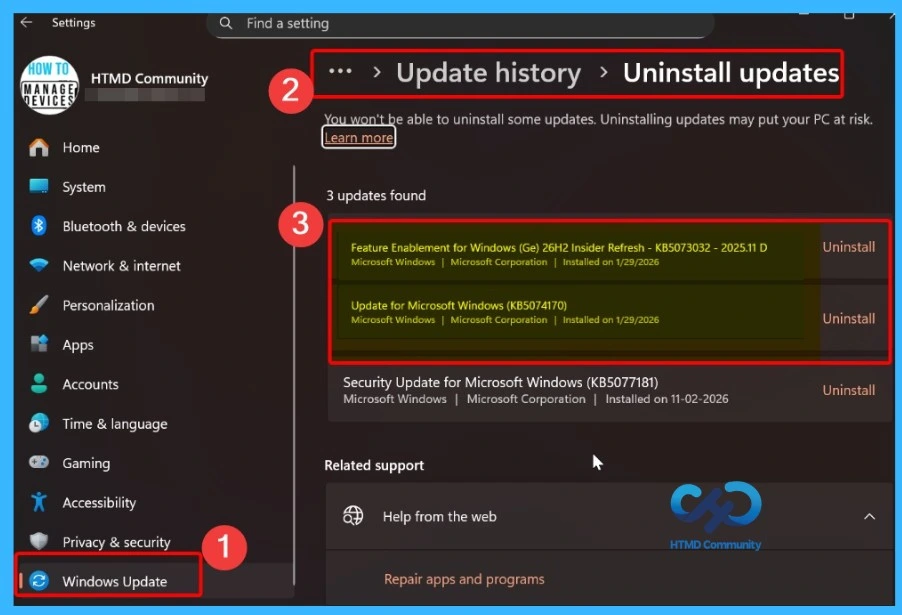
Understand Windows 11 26H2
The update for all PCs will be Windows 11 26H2, coming in October 2026. This update is part of Microsoft’s regular yearly cycle and will include new features for everyone, especially businesses. This update will arrive later in the year for all PCs that already support Windows 11, and users will receive it through the regular Windows Update process like previous yearly updates.

Windows 11 26H1 version does not require new hardware it is built on the same Windows core as recent releases, allowing it to install smoothly on existing devices.
| Update info | Windows 11 26H1 | Windows 11 26 H2 |
|---|---|---|
| Who will get this Update | only new PCs with new silicon (Snapdragon X2, Nvidia N1X) | All existing PCs |
| Is it available via Windows Update | No | Yes |
| Windows Core | Different Core Platforms | Same as 24H2/25H2 |
| Aim | Performance and battery for new hardware | General improvements for all users |
| Next Update | 27H2 in 2027 | 27H2 in 2027 |
What We can Expect in Future
Microsoft confirming that devices running Windows 11 version 26H1 and 26H2 will come back onto the same update path in a future Windows release planned for 2027. This means the current split between hardware specific and general Windows versions is temporary. After that future release, all supported devices will again receive updates from a single Windows version, ensuring long term support, regular security updates
Need Further Assistance or Have Technical Questions?
Join the LinkedIn Page and Telegram group to get the step-by-step guides and news updates. Join our Meetup Page to participate in User group meetings. Also, Join the WhatsApp Community and WhatsApp Channel to get the latest news on Microsoft Technologies. We are there on Reddit as well.
Author
Anoop C Nair has been Microsoft MVP for 10 consecutive years from 2015 onwards. He is a Workplace Solution Architect with more than 22+ years of experience in Workplace technologies. He is a Blogger, Speaker, and Local User Group Community leader. His primary focus is on Device Management technologies like SCCM and Intune. He writes about technologies like Intune, Cloud PC, Windows, Entra, Microsoft Security, Career, etc.


Discussion