






Advancing Windows 11 Security with In-Memory Patching and Zero Trust DNS
Today we are with a new discussion about Advancing Windows 11 Security with In-Memory Patching and Zero Trust DNS. Windows 11 is becoming smarter, more helpful, and more secure through a new Agentic system. This means the operating system can now understand your requests, take action on its own, and complete tasks without you having to do every step manually.
Microsoft announced big changes to Windows 11 at Ignite 2025. These changes focus on two main areas: new AI features and much stronger security. Windows is becoming an Agentic OS, which means AI agents are built into the system and can-do tasks on their own.
Instead of opening apps, searching through menus, or clicking multiple buttons, you can simply tell the system what you want, and it will understand and start working on it automatically. This meant to save time, reduce effort, and allow users to focus the prioritized works.
Windows 11 also brings in in-memory patching and Zero Trust DNS. In-memory patching fixes security issues directly in the system’s memory, which means updates happen instantly without restarting. Zero Trust DNS checks every website or server connection and blocks anything unusual.

Table of Contents
Advancing Windows 11 Security with In-Memory Patching and Zero Trust DNS
To make all this work smoothly, Windows now uses something called Model Context Protocol (MCP). It acts like a universal connector that lets AI talk to files, settings, apps, and even cloud services. Windows also has a special Agent Workspace where agents work safely without interfering with your screen.
- Adoption Of Quantum Safe Algorithms And Hybrid Cryptography In Windows
- How Windows 365 for Agents Performs Intelligent PowerPoint Editing in Cloud PC
- How to View Managed App Types Details with Intune Explorer and Security Copilot
- How to use Intune Explorer with Security Copilot to Access Devices Users Apps Compliance and Update Details
- How to Retrieve General Device Configuration Policies for Android Device Owner using Intune Copilot Explorer
What 5 Billion+ Signals
Microsoft’s new Windows 11 security system uses AI to scan and check a huge number of security signals every day. It processes more than 5 billion security actions and threats. This means the system is always watching for anything unusual, like strange apps, suspicious activity, or possible cyberattacks.
- This number also shows how much smarter and faster the security has become and there is a 150% increase compared to last year.
- With this improvement, Windows can detect dangers earlier and protect users more effectively, giving everyone a safer and stronger device experience.

Memory Patching and DNS Trust
Windows AI Security becomes stronger by using in-memory patching and Zero Trust DNS together. In-memory patching updates running processes right away, fixing vulnerabilities without downtime and stopping attacks before they spread. Zero Trust DNS checks every request, blocking harmful domains and allowing only safe connections. Combined, these methods reduce risks, prevent phishing and spoofing, and provide reliable protection that meets modern security needs.
The Windows agent system plays an important role in all this. These agents can understand commands, complete tasks on their own, and manage everyday activities like searching files, organizing information, or adjusting settings. They work quietly in the background, so users don’t have to keep switching apps or menus.
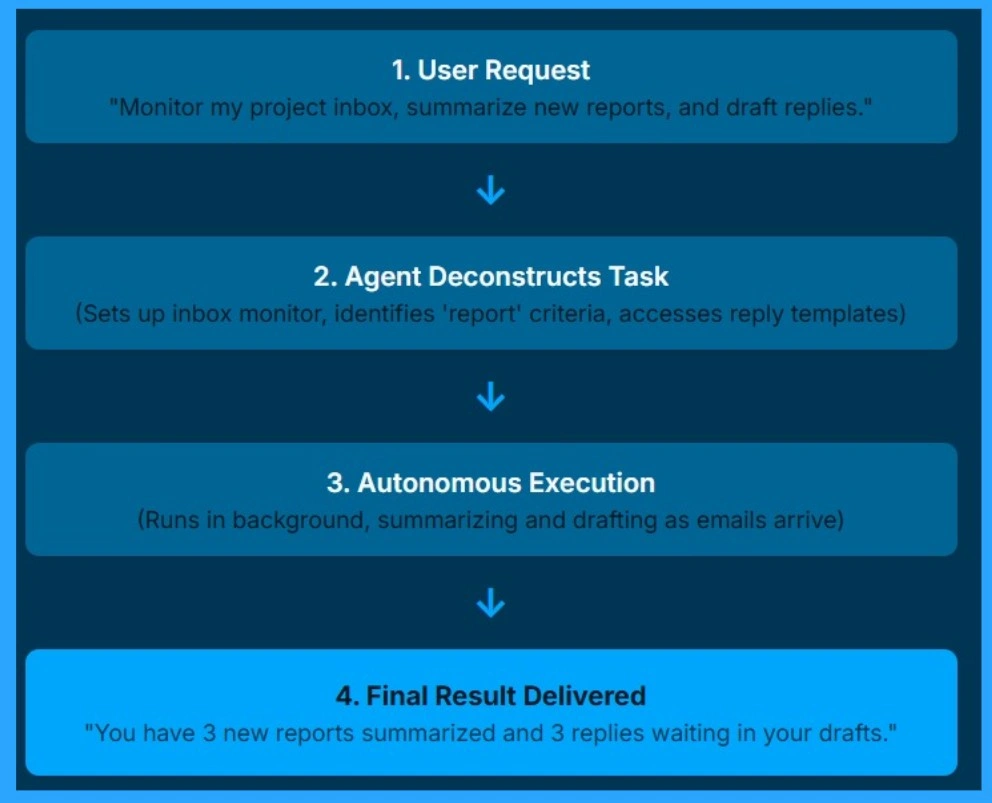
Windows 11 Agent Do Task Automatically
This flow chart shows how an AI agent in Windows 11 can take a simple request and do the whole job on its own. First, the user asks something like Watch my inbox and summarize new reports. The agent then understands the request and sets up inbox monitor, identifies report criteria, accesses reply to templates. Whenever a new email arrives, it summarizes the report and prepares a reply without the user doing anything.
- In the end the agent gives a clear update like 3 reports summarized and 3 replies ready in drafts.
- This makes everyday work easier by reducing manual checking and writing.
| Windows 11 Agent Security Features | Info |
|---|---|
| AI-Driven Threat Hunting | Watches for strange activity and stops new attacks. Protects the agent from being fooled or used by malware. |
| Aegis Credential Guard | Keeps passwords, passkeys, and tokens in a secure area. Ensures the agent cannot accidentally expose login info. |
| Pluton 2.0 Integration | Hardware-level chip that protects the PC from the moment it starts. It gives the agent a safer device environment to run in. |
| Self-Healing Kernel | An AI-powered service that detects and repairs OS-level corruption or misconfigurations autonomously. |
Agent Workspace & Registry
The Windows On-Device Registry (ODR) is a new system that lists all the AI tools and connectors available on the device. It works like a local directory that helps agents know what they can access. The ODR also supports remote connectors, which means a local agent can directly talk to cloud services such as a CRM system or GitHub.
A New Ask Copilot button is on the Taskbar
A new Ask Copilot button is now on the Taskbar. You can type @ and the agent’s name to give it tasks. When you move your mouse over the agent’s icon, you can see what it is doing right now. This makes using AI agents very easy for everyone, because the controls are simple.
Need Further Assistance or Have Technical Questions?
Join the LinkedIn Page and Telegram group to get the latest step-by-step guides and news updates. Join our Meetup Page to participate in User group meetings. Also, join the WhatsApp Community to get the latest news on Microsoft Technologies. We are there on Reddit as well.
Author
Anoop C Nair has been Microsoft MVP for 10 consecutive years from 2015 onwards. He is a Workplace Solution Architect with more than 22+ years of experience in Workplace technologies. He is a Blogger, Speaker, and Local User Group Community leader. His primary focus is on Device Management technologies like SCCM and Intune. He writes about technologies like Intune, SCCM, Windows, Cloud PC, Windows, Entra, Microsoft Security, Career, etc.




Discussion