






How to Manage Agents through Microsoft Entra Agent ID Interface for Security and Zero Trust Enforcement
Let’s discuss How to Manage Agents through Microsoft Entra Agent ID Interface. Microsoft Entra Agent ID is a new identity framework that gives AI agents (like Copilot bots or custom assistants) their own secure, governable identity inside Microsoft Entra.
Microsoft Entra Agent ID is a system that assigns a unique identity to every AI agent created in platforms like Azure AI Foundry or Microsoft Copilot Studio. Its purpose is to extend Microsoft Entra’s identity and access management to autonomous and assistive agents.
Managing agents in the Microsoft Entra Agent ID interface involves creating, registering, and governing agent identities (like AI bots or automated processes) with the same rigor as human accounts.
You can view, enable/disable, assign roles, and apply Zero Trust policies to agents directly in the Entra admin center. In this blog post, i will help you to know more about How to Manage Agents through Microsoft Entra Agent ID Interface.

Table of Contents
How to Manage Agents through Microsoft Entra Agent ID Interface for Security and Zero Trust Enforcement
You can easily manage Agents in the Entra Admin Center. Agents appear in the Enterprise Applications section of the Entra admin center. The Agent Registry organizes agents into collections for easier governance.
| Features |
|---|
| Use the Manage Agents feature to see all agents you own or sponsor. |
| Review details such as permissions, activity, and assigned roles |
| Agents can be given role-based access control (RBAC) permissions. |
| All agent activities are logged for security auditing. |
| Admins can track who created the agent, what resources it accessed |
- Important Intune Security Recommendations Organisations Should Follow In 2026
- Introduction To App Lifecycle Management Agent In Entra For Unified App Control And Visibility
- Explicit Forward Proxy In Microsoft Entra Internet Access Helps Secure VDI BYOD And Clientless Browsing
- AI Agent Tool that Brings the Power of Microsoft Graph and MS Entra
- Best Guide to Invite B2B Guest Users to Entra ID using Intune
- Key Scenarios of MS Entra External Identity Deployment Architectures
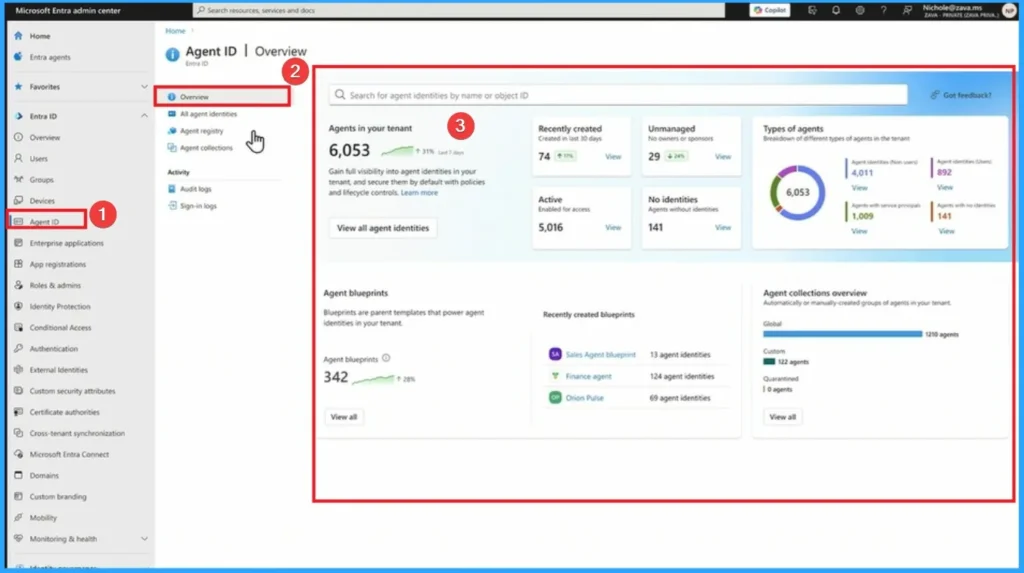
Agent ID Overview
The Agent ID Overview page in the Microsoft Entra admin center is the central dashboard where IT admins can see, manage, and govern all AI agent identities in their tenant. It provides visibility into registered agents, their ownership, permissions, and lifecycle status, ensuring they are secured and governed like human accounts.
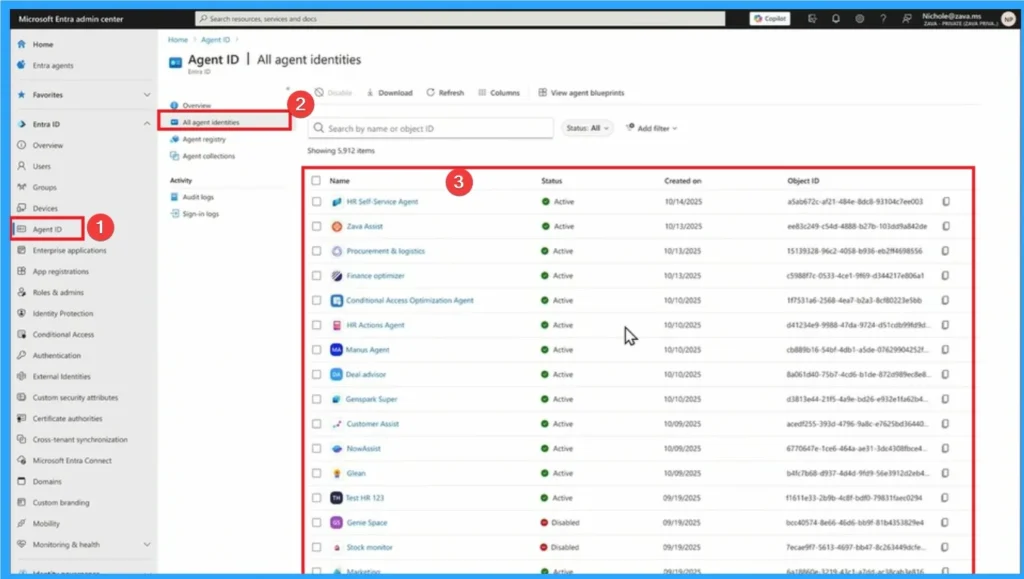
All Agent Identities
See every agent created in your tenant, whether from Azure AI Foundry, Copilot Studio, or other integrated platforms. Quickly locate agents by name, owner, or collection. Identify who created or sponsors the agent.
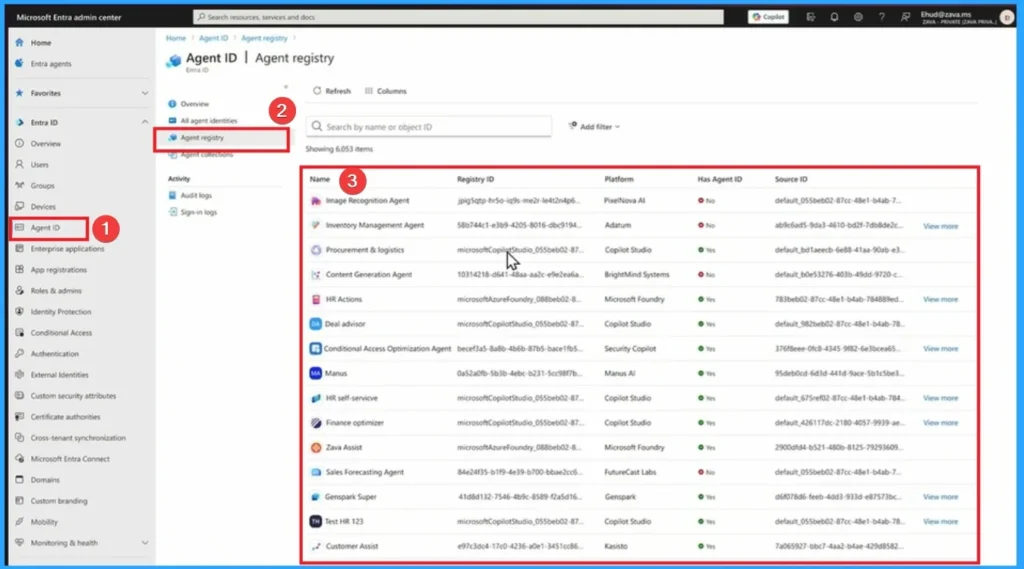
Agent Registry
The Agent Registry is the central catalog of all AI agents created in your tenant. It provides a structured way to group, view, and manage agents across different projects, teams, or applications. It ensures every agent identity is visible, secure, and compliant, while giving admins scalable tools to manage them across the enterprise.
Need Further Assistance or Have Technical Questions?
Join the LinkedIn Page and Telegram group to get the latest step-by-step guides and news updates. Join our Meetup Page to participate in User group meetings. Also, Join the WhatsApp Community to get the latest news on Microsoft Technologies. We are there on Reddit as well.
Author
Anoop C Nair has been Microsoft MVP from 2015 onwards for 10 consecutive years! He is a Workplace Solution Architect with more than 22+ years of experience in Workplace technologies. He is also a Blogger, Speaker, and Local User Group Community leader. His primary focus is on Device Management technologies like SCCM and Intune. He writes about technologies like Intune, SCCM, Windows, Cloud PC, Windows, Entra, Microsoft Security, Career, etc.




Discussion