






Windows 11 New Features | Latest Improvements
Let’s check the list of Windows 11 New Features. Microsoft Windows 11 is the next generation of Windows, designed for the next decade. Microsoft announced many enhanced features and increased integration with the cloud.
Windows 11 will be a free upgrade for eligible Windows 10 PCs. Let’s quickly check the minimum hardware requirements for Windows 11.
To know more about your Windows 10 PC that meets the hardware requirements for Windows 11, you can download and run the PC Health Check app to check for compatibility.
Some Windows 11 features may be deprecated or removed. Check the complete list of deprecated/removed applications and features – Windows 11 Removed Features | Deprecated Applications from Windows 11 | Latest List.

In this post, I will explore Windows 11’s new features (Windows 11 New Features).
Table of Contents
Windows 11 New Features
Microsoft has officially unveiled Windows 11, which brings a visual overhaul and new features and improvements to the operating system.
Windows 11 is also secure by design, with new built-in security technologies that add protection from the chip to the cloud while enabling productivity and unique experiences. It provides a Zero Trust-ready operating system to protect data and access across devices.
- New Security Features For Windows 11
- Latest Windows 11 Features Released in Oct 2023
- Latest Windows 11 Features and DC Locator Algorithm Changes Coming Soon | 25931
Windows 11 Fresh Design
Windows 11 simplified the design and user experience to empower users’ productivity. The new Start button and taskbar to each sound, font, app icons on the toolbar, rounded window edges, and other flourishes make for a cleaner, more appealing interface.
That will help users control and bring a sense of calm and ease. You will get started at the centre, making it easier to find what you need quickly.
Start utilizes the power of the cloud and Microsoft 365 to show you your recent files no matter what platform or device you viewed them on earlier, even if it was on an Android or iOS device.
Android Apps on Your PC
Windows 11 brings Android apps to Windows for the first time. Later this year, people will discover Android apps in the Microsoft Store and download them through the Amazon App Store.
There are loads of popular apps for virtual learning, like TikTok or Khan Academy Kids, that can be easily accessed right from your PC.
Microsoft Teams Integrated With Windows 11
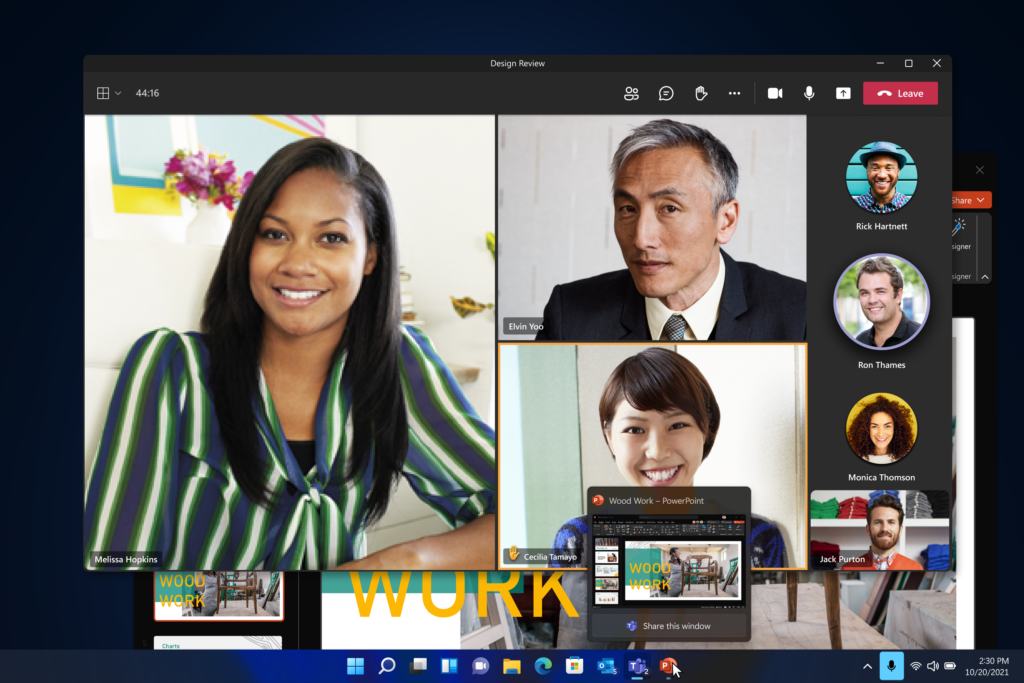
Microsoft has introduced Chat from Microsoft Teams into the new Windows taskbar. This will help many of us make it easier to mute or unmute our mics or share our desktop or even a single application during a meeting directly from the desktop taskbar.
Now, you can instantly connect with all your contacts through text, chat, voice, or video anywhere, regardless of their platform or device, across Windows, Android, or iOS. If the person you’re connecting to on the other end hasn’t downloaded the Teams app, you can still connect with them via two-way SMS.
All New Microsoft Store
The new Microsoft Store is your trusted location for apps and content to watch, create, play, work, and learn. It’s been rebuilt for speed and has a beautiful and simple-to-use all-new design.
This will bring more apps than ever before. Your favorite apps and entertainment come together, making all content – apps, games, shows, movies – easier to search for and discover with curated stories and collections.
Third-party apps like Microsoft Teams, Visual Studio, Disney+, Adobe Creative Cloud, Zoom, and Canva are available on the Microsoft Store and offer incredible experiences to entertain, inspire, and connect you. When you download an app from the Store, you have the peace of mind of knowing it’s been tested for security and family safety.
Best PC Gaming Experiences
Windows 11 enhances the PC gaming experience; Windows 11 is made for you if you’re a gamer. You are bringing over enhancements seen on the new Xbox consoles while better integrating Xbox Game Pass and other features.
Windows 11 unlocks the full potential of your system’s hardware, putting some of the latest gaming technology to work for you. For example, DirectX 12 Ultimate can enable breathtaking, immersive graphics at high frame rates; DirectStorage can provide faster load times and more detailed game worlds; and Auto HDR can provide a wider, more vivid range of colors for a truly captivating visual experience.
Windows 11 supports your favorite PC gaming accessories and peripherals. With Xbox Game Pass for PC or Ultimate, gamers get access to over 100 high-quality PC games, with new games added constantly. It’s still just as easy to find people to play with, no matter if they’re playing on a PC or console.
Resources
- Download Windows 11 Picture Gallery
- Windows 11 Minimum System Requirements | Fix This PC can’t run Windows 11 Error? Latest List
- Windows 11 How to Turn On Dark Mode System Wide | Easy Method | Color Options
We are on WhatsApp. To get the latest step-by-step guides and news updates, Join our Channel. Click here –HTMD WhatsApp.
Author
Jitesh Kumar, Microsoft MVP, has over six years of working experience in the IT Industry. He writes and shares his experiences related to Microsoft device management technologies and IT Infrastructure management. His primary focus is Windows 10/11 Deployment solution with Configuration Manager, Microsoft Deployment Toolkit (MDT), and Microsoft Intune.




Discussion